What you can only do in native: WidgetKit, Live Activities, App Intents, StoreKit 2, Foundation Models and watchOS
What only native iOS can do and React Native can't: WidgetKit, Live Activities, App Intents and Siri, StoreKit 2, Foundation Models on device, and watchOS.
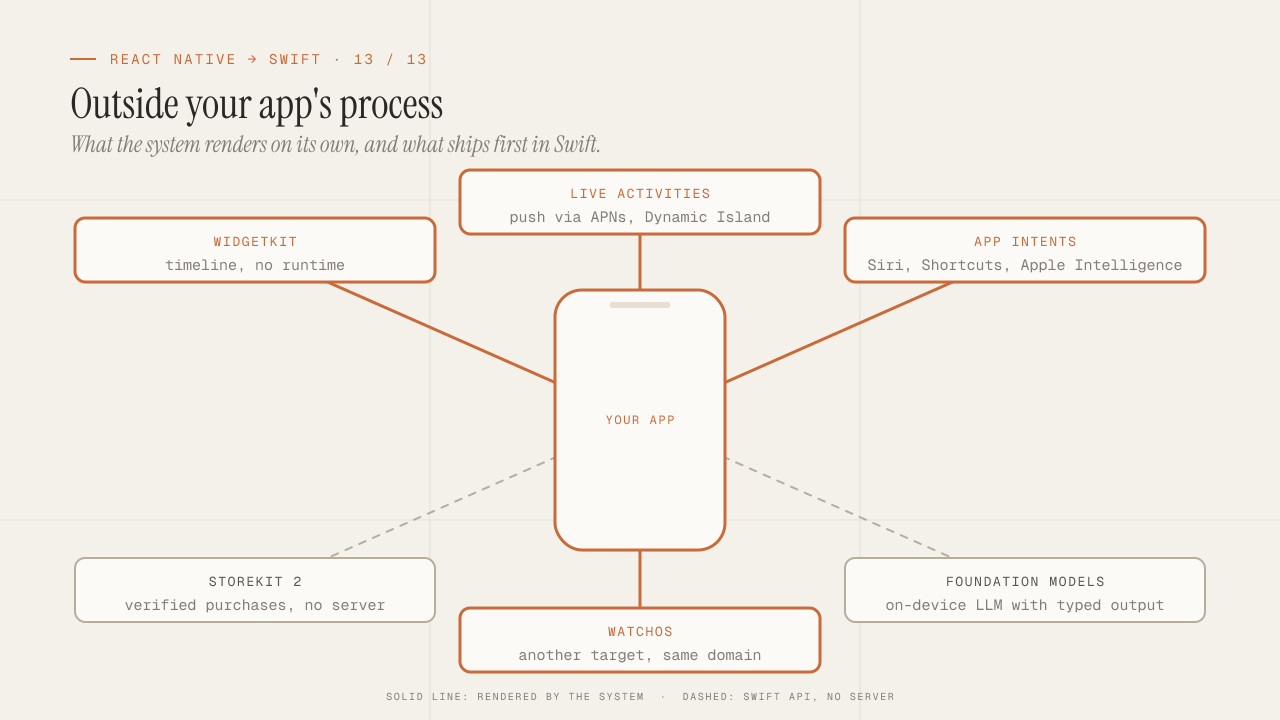
The first post of this series said that native wins where React Native does not reach: outside the app’s process, at the edge of the system, and on the day an API ships. Twelve posts later, this one closes with the detail of those capabilities, one by one, with what each demands and what it gives back: WidgetKit and Live Activities, App Intents and Siri, StoreKit 2, the on-device language model with Foundation Models, and watchOS. It is not a feature list; it is the argument you put in front of a client when the question is “why Swift and not React Native for this product?”, and the answer has to be concrete.
TL;DR
- Widgets, Live Activities, App Intents and watchOS complications run outside your process, rendered by the system from SwiftUI. There is no JavaScript runtime there; the part of the app the user sees without opening it is written only in Swift.
- StoreKit 2 and Foundation Models are Swift APIs with
async/awaitthat offer, without a server, what used to require one: purchase verification on the device and a local language model with structured output. - The sales argument is not "native is better": it is a list of system surfaces where the product can live, with the cost of each one. The client chooses which ones are worth the price; you have to be able to build them.
In this article:
- Outside the process — WidgetKit · Live Activities · App Intents and Siri
- Without a server — StoreKit 2 · Foundation Models
- Other surfaces — watchOS · The argument for the client · Closing the series
WidgetKit: the app on the home screen
An iOS widget is not a view of your app that the system shows on the home screen. It is a separate extension, with its own target and bundle id, that the system runs on its own to ask it for a timeline: a list of dated entries, each with the data the widget should show at that moment. The system renders each entry with the SwiftUI view you gave it, stores it as an image, and shows it when the time comes, without executing your code. That is why there are no free animations or scrolling in a widget, and why there can be no JavaScript: there is no process running while the widget is on screen.
import WidgetKit
import SwiftUI

struct NextOrderEntry: TimelineEntry {
    let date: Date
    let order: OrderSummary?
}

struct NextOrderProvider: TimelineProvider {
    func placeholder(in context: Context) -> NextOrderEntry {
        NextOrderEntry(date: .now, order: .placeholder)
    }

    func getSnapshot(in context: Context, completion: @escaping (NextOrderEntry) -> Void) {
        completion(NextOrderEntry(date: .now, order: SharedStore.nextOrder()))
    }

    func getTimeline(in context: Context, completion: @escaping (Timeline<NextOrderEntry>) -> Void) {
        // One entry now; the system will ask again in ~15 minutes or when the app requests it.
        let entry = NextOrderEntry(date: .now, order: SharedStore.nextOrder())
        completion(Timeline(entries: [entry], policy: .after(.now.addingTimeInterval(15 * 60))))
    }
}

struct NextOrderWidget: Widget {
    var body: some WidgetConfiguration {
        StaticConfiguration(kind: "NextOrder", provider: NextOrderProvider()) { entry in
            NextOrderView(entry: entry)
                .containerBackground(.fill.tertiary, for: .widget)
        }
        .configurationDisplayName("Next order")
        .description("Your next delivery, at a glance.")
        .supportedFamilies([.systemSmall, .systemMedium, .accessoryRectangular])
    }
}
What you have to solve around it:
- Sharing data with the app. The widget cannot read the app’s database directly: they are different processes with different containers. An App Group (an entitlement on both targets) gives you a shared container where the app writes what the widget needs (a JSON file, a
UserDefaults(suiteName:), or the whole SQLite database if both use GRDB with the same file). - Refreshing when the data changes. The app calls
WidgetCenter.shared.reloadTimelines(ofKind:)after writing. The system enforces a daily reload budget; if you exceed it, the calls are ignored. - Interactivity. Since iOS 17, a
ButtonorTogglein a widget can run an App Intent (next section), which executes in your app in the background and hands control back to the widget. That is what lets you mark a task as done without opening the app. - Families. Home screen in three sizes, lock screen (
accessory*), StandBy, and the same extension serves the watchOS complications.
In React Native, a community config plugin can add the widget target to the project, and the data bridge through the App Group works the same way. But NextOrderView, the provider and the timeline are written in Swift, without exception.
Live Activities and the Dynamic Island
A Live Activity is a widget with live state: it appears on the lock screen and in the Dynamic Island, shows the progress of something that is happening (an order on its way, a match, a timer, a trip), and is updated from the app or from the server via push, for up to eight hours.
It is built with ActivityKit (to start and update it) and WidgetKit (for the view):
import ActivityKit

struct DeliveryAttributes: ActivityAttributes {
    struct ContentState: Codable, Hashable {
        var status: DeliveryStatus
        var etaMinutes: Int
    }
    let orderId: String
    let restaurant: String
}

// From the app, when the order is confirmed:
let activity = try Activity.request(
    attributes: DeliveryAttributes(orderId: order.id, restaurant: order.restaurant),
    content: .init(state: .init(status: .preparing, etaMinutes: 25), staleDate: nil),
    pushType: .token          // the server will update it via push
)

// The token goes to the backend, which sends updates to APNs without the app being open.
for await tokenData in activity.pushTokenUpdates {
    await api.registerLiveActivityToken(tokenData, orderId: order.id)
}
The view, in the widget extension, defines four presentations: the lock screen, and in the Dynamic Island the compact, minimal and expanded variants. All in SwiftUI, all rendered by the system.
What makes it valuable for a product is the combination of two things React Native cannot give you: the surface (the island and the lock screen are the most visible spot on the phone) and push updates without opening the app, with a specific notification type (liveactivity) that the backend sends to APNs with the activity’s token. It is the feature a delivery, transport or events client asks for most once they see it in another app.
App Intents: the app the system can invoke
An App Intent is an action of your app declared so that the system can invoke it: from Siri, from Shortcuts, from an interactive widget, from Spotlight, from the iPhone’s Action button, and from Apple Intelligence. It is defined as a struct with typed parameters and a perform method:
import AppIntents

struct ReorderLastIntent: AppIntent {
    static let title: LocalizedStringResource = "Repeat last order"
    static let description = IntentDescription("Orders the same thing as last time.")

    @Parameter(title: "Restaurant")
    var restaurant: RestaurantEntity?

    static var parameterSummary: some ParameterSummary {
        Summary("Repeat the last order from \(\.$restaurant)")
    }

    @Dependency
    private var orders: OrderService

    func perform() async throws -> some IntentResult & ProvidesDialog {
        let order = try await orders.reorderLast(at: restaurant?.id)
        return .result(dialog: "Done, I ordered \(order.summary) again.")
    }
}

// Phrases for Siri, with no training:
struct AppShortcuts: AppShortcutsProvider {
    static var appShortcuts: [AppShortcut] {
        AppShortcut(
            intent: ReorderLastIntent(),
            phrases: ["Repeat my last order in \(.applicationName)", "Order the usual in \(.applicationName)"],
            shortTitle: "Repeat order",
            systemImageName: "arrow.clockwise"
        )
    }
}
What changes compared with every previous Siri integration: there is no separate extension and no definition file; the intent is Swift code that the compiler indexes, and the phrases work from the moment the app is installed, without the user configuring anything. Parameters can be your own entities (RestaurantEntity) with search, and the system resolves the disambiguation (“which restaurant?”) for you.
Since iOS 18, App Intents are also how Apple Intelligence learns what your app can do: intents annotated with system domains (@AssistantIntent) become actions that Siri can chain with on-screen context and context from other apps. It is the layer where an app stops being a screen the user opens and becomes a set of actions the system can compose, and there is no path from JavaScript to it.
StoreKit 2: purchases verified on the device
The first version of StoreKit forced you to validate receipts on your own server against Apple’s, with a binary format nobody wanted to parse, and that is where RevenueCat and react-native-iap came from. StoreKit 2 (since iOS 15, today the only API Apple recommends) is async/await with built-in verification:
import StoreKit

// Products, with localized price.
let products = try await Product.products(for: ["com.empresa.app.pro.monthly", "com.empresa.app.pro.yearly"])

// Purchase. The result comes signed; `verified` means Apple signed it.
switch try await product.purchase() {
case .success(let verification):
    let transaction = try verification.payloadValue   // throws if the signature is not valid
    await transaction.finish()
    await grantAccess(for: transaction.productID)
case .userCancelled, .pending:
    break
@unknown default:
    break
}

// Current subscription state, on any launch, without a server.
for await result in Transaction.currentEntitlements {
    if case .verified(let transaction) = result {
        await grantAccess(for: transaction.productID)
    }
}

// Background changes: renewals, refunds, purchases on another device.
for await result in Transaction.updates {
    if case .verified(let transaction) = result {
        await transaction.finish()
        await grantAccess(for: transaction.productID)
    }
}
On top of that, SubscriptionStoreView and StoreView are SwiftUI views that draw the complete subscription screen (plans, prices, free trial, terms) with the system’s design, in one line, and App Store Connect offers server notifications (App Store Server Notifications v2) so the backend learns about renewals and cancellations without polling.
RevenueCat still has a place when there is Android, web, or you need its metrics and experiments dashboard. But for an iOS-only app, StoreKit 2 plus the server notifications cover the whole flow with your own code and no fee. It is one of the conversations that change with a client: “subscriptions do not require an external service” translates into monthly cost.
Foundation Models: a language model on the device
Since iOS 26, the Foundation Models framework exposes the language model Apple runs on the device for Apple Intelligence: about three billion parameters, no network, no per-token cost, and the user’s data never leaves the phone. It is used from Swift with a session and, what makes it useful for a product, with structured output into your own types:
import FoundationModels

@Generable
struct OrderSuggestion {
    @Guide(description: "Short name of the suggested dish")
    let dish: String
    @Guide(description: "One-sentence reason, in the user's language")
    let reason: String
    @Guide(.range(1...5))
    let confidence: Int
}

let session = LanguageModelSession(
    instructions: "You suggest a dish based on the user's previous orders. Respond in English."
)

let suggestion = try await session.respond(
    to: "Previous orders: \(history.joined(separator: ", ")). It is Friday night.",
    generating: OrderSuggestion.self
).content

print(suggestion.dish, suggestion.reason, suggestion.confidence)
@Generable generates the schema from the struct, and the model produces a valid instance of that type, not text you have to parse. There is tool calling (the model can call your functions to fetch data), streaming of partial output, and an availability mode you have to check (SystemLanguageModel.default.availability), because the model requires devices compatible with Apple Intelligence and the user having it turned on.
What fits in a model of that size and what does not: summaries, classification, field extraction, suggestions over the user’s data, rewriting, tagging. Long reasoning and broad world knowledge do not fit; for that the cloud model remains, with the same routing pattern I use on the backend, with the local model as the first tier.
For a client, the sentence that matters is: AI features over the user’s data, without sending that data to any server and without inference cost. With React Native you can reach this API by writing a native module, which is exactly writing the code above in Swift plus the bridge; the argument from the first post, again.
watchOS: the app on the wrist
An Apple Watch app is one more target in the same project, in SwiftUI, with the same domain and networking packages as the iPhone app. What it adds and what it restricts:
- Complications (the small views on the watch faces) are WidgetKit widgets with
accessory*families. The same code as the iPhone widget, with other families. - Communication with the iPhone through
WatchConnectivity: messages, application context and file transfer, with the watch app able to work on its own if it has a network connection. - HealthKit and sensors with direct access: heart rate, workouts, motion. It is the reason behind most of the watch apps that are worth building.
- Real restrictions: very limited background execution time, a small screen, no full keyboard, and an interaction that has to be resolved in seconds.
There is no React Native for watchOS. If the product has a watch on the roadmap, the watch app is Swift from day one, and sharing a domain with a React Native iPhone app means maintaining two data models. It is one of the cases where the platform decision is made for the whole product, not for the main app.
The argument for the client
When a client asks why Swift, the answer that works is not a technical comparison but a list of surfaces where their product can exist and that React Native does not have, or gets late. This is how I present it:
| Surface | What the user sees | What it demands | When it is worth the price |
|---|---|---|---|
| Widget | Product data without opening the app | Extension target, App Group, timeline | Products with a value that changes and that the user wants to check often (orders, balances, progress) |
| Live Activity | Live progress on the lock screen and the Dynamic Island | ActivityKit, server push | Delivery, transport, events, anything with an “in progress” |
| App Intents | Siri, Shortcuts, interactive widgets, Apple Intelligence | One struct per action | Products with repeated actions the user wants to trigger without opening the app |
| StoreKit 2 | Subscriptions with the system screen, no external service | Your own code, server notifications | Any iOS-only app with a subscription |
| Foundation Models | AI over the user’s data, no network and no cost | Compatible devices, prompt design | Products with private data and summary, classification or suggestion features |
| watchOS | The app on the wrist, with sensors | Its own target, shared domain | Health, sport, critical notifications, quick control |
| Day-one APIs | What is new in each iOS, in September | Recompile | Products that compete on perceived quality with Apple’s apps |
The conversation ends with the table from the first post: if the product needs two platforms with one team and daily fixes through OTA, and none of the surfaces above is on the roadmap, React Native is the right answer and you have to say so. If two or more of those surfaces are the product, Swift. And if it is a React Native app with a widget and a Live Activity, the answer is hybrid, and whoever builds it has to know both.
The change in conversations with clients did not come from knowing more Swift. It came from being able to put the table above in front of them and say what each row costs. A client who understands that a Live Activity is two weeks and a widget is one decides with information; one who is told “that can’t be done” looks for someone else.
Closing the series
Thirteen posts, in the order in which a senior React Native developer runs into the problems while building their first serious app in Swift:
- The thesis: when native wins, when it loses, and what you will miss.
- Swift for people who already master TypeScript: value versus reference, optionals, enums, protocols, Codable.
- SwiftUI is not React: body, identity, modifiers, layout, property wrappers.
- State and architecture: @Observable, MVVM, TCA, injection, packages.
- Navigation: NavigationStack, a Route enum, deep links.
- Data: URLSession, a repository with AsyncStream, the database as cache.
- Concurrency: no event loop, actors, Sendable, Swift 6.
- Persistence: SwiftData, GRDB, Keychain, offline-first, CloudKit.
- From the expo-* ecosystem to Apple frameworks: the table and the permissions.
- UI, theming and animations: tokens, accessibility, animations, Liquid Glass.
- Build, signing and the App Store: certificates, match, TestFlight, App Review, Tuist.
- Testing and tooling: Swift Testing, snapshots, mocks, Instruments, build times.
- This one: what you can only do in native.
If I had to sum the series up in one idea, it would be the one from the first post: for a senior, learning native does not replace React Native, it completes it. What changes is not which tool you use, but that the choice becomes yours, per project, with judgment, and with the ability to build whatever the choice implies. What you lose is real (Fast Refresh, OTA, npm, one codebase) and so is what you gain (widgets, Live Activities, intents, the local model, day one of every API).
Frequently asked questions
Can I add a widget to an existing React Native app without rewriting it?
Yes. A widget extension target in the iOS project, an App Group to share data, and a module (or an Expo config plugin) so the app writes to the shared container and calls reloadTimelines. The widget itself is Swift. It is the most common entry point into native for React Native teams, and a good first Swift app.
Does Foundation Models work on every device?
No. It requires a device compatible with Apple Intelligence (iPhone 15 Pro or later, and the iPads and Macs with recent chips), iOS 26 or later, and the user having Apple Intelligence turned on. The app must check availability and offer an alternative (a cloud model or the feature disabled) when it is not available.
Do Live Activities need a server?
For updates while the app is not open, yes: the backend sends pushes to APNs with the activity’s token. Without a server, the app can update the activity while it is in the foreground or during the background time the system grants it, which is short. A timer or a countdown works without a server because the view can display relative time on its own.
Is StoreKit 2 useful if I also have Android?
It covers iOS, and on Android its equivalent is Google Play Billing. What you lose without RevenueCat is the unified subscriber model across platforms and the dashboard. If the backend already receives the server notifications from both stores, you can unify there; if not, RevenueCat is still the practical option for two platforms.
Is there an Android equivalent to all of this?
Widgets (Glance with Compose), Live Updates since Android 16 with a narrower scope than Live Activities, App Actions for the Assistant, Play Billing, and ML Kit or Gemini Nano on the device. The correspondence is not one to one and Google’s local model is on fewer devices. Wear OS exists and is programmed in Kotlin. The conclusion of the series applies the same way: for those surfaces, the code is native to each platform.
Conclusion
What you can only do in native shares one trait: it lives outside your app’s process or in an API that ships first in Swift. Widgets and Live Activities are rendered by the system from a SwiftUI timeline. App Intents turn the app into actions that Siri, Shortcuts and Apple Intelligence can invoke. StoreKit 2 verifies purchases on the device with no external service. Foundation Models runs a language model with structured output, no network and no cost. watchOS is another target in the same project. And every September, what is new arrives on day one.
To get started: pick the surface that is worth the most for your product (almost always a widget), write the extension with an App Group and a timeline, and put it in front of the client before writing the second one. With that demo, the table in this post stops being theory and becomes a price list, which is what a client needs to decide, and what a senior React Native developer who now also knows Swift can offer.
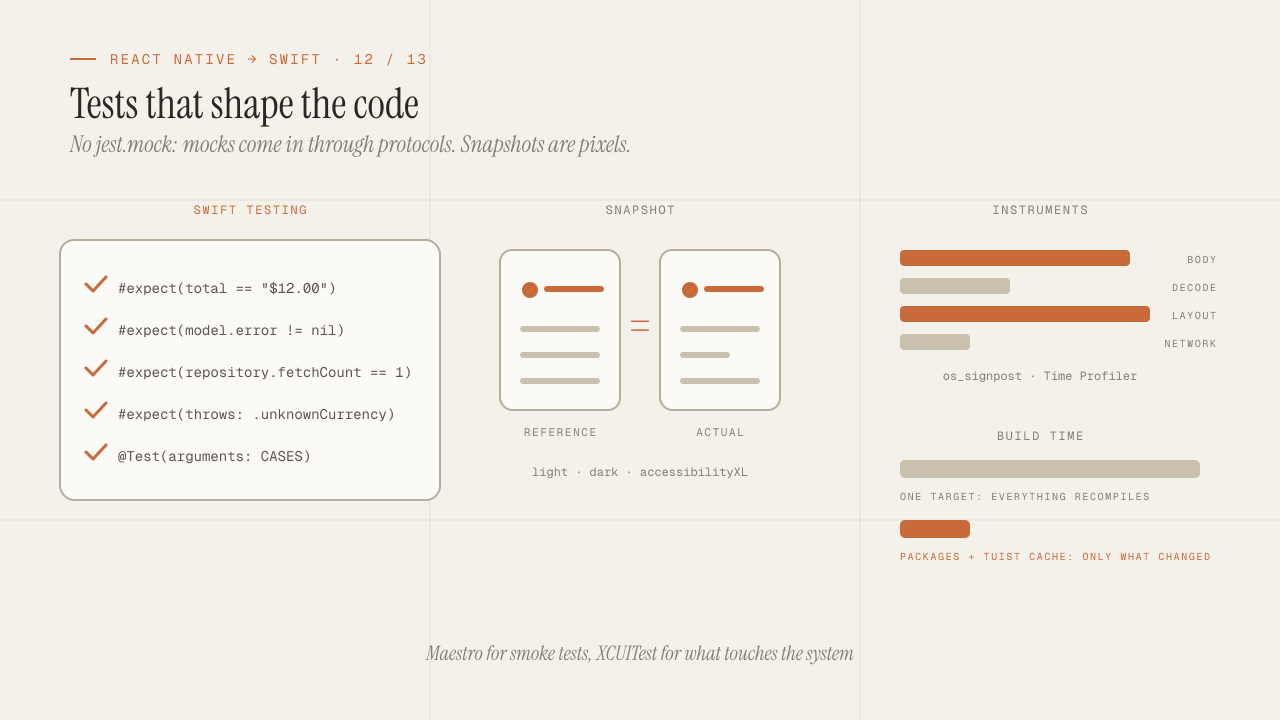
iOS testing and tooling for seniors: Swift Testing, snapshots, mocks, Instruments and build times
iOS testing coming from Jest: Swift Testing vs XCTest, snapshots, mocks via protocols and URLProtocol, XCUITest vs Maestro, Instruments and faster build times.
Read more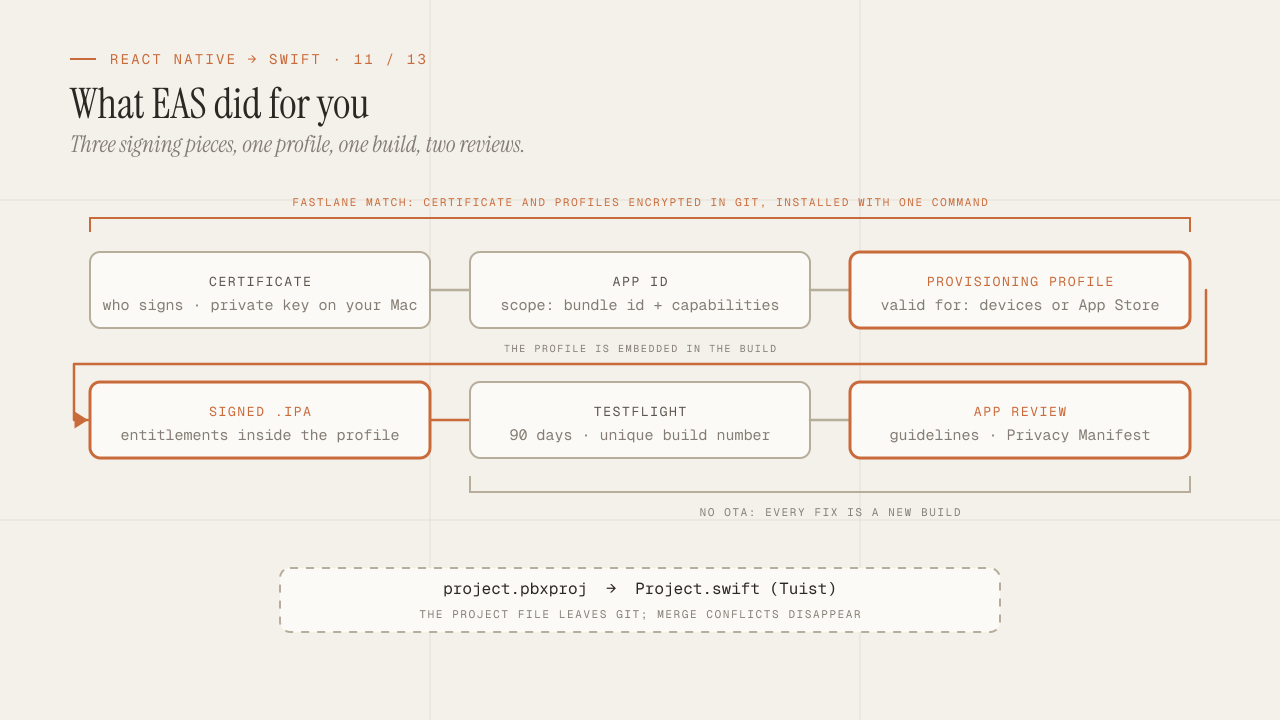
Build, signing and the App Store: what EAS hid from you
What EAS Build did for you is now yours: certificates, profiles and entitlements, Fastlane match, TestFlight, App Review rejections and the Privacy Manifest.
Read more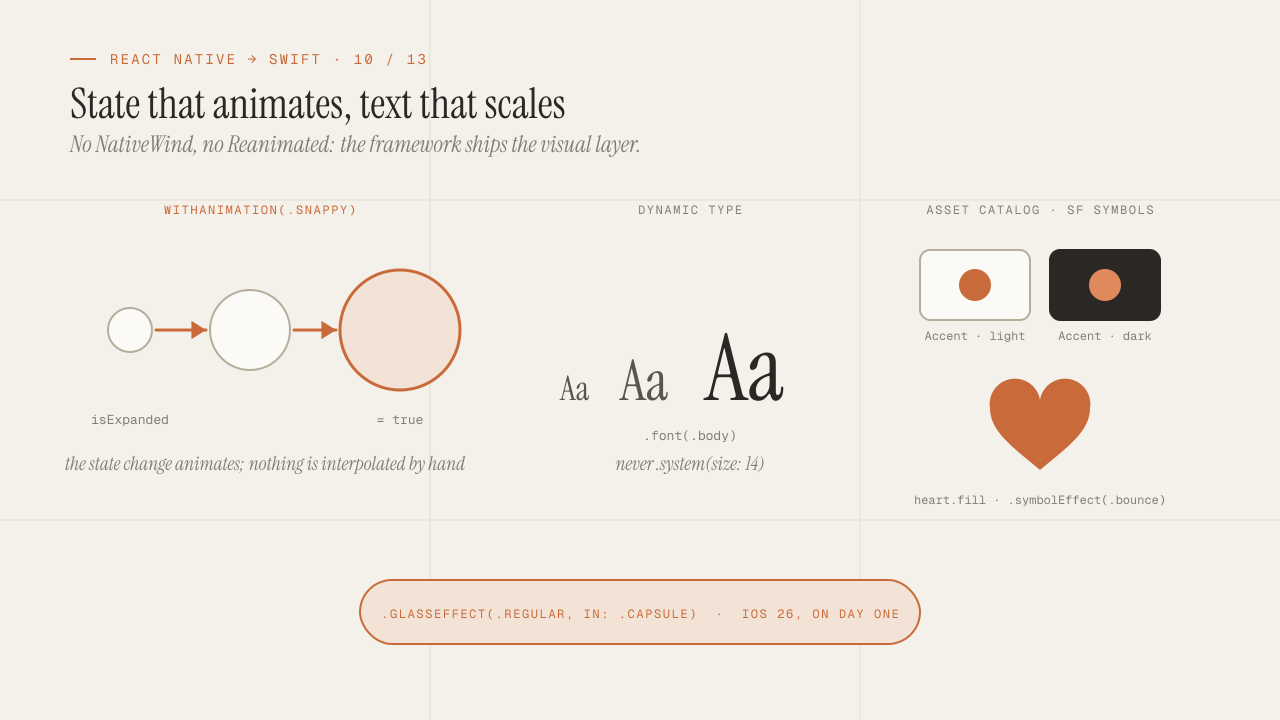
UI, theming and animations in SwiftUI without NativeWind or Reanimated
Theming, animations and accessibility in SwiftUI without NativeWind or Reanimated: design tokens, Dynamic Type, SF Symbols, withAnimation and Liquid Glass.
Read more