iOS persistence: SwiftData, GRDB and Keychain, and why Realm is no longer an option
Choosing between SwiftData, GRDB and Core Data for iOS persistence, why Realm is out, why the Keychain survives uninstalls, and offline-first with CloudKit.
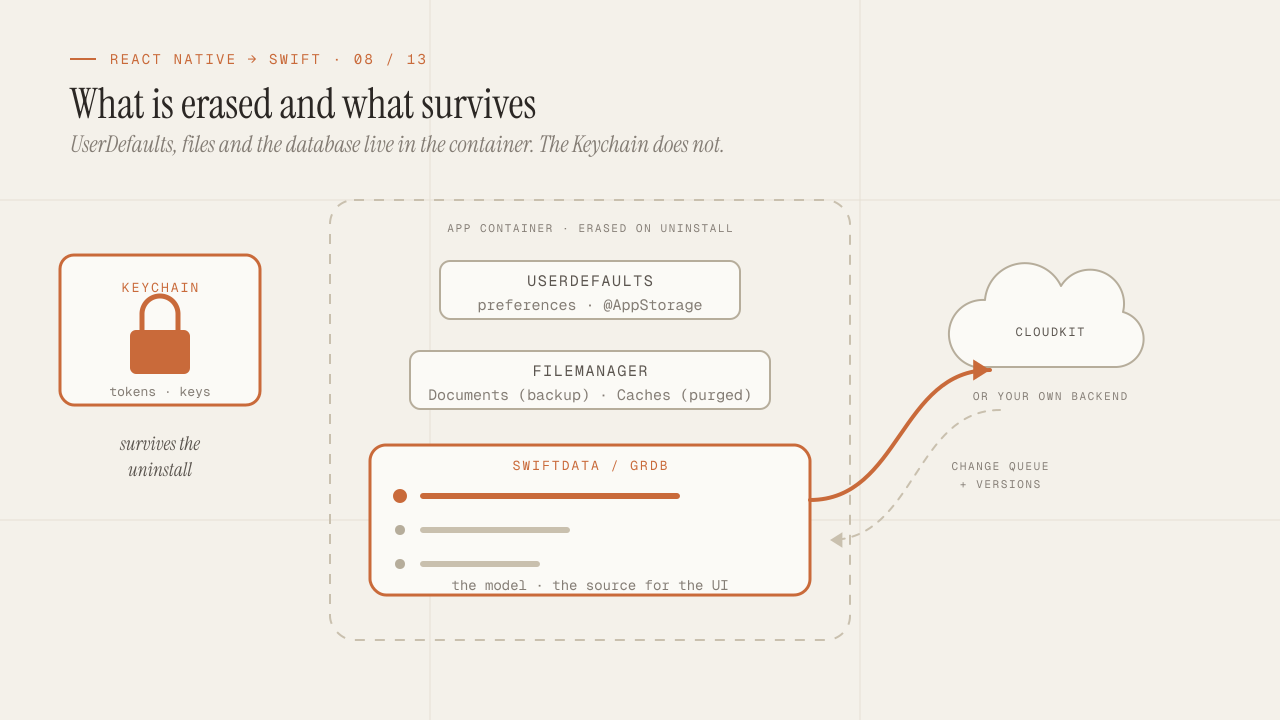
In React Native, persistence was a one-line decision: AsyncStorage or MMKV for simple keys, and WatermelonDB, SQLite via Expo or Realm when you needed a database. In native iOS the list is shorter and the decision carries more weight, because the local database is not a detail: in the design of this series’ data layer, it is the source the UI reads from. This post gives you the criterion for choosing between SwiftData, GRDB and Core Data, explains why Realm left the list, clarifies a Keychain behavior that surprises everyone coming from AsyncStorage, and lays out how to build an offline-first app with sync, either with CloudKit or with your own backend.
TL;DR
- SwiftData for small, Apple-only apps with views that use
@Query; GRDB when there are real queries, migrations that will evolve, or sync with conflicts; Core Data only if you inherit it. Realm is discontinued and should not go into a new project. - The Keychain is not wiped when the app is uninstalled. A token stored there comes back if the user reinstalls; you have to detect the first launch and clear it on purpose.
- Offline-first is an architecture, not a library: local writes first, a queue of pending changes, and sync with explicit conflict resolution. CloudKit gives it to you almost for free between the same user's devices; with your own backend, you write it.
In this article:
- The decision — The option map · SwiftData, GRDB or Core Data · Why Realm is out
- The details — Keychain · UserDefaults and files
- The sync — Offline-first · CloudKit
The option map versus React Native
| Need | React Native | Native iOS |
|---|---|---|
| Preferences, flags, small values | AsyncStorage, MMKV | UserDefaults (@AppStorage in SwiftUI) |
| Tokens, passwords, keys | expo-secure-store | Keychain (Security framework) |
| Relational database | expo-sqlite, WatermelonDB | GRDB (SQLite), Core Data |
| Models observable from the UI | Realm, WatermelonDB | SwiftData, Core Data |
| Large files (images, documents) | expo-file-system | FileManager in Documents or Caches |
| Sync between devices | Your own backend | CloudKit, or your own backend |
The difference that changes the design the most: in React Native, Realm and WatermelonDB offered observable objects that updated the UI when they changed. On iOS, SwiftData and Core Data do that with SwiftUI, and GRDB does it with ValueObservation. You don’t have to choose between “database” and “reactivity”; every serious option is observable.
SwiftData, GRDB or Core Data: the criterion
SwiftData is Apple’s persistence framework for modern Swift, available since iOS 17. You declare it with macros on classes (@Model), query it from SwiftUI with @Query, and it uses Core Data underneath. It is the one that shows up in every Apple example.
import SwiftData

@Model
final class Note {
    var title: String
    var body: String
    var createdAt: Date
    @Relationship(deleteRule: .cascade) var attachments: [Attachment] = []

    init(title: String, body: String) {
        self.title = title
        self.body = body
        self.createdAt = .now
    }
}

struct NotesScreen: View {
    @Query(sort: \Note.createdAt, order: .reverse) private var notes: [Note]
    @Environment(\.modelContext) private var context

    var body: some View {
        List(notes) { note in Text(note.title) }
            .toolbar {
                Button("New") { context.insert(Note(title: "Untitled", body: "")) }
            }
    }
}
What it does well: zero configuration, SwiftUI integration, CloudKit sync you can turn on with one option, automatic lightweight migrations. What it does badly or doesn’t do: queries with joins or complex aggregations (#Predicate covers filters, not reports), fine-grained control of transactions and threads, and stability across iOS versions, which in its first two years had behavior changes that broke apps in production. Its models are classes, not struct, and therefore not Sendable: moving them across actors requires ModelActor and care.
GRDB is a third-party library (Gwendal Roué, maintained since 2015) that exposes SQLite with a Swift API: rows as struct types that conform to Codable and FetchableRecord, queries with a typed builder or handwritten SQL, explicit versioned migrations, and ValueObservation to observe the result of any query.
struct Note: Codable, FetchableRecord, PersistableRecord, Identifiable {
    var id: Int64?
    var title: String
    var body: String
    var createdAt: Date
}

var migrator = DatabaseMigrator()
migrator.registerMigration("v1") { db in
    try db.create(table: "note") { t in
        t.autoIncrementedPrimaryKey("id")
        t.column("title", .text).notNull()
        t.column("body", .text).notNull()
        t.column("createdAt", .datetime).notNull().indexed()
    }
}
try migrator.migrate(dbQueue)

// Observation: emits every time the result changes.
let observation = ValueObservation.tracking { db in
    try Note.order(Column("createdAt").desc).fetchAll(db)
}
What it does well: full SQLite performance and control, models as struct (and therefore Sendable), migrations you write and version yourself, and an API that doesn’t depend on SwiftUI, so the persistence layer lives in a package that never imports UI. What it costs: writing the schema by hand, and an external dependency, although one of the most stable in the ecosystem.
Core Data is the original framework, from 2005, in Objective-C with a Swift API. It is powerful, mature and verbose. If you inherit a project with Core Data, you keep it; if you start a new one, there is no reason to pick it over SwiftData (which wraps it) or GRDB.
The criterion as a decision:
| Your case | What to use |
|---|---|
| An inherited project with Core Data | Core Data, and evaluate migrating to SwiftData if you are on iOS 17+ |
| Complex queries, migrations that will evolve, sync with conflicts, or a data layer without SwiftUI | GRDB |
None of the above, iOS 17+ and the views can use @Query directly | SwiftData |
None of the above, but no iOS 17+ or views that cannot use @Query | GRDB |
In apps with a backend, I almost always end up on GRDB. In small local apps (notes, habits, a catalog that syncs with iCloud), SwiftData saves a lot of code.
Why Realm is no longer an option
For years Realm was the convenient alternative in both worlds: observable objects, sync with Atlas Device Sync, and the same database in React Native and in Swift. In September 2024 MongoDB announced the discontinuation of Atlas Device Sync and the Realm SDKs, with end of support in September 2025. The code is open source and still compiles, but it receives no updates for new iOS or Swift versions, and under strict Swift 6, an unmaintained SDK is a problem that grows with every release.
For a new project, the answer is no. For an existing one on Realm, the path is GRDB (struct models, a handwritten data migration) or SwiftData if the app is simple, and in either case sync is solved separately, with CloudKit or with your own backend. It is work, and it is better to do it before an iOS change makes it urgent.
Keychain: what survives uninstalling
expo-secure-store on iOS uses the Keychain underneath, so technically you were already using it. What you probably didn’t know is a behavior that in native you have to handle yourself: Keychain items are not deleted when the user uninstalls the app. The app container’s data is deleted (UserDefaults, files, the database), but the Keychain is a system store, indexed by the app’s identifier, and its entries persist until something deletes them.
The concrete consequence: a user uninstalls your app to “start over”, reinstalls it, and lands already signed in because the token is still there. Or worse, a device that changes owners with the app uninstalled. The pattern for handling it is to detect the first launch after an install and clean up:
enum FirstLaunch {
    private static let key = "hasLaunchedBefore"

    /// Call at launch, before reading any credential.
    static func resetKeychainIfFreshInstall() {
        let defaults = UserDefaults.standard
        guard !defaults.bool(forKey: key) else { return }
        // UserDefaults was wiped by the uninstall; the Keychain was not.
        Keychain.deleteAll()
        defaults.set(true, forKey: key)
    }
}
About the API itself: Security exposes C functions (SecItemAdd, SecItemCopyMatching) with attribute dictionaries, and writing the wrapper is an afternoon nobody enjoys. The options are to write a hundred-line wrapper once and reuse it, or to use a thin library like KeychainAccess. Either works; what you should not do is store tokens in UserDefaults because “it’s easier”: UserDefaults is an unencrypted plist file inside the container, readable in an unencrypted backup.
Two attributes that matter when saving:
kSecAttrAccessible: when the system allows the item to be read.kSecAttrAccessibleWhenUnlockedThisDeviceOnlyis the sensible value for tokens: only with the device unlocked, and it doesn’t migrate to another device through a backup.- Access groups (
kSecAttrAccessGroup): for sharing credentials between the app and its extensions (a widget that needs the token to fetch data). Requires the Keychain Sharing entitlement.
UserDefaults and files: the small and the large
UserDefaults is the AsyncStorage replacement for small values: preferences, the last tab visited, onboarding flags. In SwiftUI, @AppStorage("showCompleted") private var showCompleted = false reads and writes it as if it were @State, with the view updating on change. Two limits: it is not secure (already said), and it is not a database; storing a large array of encoded objects there works until it doesn’t.
For files (downloaded images, PDFs, exports), FileManager with two directories that have different semantics:
Documents: user data, included in the iCloud backup, never deleted by the system.Caches: regenerable data, excluded from the backup, and the system may delete it when space runs low. Cached network images go here, and the code must assume they may be gone.
If you store something in Documents that can be downloaded again, App Review can reject it for inflating the user’s backup. It is one of the guidelines that gets enforced the most and known the least.
Offline-first: local writes and a change queue
Offline-first is not “caching the responses”. It means the app works completely without a network, writes included, and syncs later. The design has three pieces, all on top of the local database:
- Every write goes to the local database first. The user creates a note, the note exists immediately, the UI shows it, without waiting for the server.
- Every write leaves a pending change in a queue table (
pending_change: type, entity, id, payload, date). It is the record of what the server doesn’t know yet. - A synchronizer drains the queue when there is a network, in order, and applies what the server returns (final ids, versions, conflicts).
-
The user creates a note
-
db.write { insert Note(id: local); insert PendingChange(.create, note) }The UI already shows it, without waiting for the network.
-
The synchronizer drains the queue when there is a network —
POST /notes
What the server replies
- Ok —
db.write { update Note(id: remote); delete PendingChange } - Version conflict — it is resolved and written again with
db.write { … }
Conflicts are the part no library solves for you, because they depend on the domain. The three strategies I use, in order of frequency:
- Last write wins, per field or per record, with a timestamp. Works for preferences and single-person data.
- The server wins and the client shows it: the local change is discarded and the UI notifies the user. Works for shared data where the client should not be the one deciding.
- Per-field merge: both changes are applied if they touch different fields, and the user is asked if they touch the same one. Works for collaborative editors and is the most expensive to implement.
Any of the three requires every record to carry a version (an integer or a server-side updatedAt) and the server to compare it on write. If the backend has no versions, there is no correct sync; it is the first thing I ask for when a client says “we want it to work offline”.
CloudKit: sync between the same user’s devices
If the app has no backend of its own and the data belongs to a single user (notes, habits, collections), CloudKit solves sync between iPhone, iPad and Mac through the user’s iCloud account, with no server of yours and no cost until high quotas. SwiftData turns it on with ModelConfiguration(cloudKitDatabase: .automatic) and a capability in the project; Core Data with NSPersistentCloudKitContainer. With GRDB there is no direct integration; you write the synchronizer with CKRecord by hand, or use a library that does it.
The restrictions you have to accept in exchange:
- Every attribute must be optional or have a default value, and relationships cannot be required, because records can arrive in any order.
- There are no unique keys or uniqueness constraints: two devices can create “the same” entity while offline and both will exist. If the domain requires uniqueness, you have to deduplicate on receive.
- Conflict resolution is “last write wins” per field and cannot be configured. If you need anything else, CloudKit is not the tool.
- It only works with an iCloud account, and only across Apple platforms. If Android or web ever shows up, the data sits somewhere you can’t reach.
For personal single-user apps, that list is acceptable and the savings from not having a backend are enormous. For anything with users who share data with each other, with Android in the plan, or with business logic on the server, your own backend with the change queue from the previous section is the way, and GRDB is the local database that supports it best.
The mistake I’ve seen most often in migrations from React Native is treating the local database as an optional cache and the network as the truth. On iOS, with observable SwiftData or GRDB, it’s the other way around: the database is the truth for the UI and the network is a process that updates it. Once that order is clear, offline-first stops being a feature and becomes the app’s normal state.
Frequently asked questions
Can I use SwiftData and GRDB in the same app?
Technically yes, but I don’t recommend it: two databases are two schemas, two sets of migrations and two ways of observing. Pick one. If you are torn between the two, GRDB covers everything SwiftData does, with more code and without the @Query integration.
How do I migrate data from one schema version to another without losing the user’s data?
With GRDB, every schema change is a named, registered migration that runs exactly once and in order. With SwiftData, simple changes (adding an optional attribute) are automatic, and complex ones require a SchemaMigrationPlan with stages. In both cases, the rule is never to edit a migration that has already shipped: you add a new one.
Is SwiftData or GRDB data encrypted?
Not by default. The app container is protected by device encryption (Data Protection), which encrypts the files while the device is locked, and it can be hardened with FileProtectionType.complete. For database-level encryption, GRDB supports SQLCipher. For most apps, Data Protection plus the Keychain for secrets is enough.
Where do I store the “the user has already seen the onboarding” state?
In UserDefaults, with @AppStorage if a view reads it. That is the exact use case for that store: a small, non-sensitive value that is deleted along with the app.
Does MMKV have an iOS equivalent?
MMKV is a Tencent library that also exists for native iOS, and it is faster than UserDefaults for frequent writes. In practice, UserDefaults is enough for preferences, and when there are frequent writes of structured data the answer is the database, not a faster key-value store.
Conclusion
Persistence on iOS has fewer options than in React Native and each one has a clear place: UserDefaults for the small, Keychain for the secret, FileManager for the large, and an observable database for the model. Between SwiftData and GRDB, the decision comes down to queries, migrations and sync: simple and Apple-only, SwiftData; anything else, GRDB. Realm is off the map. The Keychain survives uninstalling and has to be cleared on first launch. And offline-first is a three-piece architecture (local write, change queue, synchronizer with explicit conflicts) that CloudKit hands you ready-made for a single user and that you write yourself with your own backend.
To get started: pick the database with the diagram, write the first migration before the first view, move the token to the Keychain with a first-launch cleanup, and if the product says “offline”, ask for versions in the backend before writing a single line of sync. The next post is the big table: which Apple framework replaces each expo-* package, by domain, and the silent permissions crash we all cause the first time.
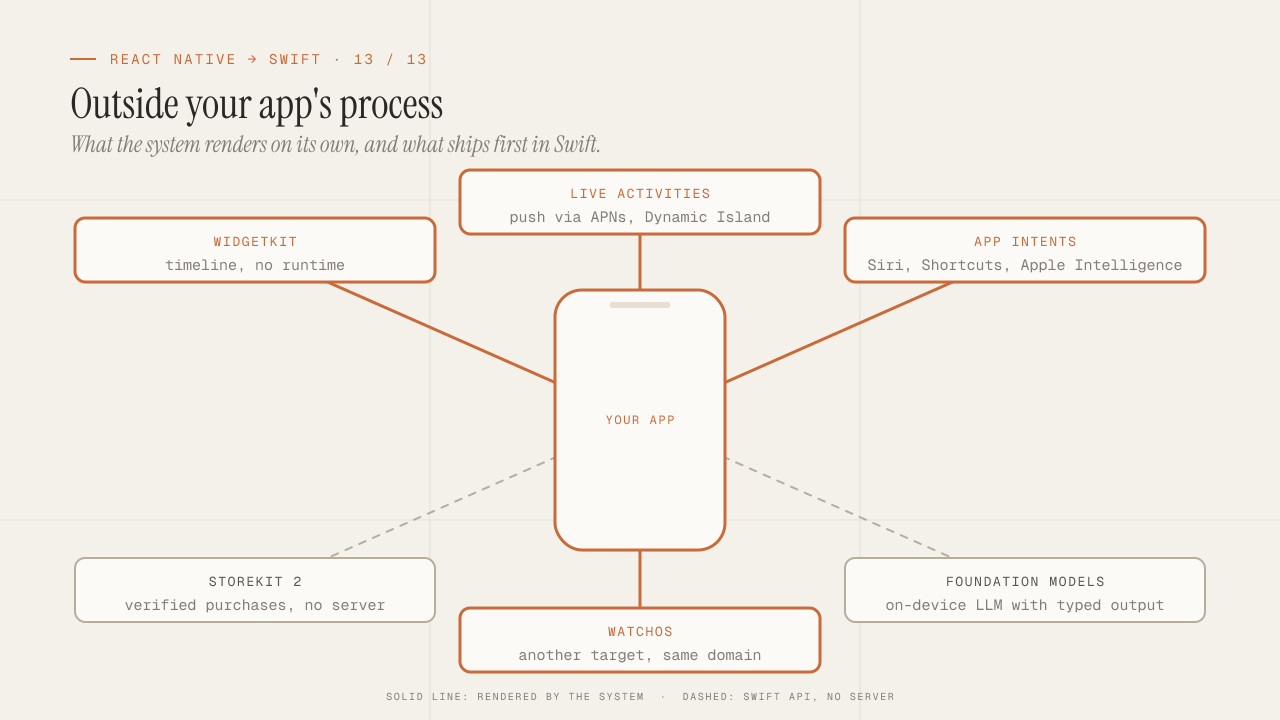
What you can only do in native: WidgetKit, Live Activities, App Intents, StoreKit 2, Foundation Models and watchOS
What only native iOS can do and React Native can't: WidgetKit, Live Activities, App Intents and Siri, StoreKit 2, Foundation Models on device, and watchOS.
Read more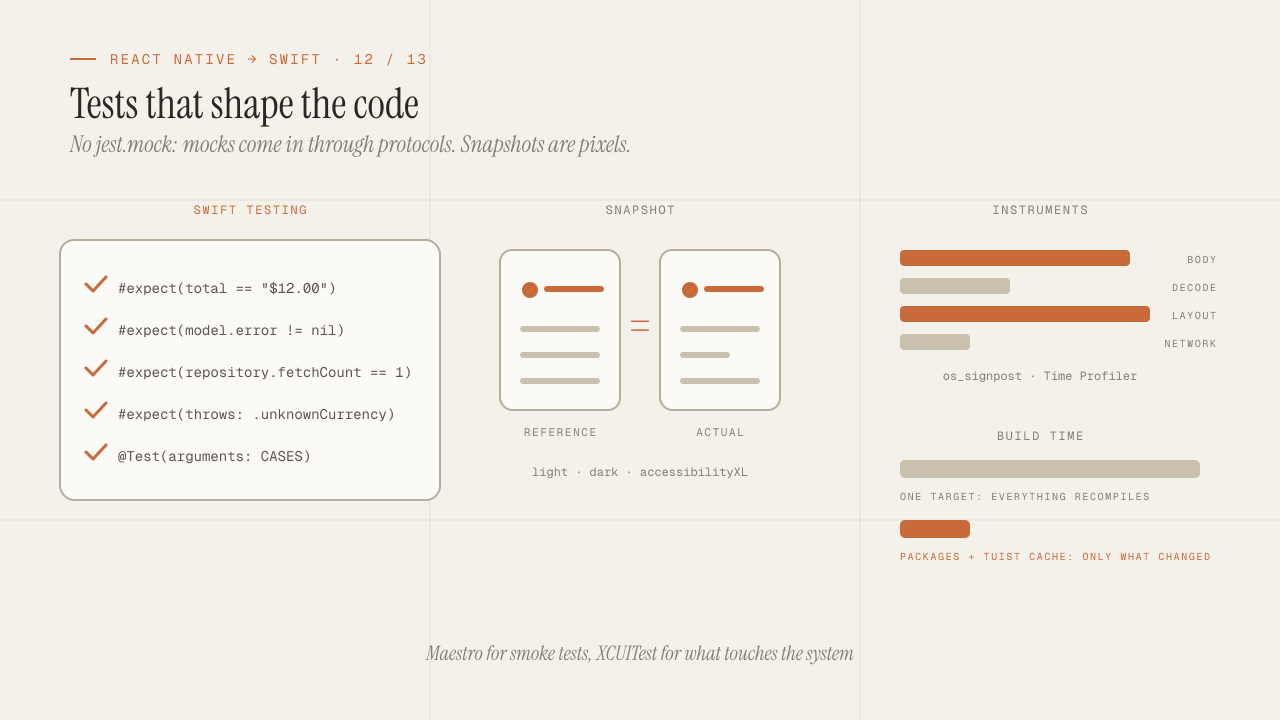
iOS testing and tooling for seniors: Swift Testing, snapshots, mocks, Instruments and build times
iOS testing coming from Jest: Swift Testing vs XCTest, snapshots, mocks via protocols and URLProtocol, XCUITest vs Maestro, Instruments and faster build times.
Read more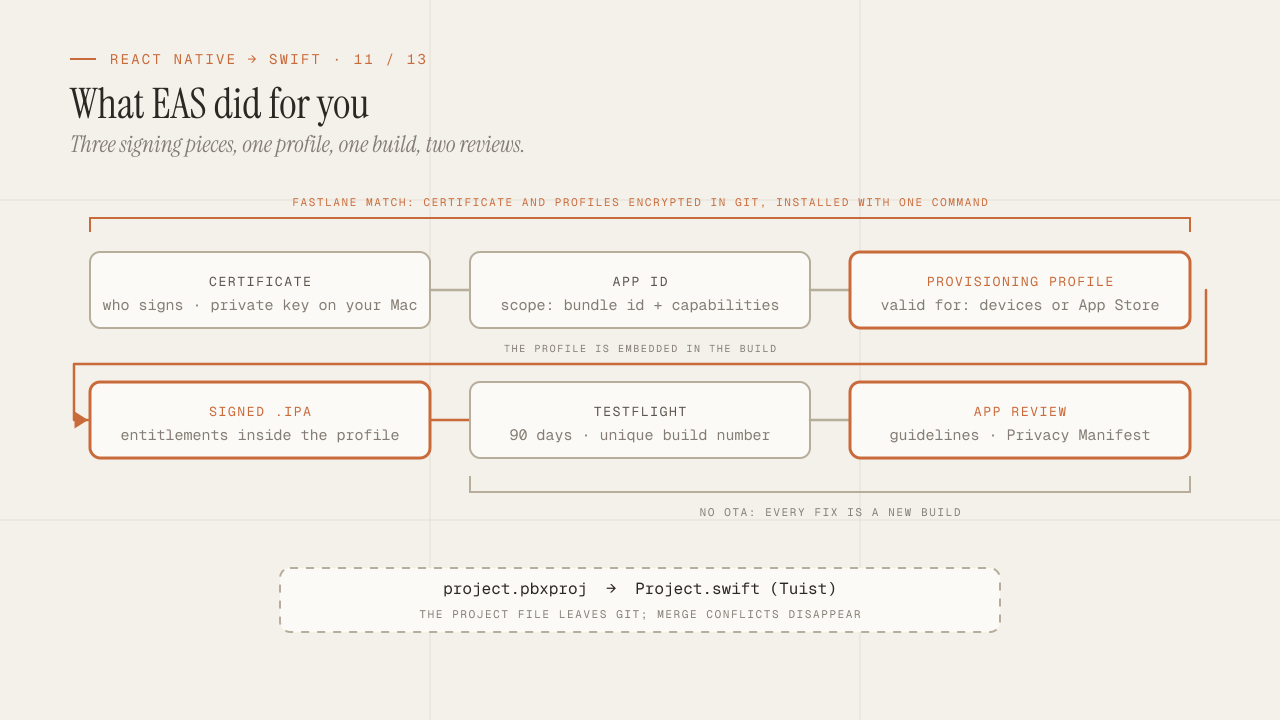
Build, signing and the App Store: what EAS hid from you
What EAS Build did for you is now yours: certificates, profiles and entitlements, Fastlane match, TestFlight, App Review rejections and the Privacy Manifest.
Read more