From the expo-* ecosystem to Apple frameworks: the equivalence table by domain
Which Apple framework replaces each expo-* package in native iOS: camera, location, auth, payments, notifications, files, plus Info.plist permissions.
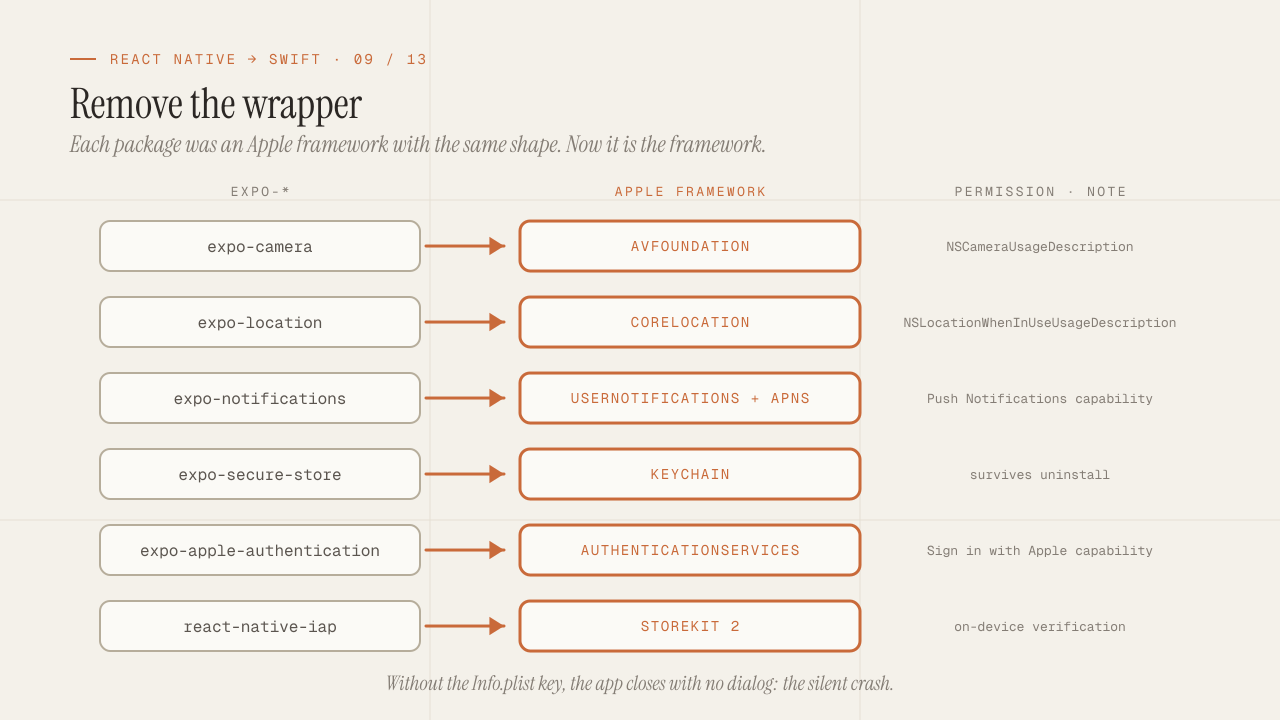
Expo did something you only notice once you lose it: it wrapped every capability of the phone in a package with the same shape. expo-camera, expo-location, expo-notifications, expo-secure-store: install, ask for permission with one function, use. In native there is no such uniformity. Each capability is an Apple framework with its own history, its own API (sometimes modern Swift, sometimes delegates from 2010) and its own way of asking for permission. This post is the table I wish I had had: by domain, which expo-* package you were using, which framework replaces it, which permission it requires and what changes in how you use it. And at the end, the mistake everyone makes the first time: the silent crash caused by a missing key in Info.plist.
TL;DR
- Almost every
expo-*package is a wrapper around an Apple framework: AVFoundation, CoreLocation, UserNotifications, StoreKit, AuthenticationServices, PhotosUI. Learning the framework means learning what the package was hiding, including its design decisions. - Every permission has two parts: a usage key in
Info.plistwith the text the user sees, and a request call at runtime. If the key is missing, the app closes with no dialog and no readable error; it is the silent crash of the first week. - For what Apple does not cover (third-party analytics, Google maps, certain SDKs), Swift Package Manager has most of the official SDKs. What does not exist on SPM is a warning: a mature alternative probably does not exist either.
In this article:
- The table — How to read the table · Camera, photos and media · Location and maps · Authentication · Payments and subscriptions · Notifications · Device and system
- The permissions — Info.plist and the silent crash · A pattern for requesting them
- What is missing — What Apple does not cover
How to read the table
Each row gives the Expo package, the Apple framework that replaces it, the permission it needs (the Info.plist key and, where it applies, the project capability or entitlement) and the change in usage that surprises people the most. It is not exhaustive; it is the list of what shows up in most commercial apps.
Two general clarifications:
- “Framework” does not mean a single class.
expo-camerais replaced by AVFoundation, which is a huge framework; to take a photo you use four or five of its types. The table points at the framework, and the text at the part you use. - Many of these frameworks have two APIs: a modern one with
async/awaitand an older one with delegates or callbacks. When the modern one exists, it is the one I use; when it does not,withCheckedContinuationorAsyncStreamwrap it once, as the concurrency post explains.
Camera, photos and media
| Expo | Apple | Permission | What changes |
|---|---|---|---|
expo-camera | AVFoundation (AVCaptureSession, AVCapturePhotoOutput) | NSCameraUsageDescription; NSMicrophoneUsageDescription for video | There is no preview component: you assemble an AVCaptureSession with a device, an input and an output, and show the preview with an AVCaptureVideoPreviewLayer wrapped in UIViewRepresentable. More code and full control (focus, exposure, RAW format). |
expo-image-picker (camera) | UIImagePickerController (wrapped) | NSCameraUsageDescription | For “take a photo and that’s it”, the system picker is still the short option. It is UIKit, wrapped once. |
expo-image-picker (gallery) | PhotosUI (PhotosPicker) | None | PhotosPicker is native SwiftUI and runs outside your process: the user picks and you receive only what was picked, without asking for photo library permission. It is the most pleasant change in the table. |
expo-media-library | Photos (PHPhotoLibrary) | NSPhotoLibraryUsageDescription; NSPhotoLibraryAddUsageDescription for save-only | Only if you need to read the whole library or save to an album. Since iOS 14 the user can grant limited access to selected photos, and your code has to support that state. |
expo-av (playback) | AVFoundation (AVPlayer), AVKit (VideoPlayer) | None | AVKit’s VideoPlayer is a SwiftUI view with the system controls. AVPlayer for audio and programmatic control. For background audio, the Background Modes capability with Audio. |
expo-av (recording) | AVFoundation (AVAudioRecorder, AVAudioSession) | NSMicrophoneUsageDescription | AVAudioSession is the concept Expo was hiding: it decides how your audio coexists with the system’s (category, mode, interruptions from calls). Configuring it wrong is the cause of most audio bugs. |
expo-speech | AVFoundation (AVSpeechSynthesizer) | None | Direct API. System voices, with enhanced quality the user can download. |
expo-barcode-scanner | AVFoundation (AVCaptureMetadataOutput) or Vision (VNDetectBarcodesRequest) | NSCameraUsageDescription | Vision detects codes in an image already taken; AVCaptureMetadataOutput reads them live from the capture session. Both without libraries. |
expo-image | AsyncImage (basic) or Nuke / Kingfisher (SPM) | None | AsyncImage does not cache to disk or prefetch. For an app with network images, Nuke or Kingfisher are the standard dependency. |
Location and maps
| Expo | Apple | Permission | What changes |
|---|---|---|---|
expo-location | CoreLocation (CLLocationManager, CLLocationUpdate) | NSLocationWhenInUseUsageDescription; NSLocationAlwaysAndWhenInUseUsageDescription for background; Background Modes capability with Location | Since iOS 17, CLLocationUpdate.liveUpdates() delivers locations as an AsyncSequence with no delegate. The “always” permission is requested in two steps (first “when in use”, then “always”) and the system decides when to show the second dialog, not you. |
expo-location (geocoding) | CoreLocation (CLGeocoder) | None | Rate limits from Apple’s service. For volume, your own service. |
react-native-maps | MapKit (SwiftUI Map) | None; NSLocationWhenInUseUsageDescription if you show the user’s location | Map in SwiftUI with annotations, overlays and a controllable camera since iOS 17. No API key, no quota. For Google maps, the official SDK via SPM. |
| Geofencing | CoreLocation (CLMonitor) | “Always” permission | CLMonitor (iOS 17) replaces delegate-based regions. Limit of 20 monitored regions per app. |
Authentication and session
| Expo | Apple | Permission / capability | What changes |
|---|---|---|---|
expo-apple-authentication | AuthenticationServices (SignInWithAppleButton) | Sign in with Apple capability | Native SwiftUI button. Apple requires you to offer it if you offer any other social login. The real email only arrives the first time; you have to store it then. |
expo-auth-session (OAuth) | AuthenticationServices (ASWebAuthenticationSession) | None; URL scheme or Universal Link for the callback | Opens an isolated Safari session for the OAuth flow and returns the callback URL. It is what expo-auth-session was doing underneath. |
expo-local-authentication | LocalAuthentication (LAContext) | NSFaceIDUsageDescription | LAContext.evaluatePolicy with async. Face ID requires the key; Touch ID does not. If the key is missing and the device has Face ID, silent crash. |
expo-secure-store | Security (Keychain) | Keychain Sharing capability only to share with extensions | Covered in the persistence post: it survives uninstallation. |
| Passkeys | AuthenticationServices (ASAuthorizationPlatformPublicKeyCredentialProvider) | Associated Domains with webcredentials: | No mature equivalent in Expo. It is one of the capabilities that today justify native in apps with login. |
| Password autofill | .textContentType(.username / .password / .oneTimeCode) | Associated Domains with webcredentials: | One modifier per field, and the system offers the saved credentials and the SMS codes. |
Payments and subscriptions
| Expo | Apple | Permission / capability | What changes |
|---|---|---|---|
react-native-iap, RevenueCat | StoreKit 2 (Product, Transaction) | In-App Purchase capability | StoreKit 2 is pure async/await: Product.products(for:), product.purchase(), Transaction.currentEntitlements. Receipt verification comes signed and validated on the device. RevenueCat still makes sense for analytics and a subscription backend, but the base API no longer hurts. |
@stripe/stripe-react-native | Stripe iOS SDK (SPM) | None | Same official SDK. Remember: digital goods consumed in the app go through In-App Purchase, not Stripe; App Review checks it. |
| Apple Pay | PassKit (PKPaymentAuthorizationController) | Apple Pay capability with Merchant ID | For physical goods and services. The native button (PayWithApplePayButton) is SwiftUI. |
expo-store-review | StoreKit (requestReview in the environment) | None | @Environment(\.requestReview) and one call. The system decides whether it shows the dialog. |
Notifications
| Expo | Apple | Permission / capability | What changes |
|---|---|---|---|
expo-notifications (push) | UserNotifications + APNs | Push Notifications capability; registerForRemoteNotifications | Expo had its own push service that saved you from talking to APNs; now your backend talks to APNs directly (auth token with the .p8 key) or through Firebase Cloud Messaging. The device token arrives in AppDelegate, which in SwiftUI is added with @UIApplicationDelegateAdaptor. |
expo-notifications (local) | UserNotifications (UNUserNotificationCenter) | Runtime permission request, no plist key | requestAuthorization(options:) is async. Local notifications are scheduled with time, calendar or location triggers. |
| Rich notifications (image, actions) | Notification Service Extension and Content Extension | Extension target | A separate target, in Swift, that modifies the notification before showing it. It is the first place where many teams write Swift even though the app is React Native. |
| Badges | UNUserNotificationCenter.setBadgeCount | Included in the notifications permission | Direct. |
Device, files and system
| Expo | Apple | Permission / capability | What changes |
|---|---|---|---|
expo-file-system | Foundation (FileManager, URL) | None | Documents with backup, Caches without backup and purgeable. See the persistence post. |
expo-document-picker | .fileImporter (SwiftUI) | None | A SwiftUI modifier that opens the system file picker and returns security-scoped URLs (startAccessingSecurityScopedResource). |
expo-sharing | ShareLink (SwiftUI) or UIActivityViewController | None | ShareLink(item:) is one line. To share with a custom preview, Transferable. |
expo-clipboard | UIPasteboard | None; iOS notifies the user when you read the clipboard | Reading the clipboard without a user action shows a system banner. Only read after an explicit tap. |
expo-haptics | .sensoryFeedback (SwiftUI) or UIImpactFeedbackGenerator | None | .sensoryFeedback(.success, trigger: value) as a modifier. |
expo-device, expo-constants | UIDevice, ProcessInfo, Bundle.main | None | The exact model name (“iPhone 16 Pro”) is not exposed; utsname gives the hardware identifier and you have to map it. |
expo-network | Network (NWPathMonitor) | None | Connectivity monitor as an AsyncStream. It reports whether there is a route, not whether the internet works. |
expo-linking | .onOpenURL, openURL from the environment | LSApplicationQueriesSchemes to check whether another app is installed | Covered in the navigation post. |
expo-web-browser | SFSafariViewController (wrapped) | None | Safari inside the app, with cookies shared with Safari. For your own content, WKWebView. |
expo-localization | Foundation (Locale, String(localized:), String Catalogs) | None | String Catalogs (.xcstrings) replace the i18n JSON files, with plurals and per-device variants built in. Xcode extracts the strings automatically. |
expo-calendar, expo-contacts | EventKit, Contacts | NSCalendarsFullAccessUsageDescription, NSContactsUsageDescription | Since iOS 17, the calendar has “write-only” access without full permission (EKEventEditViewController). Contacts allows limited access. |
expo-sensors | CoreMotion | NSMotionUsageDescription | Accelerometer, gyroscope, pedometer. Health data is separate, in HealthKit, with its own permission per data type. |
expo-background-fetch, expo-task-manager | BackgroundTasks (BGAppRefreshTask, BGProcessingTask) | Background Modes capability with Background fetch / processing; identifiers in Info.plist | The system decides when the task runs based on app usage; there is no frequency guarantee. It is the point where the most expectations break. |
expo-updates | Does not exist | — | There are no OTA code updates in native. Remote configuration and feature flags, yes; code, no. |
Permissions: Info.plist and the silent crash
Every permission on iOS has two halves. The first is a key in Info.plist whose value is the text the user reads in the system dialog (“This app uses the camera to scan your receipts”). The second is the runtime call that triggers the dialog. Expo joined the two: the package’s config plugin wrote the key for you, with a default text, and the requestPermissionsAsync function made the call.
In native, if you make the call without having written the key, the app closes at that instant. There is no Swift exception to catch, no dialog, no error in the app’s console. The message appears in the system log (in Console.app, or in Xcode’s output if you are connected), and it says something like the app was terminated for a privacy reason because it tried to access sensitive data without a usage description. It is the silent crash of the first week, and also the one that shows up in production when someone adds Face ID to an app that only had Touch ID.
The most common keys, to have them at hand:
| Capability | Info.plist key |
|---|---|
| Camera | NSCameraUsageDescription |
| Microphone | NSMicrophoneUsageDescription |
| Photo library (read) | NSPhotoLibraryUsageDescription |
| Photo library (save only) | NSPhotoLibraryAddUsageDescription |
| Location when in use | NSLocationWhenInUseUsageDescription |
| Location always | NSLocationAlwaysAndWhenInUseUsageDescription |
| Face ID | NSFaceIDUsageDescription |
| Contacts | NSContactsUsageDescription |
| Calendar | NSCalendarsFullAccessUsageDescription |
| Motion | NSMotionUsageDescription |
| Bluetooth | NSBluetoothAlwaysUsageDescription |
| Cross-app tracking (ATT) | NSUserTrackingUsageDescription |
| Local network | NSLocalNetworkUsageDescription |
| Health (read / write) | NSHealthShareUsageDescription / NSHealthUpdateUsageDescription |
Three rules about the text:
- Explain the concrete benefit, not the capability. “To scan receipts” instead of “To use the camera”. App Review rejects vague descriptions, and the user’s acceptance rate changes with the text.
- Localize it.
Info.plistkeys are translated inInfoPlist.xcstrings; a Spanish-language app with the dialog in English stands out. - Ask for the permission in context, when the user taps the feature that needs it, not at launch. Each permission is asked only once; if the user says no, they can only change it in Settings, and your app has to offer a button that opens
UIApplication.openSettingsURLString.
A detail that was not visible in Expo: since iOS 17, apps that use certain APIs considered sensitive (UserDefaults, file timestamps, disk space, system boot time) must declare the reason in a Privacy Manifest (PrivacyInfo.xcprivacy), and the same applies to the third-party SDKs you include. Without it, App Store Connect rejects the submission with a warning email. The build and App Store post covers it.
A pattern for requesting permissions without repeating code
Each framework asks for permission its own way: CoreLocation with a delegate, AVFoundation with async, UserNotifications with async throws, Photos with a callback. What I do is normalize them behind a single type, so the views know nothing about frameworks:
enum PermissionStatus {
    case notDetermined, granted, denied, restricted
}

protocol Permission: Sendable {
    var status: PermissionStatus { get async }
    func request() async -> PermissionStatus
}

struct CameraPermission: Permission {
    var status: PermissionStatus {
        get async {
            switch AVCaptureDevice.authorizationStatus(for: .video) {
            case .authorized: .granted
            case .denied: .denied
            case .restricted: .restricted
            case .notDetermined: .notDetermined
            @unknown default: .denied
            }
        }
    }

    func request() async -> PermissionStatus {
        let granted = await AVCaptureDevice.requestAccess(for: .video)
        return granted ? .granted : .denied
    }
}
And a view that uses it the same way for any permission:
struct PermissionGate<Content: View>: View {
    let permission: any Permission
    let rationale: String
    @ViewBuilder let content: () -> Content
    @State private var status: PermissionStatus = .notDetermined
    @Environment(\.openURL) private var openURL

    var body: some View {
        Group {
            switch status {
            case .granted:
                content()
            case .notDetermined:
                ContentUnavailableView(rationale, systemImage: "lock", description: Text("We need your permission to continue."))
                    .overlay(alignment: .bottom) {
                        Button("Allow") { Task { status = await permission.request() } }
                    }
            case .denied, .restricted:
                ContentUnavailableView("Permission turned off", systemImage: "gear")
                    .overlay(alignment: .bottom) {
                        Button("Open Settings") {
                            openURL(URL(string: UIApplication.openSettingsURLString)!)
                        }
                    }
            }
        }
        .task { status = await permission.status }
    }
}
With that, PermissionGate(permission: CameraPermission(), rationale: "Scan your receipts") { ScannerView() } handles the explanation screen, the request and the denied case, and adding a new permission means implementing the protocol once.
What Apple does not cover, and where it comes from
There are domains where there is no Apple framework and the answer is a third-party SDK via Swift Package Manager:
- Analytics and crash reporting: Firebase (Analytics, Crashlytics), Sentry, PostHog, Mixpanel. All with SPM. Apple’s MetricKit gives aggregated diagnostics without an SDK, but it does not replace a crash reporter.
- Google Maps, Mapbox: official SDKs via SPM. MapKit covers most cases without them.
- Real-time chat and video: Stream, Sendbird, Twilio, Agora, LiveKit. With SPM.
- Feature flags and remote configuration: Firebase Remote Config, LaunchDarkly, or your own endpoint. It is the partial replacement for OTA: what can change without a release is what the app reads from the server.
- Backend as a service: Firebase, Supabase (
supabase-swift), Appwrite. Covered in the data post.
The signal I use to evaluate an SDK: if it is not on SPM (only CocoaPods or a manual .xcframework), it is probably not maintained for modern Swift, and with strict Swift 6 that becomes a problem on the first build. CocoaPods still works, but it has been in maintenance mode since 2024 and is no longer the default route.
The first app I migrated from Expo to native had fourteen
expo-*packages. When I finished, twelve were Apple frameworks with no dependency, and two were third-party SDKs via SPM. The permissions code, which in Expo was fourteen calls with the same shape, ended up as one protocol and fourteen implementations of twenty lines each. More code, and for the first time I knew exactly what each one was asking for.
Frequently asked questions
How do I know which framework to use for something that is not in the table?
Apple’s documentation is organized by framework, and Xcode’s search (the built-in documentation) is faster than the web. My shortcut is to search for the name of the Expo package in its own repository: the source code of the iOS module of expo-whatever imports exactly the Apple framework you need and shows how it uses it.
Is it worth using UIKit for the camera, or is there something in SwiftUI?
For preview and capture, the AVFoundation session is displayed with a UIKit layer wrapped in UIViewRepresentable. There is no camera view in pure SwiftUI. It is one of the few UIKit wrappers every app with a camera writes, and it is written once.
What about permissions in the simulator?
Most can be tested: the simulator shows the dialogs and stores the decision. The camera and certain sensors do not work in the simulator; for those you need a device. xcrun simctl privacy lets you grant or revoke permissions from the command line, useful in UI tests.
How do I reset a permission already granted to test the dialog again?
On the device, by uninstalling the app (the permission is erased, the Keychain is not). In the simulator, xcrun simctl privacy booted reset all com.miapp.bundle. In Settings, Privacy, you can change the state, but not go back to “not determined”.
Do third-party SDKs also need permission keys?
Yes. If an analytics SDK accesses the local network, the IDFA or the clipboard, your Info.plist needs the corresponding key and your Privacy Manifest must declare it, even if the SDK is the one doing the access. App Review holds the app responsible, not the SDK.
Conclusion
Every expo-* package was a uniformly shaped wrapper around an Apple framework with a shape of its own. Moving to native means removing the wrapper: AVFoundation for camera and audio, CoreLocation and MapKit for location, AuthenticationServices for login, StoreKit 2 for payments, UserNotifications with APNs for push, and Foundation for files and localization. What you gain is control and day-one APIs; what you lose is the uniformity, and that is recovered with your own permissions protocol and with SPM for what Apple does not cover. The silent crash from a missing Info.plist key is the bug everyone hits once and nobody twice.
To get started: build your own table from the packages in your package.json, write the Info.plist keys before the code that needs them, normalize the permissions behind a protocol, and choose SPM as your only dependency manager. The next post covers the visual layer: design tokens without NativeWind, animations without Reanimated, and Dynamic Type and accessibility as the standard rather than an extra.
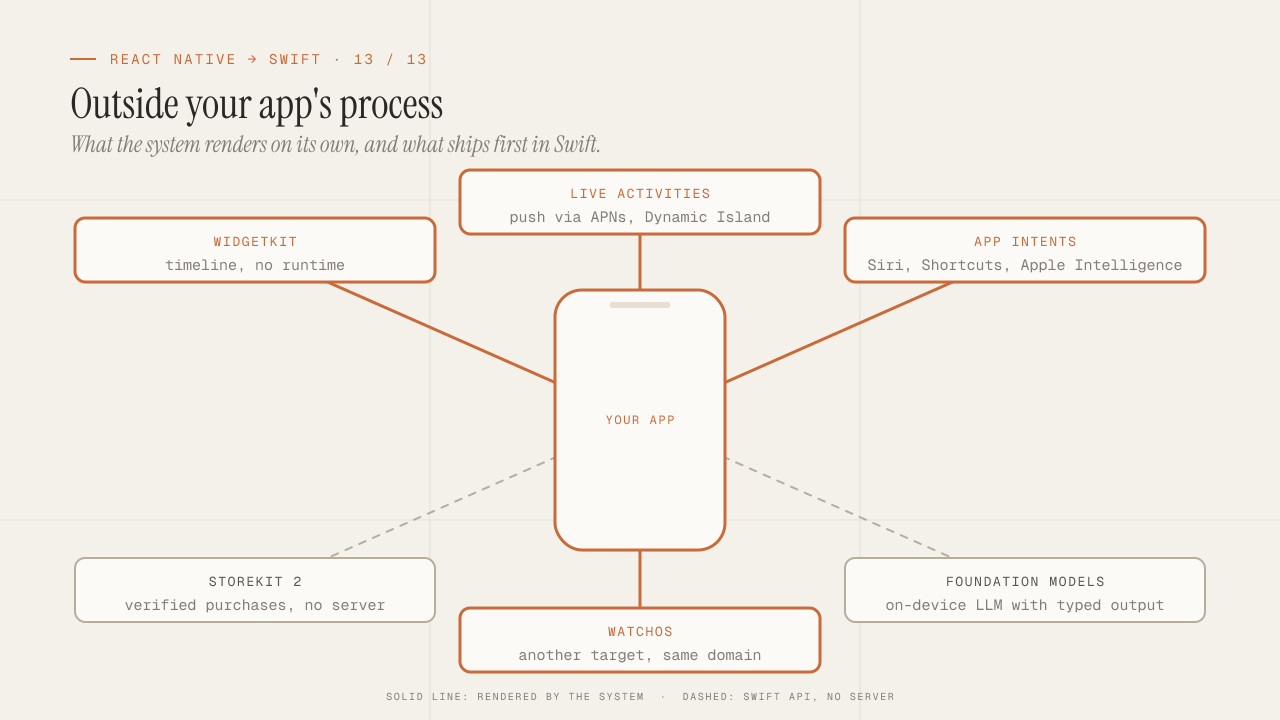
What you can only do in native: WidgetKit, Live Activities, App Intents, StoreKit 2, Foundation Models and watchOS
What only native iOS can do and React Native can't: WidgetKit, Live Activities, App Intents and Siri, StoreKit 2, Foundation Models on device, and watchOS.
Read more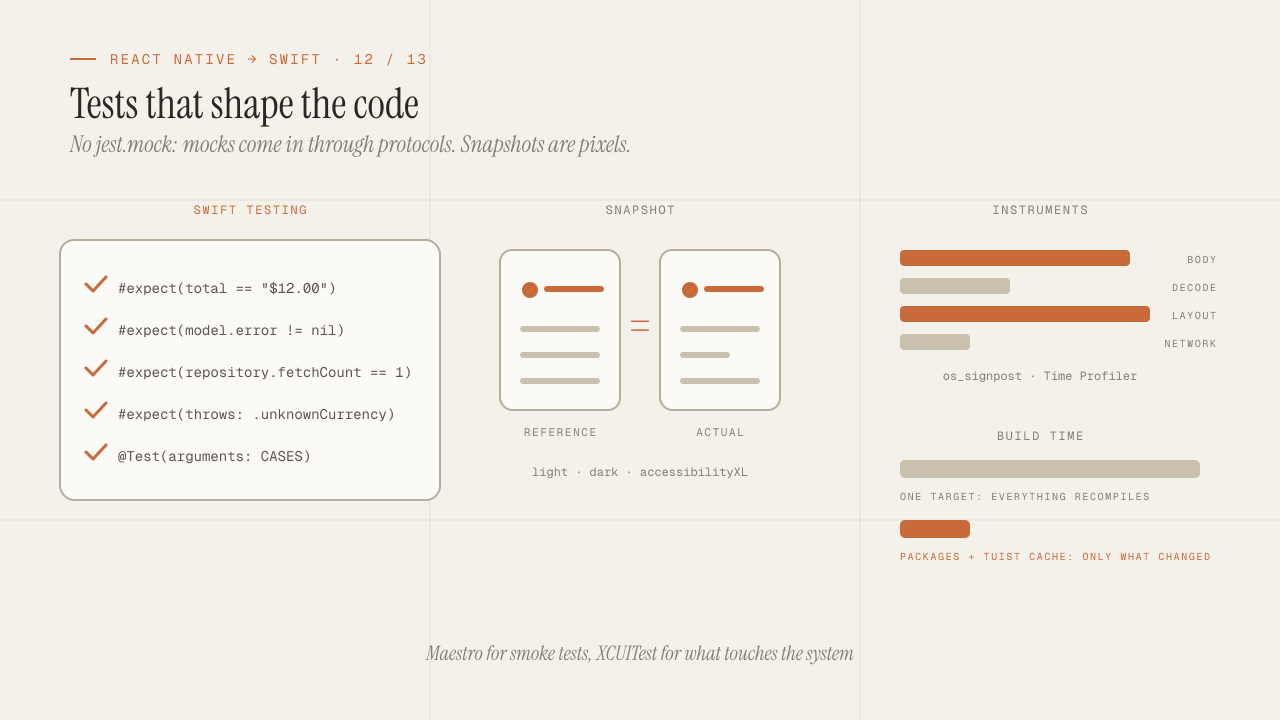
iOS testing and tooling for seniors: Swift Testing, snapshots, mocks, Instruments and build times
iOS testing coming from Jest: Swift Testing vs XCTest, snapshots, mocks via protocols and URLProtocol, XCUITest vs Maestro, Instruments and faster build times.
Read more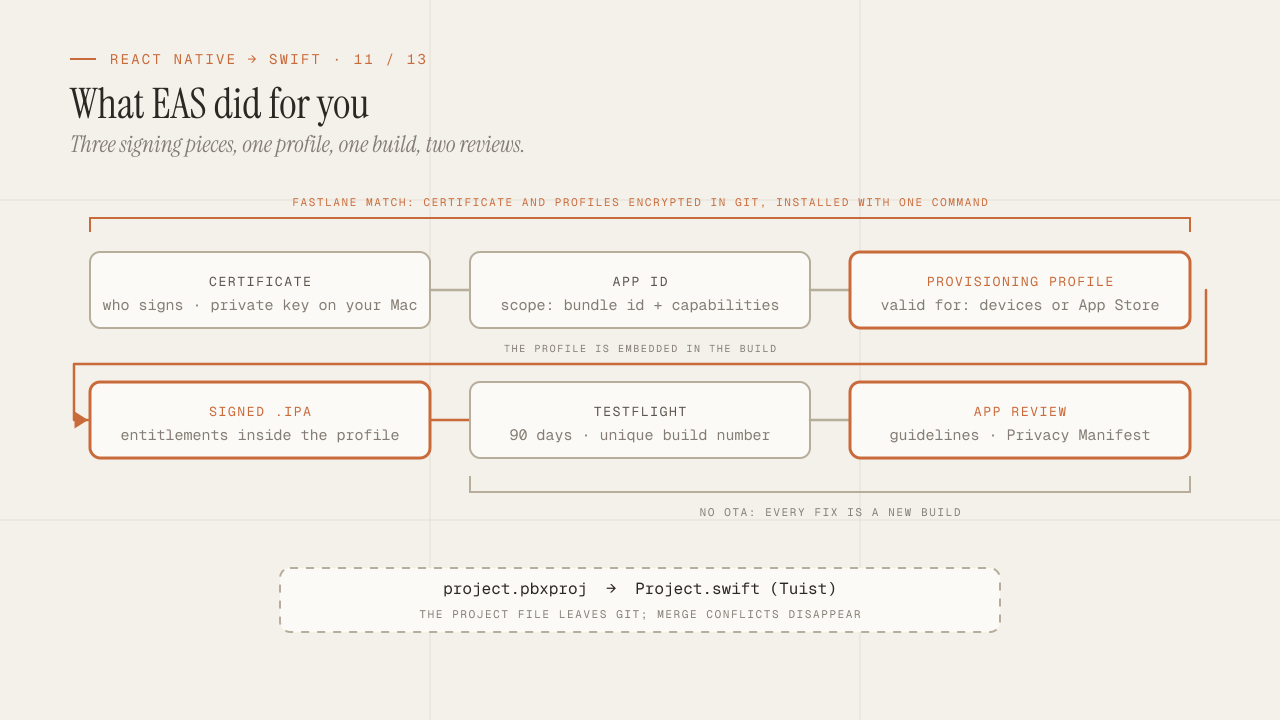
Build, signing and the App Store: what EAS hid from you
What EAS Build did for you is now yours: certificates, profiles and entitlements, Fastlane match, TestFlight, App Review rejections and the Privacy Manifest.
Read more