SwiftUI is not React, even if it looks like it: body, identity, modifiers and layout
SwiftUI for React developers: body vs render, view identity, why modifier order matters, layout without flexbox, and how hooks map to property wrappers.
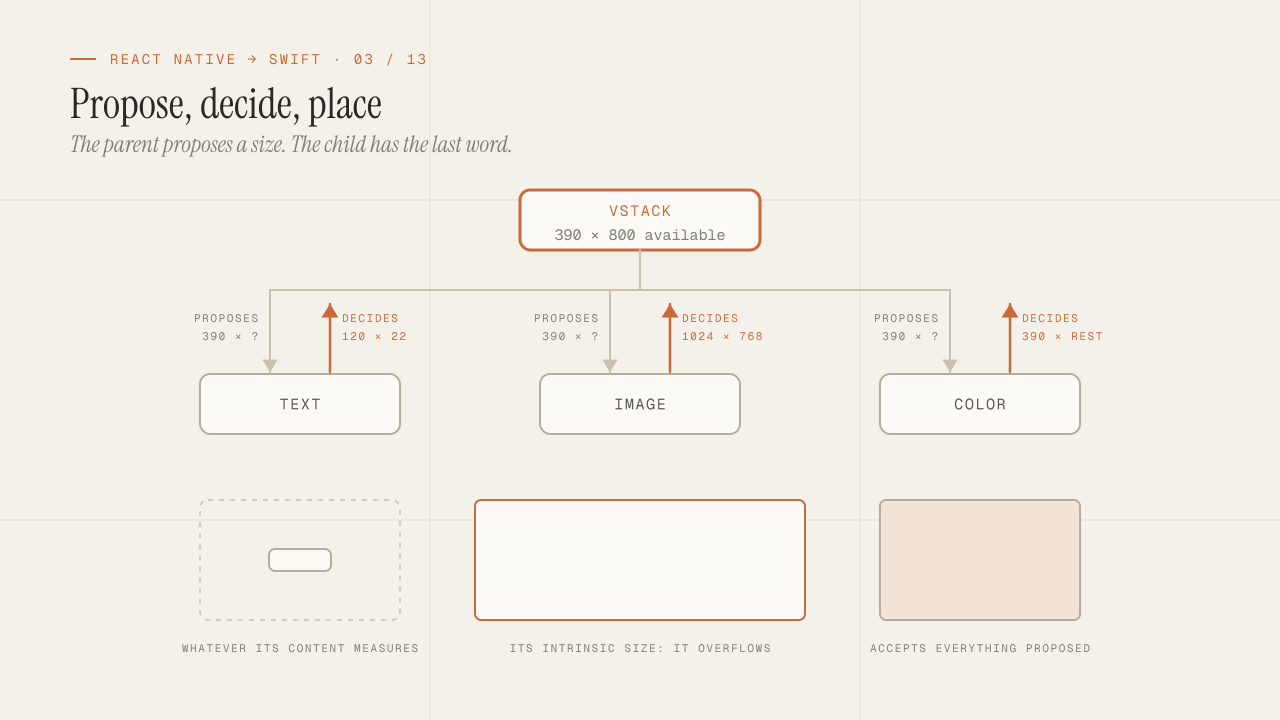
SwiftUI looks enough like React that a senior React Native developer writes their first screen in an hour and their first incomprehensible bug in the second. The declarative syntax, the state that triggers re-renders, the composition of small views: all of that is there. What is not there is React’s execution model, and that is where the reflexes fail. body is not render, a view is not a component, the order of the modifiers changes the result and the layout is not flexbox. This post is the map of those differences, so that when SwiftUI does something you don’t expect, you know why instead of trying random changes.
TL;DR
- A SwiftUI view is a cheap
structthat describes the UI; it is created and destroyed constantly. State does not live in the struct but in a store that SwiftUI associates with the view's identity, which is why identity (structural, or explicit withid) decides what is kept and what is reset. - Each modifier wraps the view in another view.
.padding().background()and.background().padding()are two different trees with two different results; there is no stylesheet applied at the end. - Layout is a three-step negotiation: the parent proposes a size, the child decides its own, the parent positions it.
flex: 1does not exist;Spacer,frame(maxWidth:)andlayoutPrioritydo.
In this article:
- The model — body is not render · View identity
- Composition — Modifier order · Layout without flexbox
- The translation — Hooks to property wrappers · First-week mistakes
body is not render: the view is a description, not an instance
In React, a component is a function that runs when its state or props change, and it produces elements that the reconciler compares with the previous ones. You think of “this component re-rendered” as an event that happens to something that exists between renders.
In SwiftUI, a view is a struct that conforms to View and has a body property. That struct does not exist between evaluations: SwiftUI builds it, asks it for body, keeps what it needs and discards it. It can be created hundreds of times per second and nothing happens, because it is a value with no identity of its own, like an Order or an Address. What persists is not the view but an internal record that SwiftUI keeps per position in the tree.
struct Counter: View {
    @State private var count = 0     // does not live in the struct: it lives in SwiftUI's store

    var body: some View {
        Button("Tapped \(count) times") {
            count += 1               // mutates the store; SwiftUI asks for body again
        }
    }
}
Three consequences that change how you write:
- There is no instance lifecycle. There is no
componentDidMountand nouseEffect(() => ..., [])that runs “when the component is created”, because the struct is created all the time. What there is:.onAppearand.task, which fire when the view enters the screen, and.onChange(of:)to react to a value. - Don’t put expensive logic in
bodyor in the initializer. Aninitthat creates a date formatter or opens a connection runs every time the parent is re-evaluated. Expensive state goes in@Statewith lazy initialization, in an observed object or in the environment. bodymust be pure. It does not hit the network, does not write to disk, does not mutate state. If it does, you enter a re-evaluation cycle that SwiftUI cuts with a runtime warning that says exactly that: modifying state during view update is undefined behavior.
The distinction is in the name: React renders; SwiftUI evaluates a description and decides on its own which part of the real UI needs to change. You don’t control when body is called, and you shouldn’t need to.
View identity: why state resets (or doesn’t)
If the view does not exist between evaluations, how does SwiftUI know that the @State of a Counter is the same one as in the previous render? By identity. And identity is the concept that produces the most bugs in the first week.
SwiftUI assigns every view an identity in two ways. Structural identity is its position in the tree: “the second child of the VStack that is inside the if”. Explicit identity is the one you give with .id(...) or with the id of the elements of a ForEach. As long as the identity holds, state is kept; when it changes, state is discarded and created again.
The classic case:
struct Profile: View {
    let isEditing: Bool

    var body: some View {
        if isEditing {
            NameField()            // identity A: "the child of the if in the true branch"
        } else {
            NameField()            // identity B: "the child of the if in the false branch"
        }
    }
}
Even though both branches build the same view, they are two different identities. When isEditing changes, the internal @State of NameField is lost. In React, a ternary with the same component in both branches keeps the instance. Here it doesn’t. If you want to keep the state, you have to take the condition out of the structure:
var body: some View {
    NameField()
        .disabled(!isEditing)      // a single identity; only a modifier changes
}
The other side: sometimes you want to reset the state on purpose. A detail screen that receives a different orderId should start from scratch, not keep the scroll position or the form of the previous order. That is what .id(orderId) is for: when the id changes, SwiftUI treats the view as new.
Is a view’s state kept between evaluations?
| What happened to the view | Its state |
|---|---|
Its position in the tree changed: another branch of an if, another index | Reset |
Same position, it has .id(x) and x changed | Reset, on purpose |
Same position, and the same .id(x) or none at all | Kept |
In ForEach, identity comes from the id of each element. Using ForEach(items.indices) or ForEach(0..<items.count) gives identity by index, and when you insert an element at the beginning, every state shifts one position: row 3 inherits the state of what used to be row 2. It is the same mistake as using the index as key in React, with the same fix: Identifiable with a stable id.
The order of modifiers changes the result
In React Native, style is an object: { padding: 16, backgroundColor: "red" } produces the same thing as { backgroundColor: "red", padding: 16 }. Styles are resolved at the end, as a whole.
In SwiftUI there is no stylesheet. Each modifier takes the view and returns a new view that wraps the previous one. Text("Hello").padding().background(.red) is a three-level tree: background(padding(text)). The red background covers the text plus the padding. If you reverse the order, Text("Hello").background(.red).padding(), the tree is padding(background(text)): the background covers only the text, and the padding sits outside, transparent.
// Red background with 16 pt of inner margin around the text
Text("Hello").padding().background(.red)

// Red background tight against the text, 16 pt of transparent space around it
Text("Hello").background(.red).padding()
The same applies to .frame, .clipShape, .shadow, .opacity and any modifier that affects geometry or drawing. A .cornerRadius (or .clipShape(.rect(cornerRadius:))) before the .background does not clip the background; after it, it does. A .shadow applied before .clipShape gets clipped by the shape; after it, it is drawn in full.
The rule for reading a chain of modifiers: from the inside out, in the order they are written. The first one is the innermost. And a useful consequence: modifiers that do not affect geometry (.foregroundStyle, .font, .tint) propagate downward through the environment, so you can put them on the container and they apply to every child. A .font(.headline) on a VStack is the equivalent of an inherited style.
The layout system: propose, decide, position
This is the biggest mental shift of the whole series, and the one that fights hardest against flexbox reflexes.
In flexbox, the container is in charge: it distributes the space among the children according to flex, justifyContent and alignItems, and the children take what they were given. In SwiftUI, layout is a three-step negotiation that repeats at every level of the tree:
- The parent proposes a size to the child. It can be a concrete size,
nilin some dimension (no constraint) or the space it has left. - The child decides its size. It can accept the proposal, ignore it or return something in between. A
Textreturns what its content measures; aColoraccepts everything proposed; anImagereturns its intrinsic size unless it is.resizable(). - The parent positions the child inside its own space, using the alignment.
The parent proposes, but the child has the last word on its size. That is exactly the opposite of flexbox, and it explains most of the surprises.
A VStack that receives 390 x 800 from the screen negotiates with each child separately:
What the VStack proposes | What the child replies |
|---|---|
390 x ? to Text("Title") | 120 x 22: what its content measures |
390 x ? to Image, not resizable | 1024 x 768: its intrinsic size, and it overflows |
390 x rest to Color.blue | 390 x rest: accepts everything |
How flexbox reflexes translate:
| What you did in React Native | What you do in SwiftUI |
|---|---|
flex: 1 to take the rest | Spacer() to push, or .frame(maxWidth: .infinity) so the view accepts everything proposed |
flexDirection: "row" / "column" | HStack / VStack; ZStack to overlap |
justifyContent: "space-between" | Spacer() between the children; HStack(spacing:) for fixed separation |
alignItems: "center" | VStack(alignment: .center) or the alignment of the .frame |
width: "100%" | .frame(maxWidth: .infinity) |
width: 200 | .frame(width: 200): a 200-wide container that proposes that width to its child; the child still decides its own |
position: "absolute" | .overlay / .background with alignment, or ZStack; .offset to shift without affecting layout |
aspectRatio | .aspectRatio(16/9, contentMode: .fit) |
flexWrap | No direct equivalent; a custom Layout or a flow layout library |
| A child that “wins” when there is no room | .layoutPriority(1) |
Two more ideas with no equivalent in flexbox:
.frame does not change the view’s size; it creates a container. Text("Hello").frame(width: 200) does not make the text 200 wide: it creates an invisible 200-wide view and puts the text inside it, centered by default. That is why .frame(maxWidth: .infinity, alignment: .leading) is so common: a container that accepts the full width and aligns its content to the left.
GeometryReader is the last resort, not the first. People coming from onLayout use it for everything, and the result is a view that accepts all the proposed space (a GeometryReader is greedy) and breaks the parent’s layout. Before measuring, try Spacer, frame, layoutPriority and containerRelativeFrame. In my experience, every GeometryReader I wrote in the first week I deleted in the third.
From hooks to property wrappers: the complete map
React hooks are functions called in order inside the component. SwiftUI property wrappers are annotations on properties of the struct that tell SwiftUI where the data lives and when it should re-evaluate body. The table I use to translate:
| React / React Native | SwiftUI | Note |
|---|---|---|
useState | @State | Local, private state owned by the view. Always private. |
| Props | let properties of the struct | Immutable; the view is rebuilt with new props |
Prop + onChange callback | @Binding | Read and write access to the parent’s state, without a callback |
useContext | @Environment | System values (colorScheme, dismiss) and your own |
| Context provider | .environment(...) | Injects downward into the tree |
useReducer / Zustand / Redux | @Observable class | Shared state with identity; the architecture post goes into detail |
useEffect with deps | .onChange(of:) | Reacts to a specific value |
useEffect on mount | .task / .onAppear | .task cancels by itself when the view leaves the screen |
useEffect with cleanup | .task (cancellation) / .onDisappear | Structured cancellation replaces the manual cleanup |
useMemo | Computed property | body is cheap; if the computation is truly expensive, it leaves the view (to the model or to .task), not into a @State, whose initial value may be built every time the struct is created |
useCallback | Nothing | There is no function identity to preserve |
useRef (mutable value without re-render) | @State on a non-observed class, or a property of an @Observable not read in body | Only what body reads triggers re-evaluation |
useRef (reference to a node) | Does not exist | It is controlled with state (FocusState, ScrollViewReader) |
forwardRef | Does not exist | Same reason |
The two that are hardest to internalize:
@Binding replaces the prop-plus-callback pair. In React Native, a controlled TextInput receives value and onChangeText. In SwiftUI, TextField("Name", text: $name) receives a binding: a read-and-write reference to the parent’s @State. The $ in front of a @State property produces its Binding. A child component that needs to modify the parent’s state declares @Binding var name: String and that’s it, no callbacks.
@Environment is the context, with two uses. The first is reading values the system provides: @Environment(\.dismiss) private var dismiss to close a screen, @Environment(\.colorScheme) for dark mode. The second is injecting your own objects: .environment(session) at the top and @Environment(Session.self) private var session below, which is how you get a global “store” without passing it through props.
And a difference in granularity that was hard to get in React: SwiftUI only re-evaluates the views whose body read the property that changed. With @Observable, if a view reads session.user.name and session.cart changes, that view is not touched. It is the behavior of a Zustand selector, but automatic and per property.
The mistakes of the first week
The ones I made and the ones I have seen others make, with their cause in the model above:
- State that resets “on its own”. Cause: structural identity changed because of an
ifor aForEachwith indices. Fix: move the condition into a modifier or useIdentifiable. - A background that does not cover the padding. Cause:
.backgroundbefore.padding. Fix: read the chain from the inside out. - An image that overflows the screen. Cause: the child decides its size, and a non-resizable
Imagereturns its intrinsic size. Fix:.resizable().scaledToFit(). - A
GeometryReaderthat breaks aVStack. Cause: it accepts all the proposed space. Fix: remove it and useframe,SpacerorcontainerRelativeFrame. - A network call in
initor inbody. Cause: auseEffectreflex without understanding that the struct is created all the time. Fix:.task. @Statewith a plain class and changes that don’t show up. Cause: the class is not observable, so SwiftUI only sees the reference and nobody tells it when a property changes. Fix: mark the class with@Observable(an@Observableclass can live in@State, and SwiftUI tracks the properties thatbodyreads) or use astruct.- A public
@Stateinitialized from outside. Cause: the initial value is only taken the first time; changes from the parent do not update it. Fix: if the parent must control it, it is a@Bindingor aletproperty.
The day I stopped thinking “this component re-rendered” and started thinking “SwiftUI asked for this description again, and keeps whatever has identity”, most of the strange behaviors stopped being strange. It is not a difference of API; it is a difference of who is in charge.
Frequently asked questions
Does SwiftUI have a virtual DOM or a reconciler?
It has something equivalent in function but not in form. SwiftUI keeps a dependency graph between state and the views that read it, and with @Observable models it records which properties each body read: a property that was not read does not trigger an update of that view. What you shouldn’t do is extrapolate that to the whole mechanism: SwiftUI still evaluates hierarchies and decides how to update the representation, which is why .equatable() and EquatableView exist for the cases where you want to control that comparison yourself. In practice, React.memo stops being a habit, not an impossibility.
How do you build a reusable component with “children”?
With @ViewBuilder in the initializer: init(@ViewBuilder content: () -> Content). It is the equivalent of children, and it lets you pass several views in one block. For named “slots”, several @ViewBuilder parameters.
What about some View? Why doesn’t it return a concrete type?
some View is an opaque type: the function returns a concrete type that the compiler knows but that you don’t name. The real type of a medium-sized body is a nesting of generics several lines long, and some View saves you from writing it. The practical restriction: every branch of an if inside body must return the same type or be inside a @ViewBuilder, which is what body already is. If you need to return different types from a helper function, AnyView exists, but it costs performance and disables selective comparison; there is almost always a better way.
Can I use SwiftUI inside UIKit and vice versa?
Yes, in both directions. UIHostingController puts a SwiftUI view inside UIKit; UIViewRepresentable and UIViewControllerRepresentable put UIKit inside SwiftUI. The second is what you will need for components SwiftUI does not cover yet, and it works similarly to writing a native module with a view in React Native, but without a JavaScript bridge.
Do Previews replace Fast Refresh?
Partly. A Preview shows an isolated view with sample data and updates as you edit, and since Xcode 15 the #Preview macro makes them easy to write. What it does not replace is the full app flow with real state: for that you have to build and run, and there the compile time comes back. The strategy that works for me is designing every view with Previews and fake data, and running the app only to test integration.
Conclusion
SwiftUI is not React with a different syntax. A view is a cheap description that is created and discarded, state lives outside of it and is tied to an identity that you can break by accident with an if, each modifier wraps the previous view and that is why order matters, and layout is a negotiation where the child decides its size. Hooks translate to property wrappers, but the useful translation is not one of names but of responsibilities: @State for what is private, @Binding to share upward, @Environment to inject downward.
If you are about to write your first screen, do this: model state with private @State and struct, keep body pure and free of expensive work, review every if that wraps a view with state, read every chain of modifiers from the inside out and don’t use GeometryReader until you have tried frame and Spacer. The next post goes one level up: when state stops being local and you have to choose between @Observable, MVVM and TCA, with the MV versus MVVM discussion that a senior is going to ask about anyway.
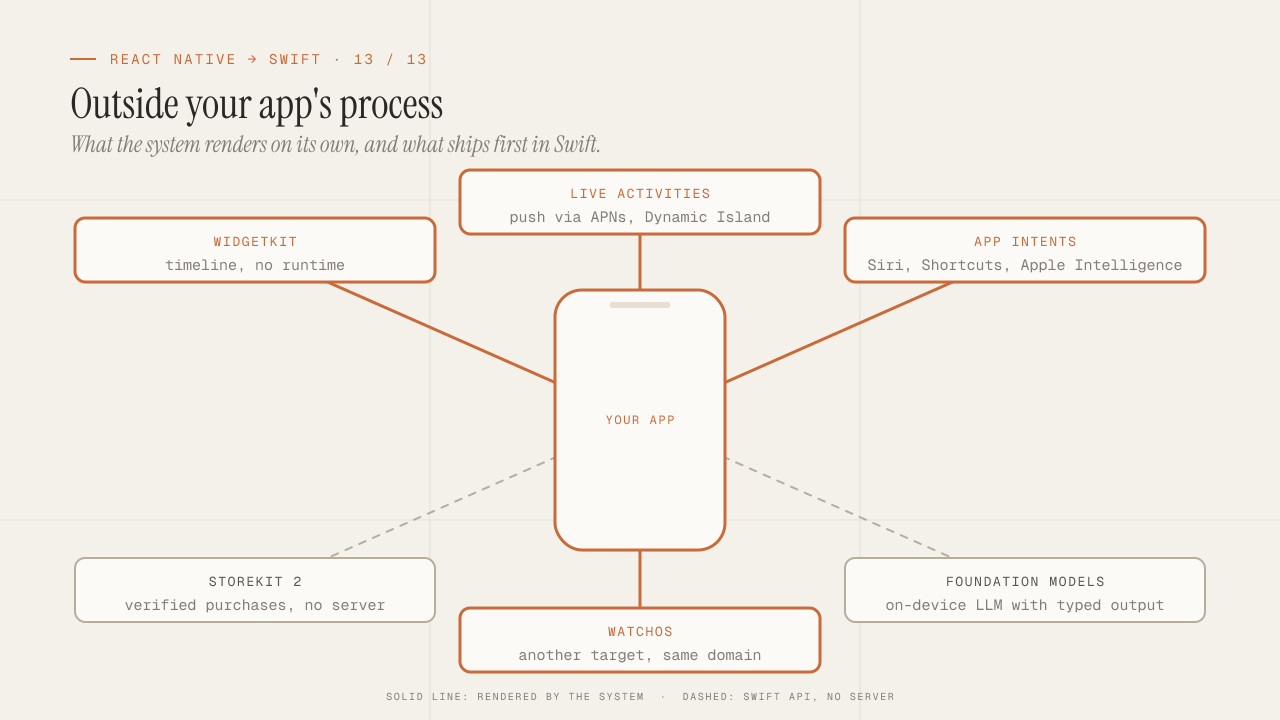
What you can only do in native: WidgetKit, Live Activities, App Intents, StoreKit 2, Foundation Models and watchOS
What only native iOS can do and React Native can't: WidgetKit, Live Activities, App Intents and Siri, StoreKit 2, Foundation Models on device, and watchOS.
Read more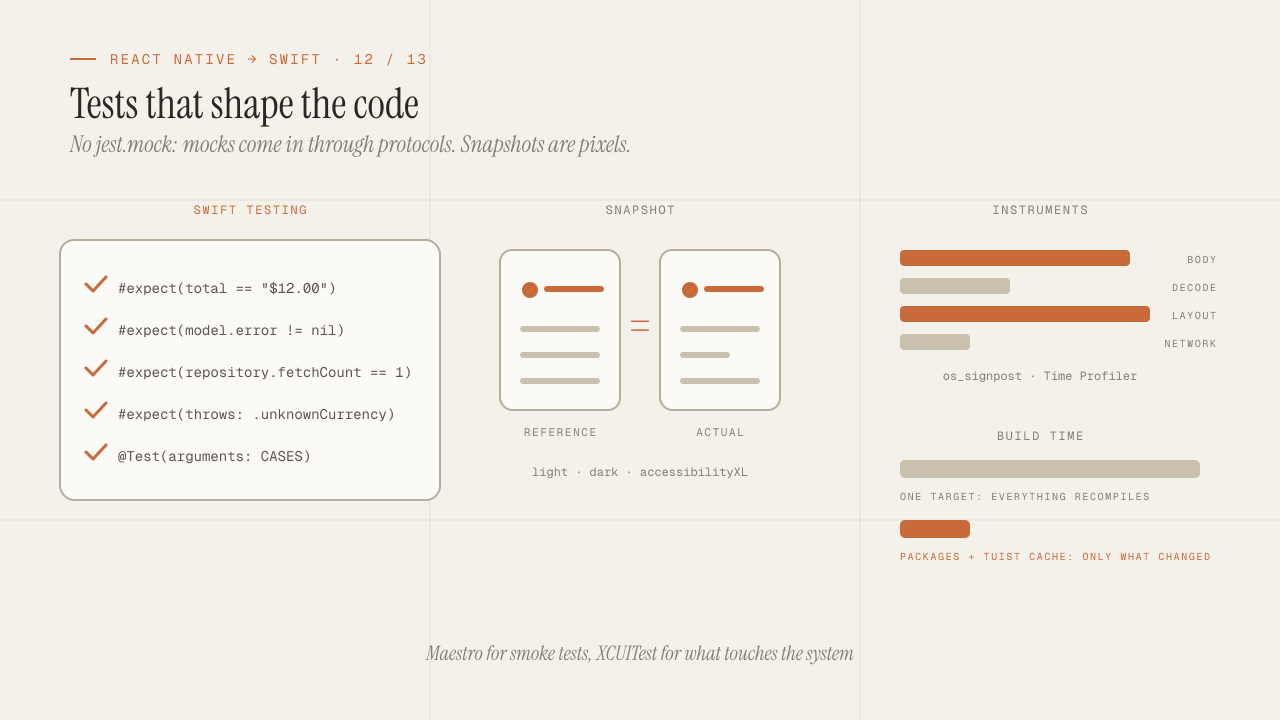
iOS testing and tooling for seniors: Swift Testing, snapshots, mocks, Instruments and build times
iOS testing coming from Jest: Swift Testing vs XCTest, snapshots, mocks via protocols and URLProtocol, XCUITest vs Maestro, Instruments and faster build times.
Read more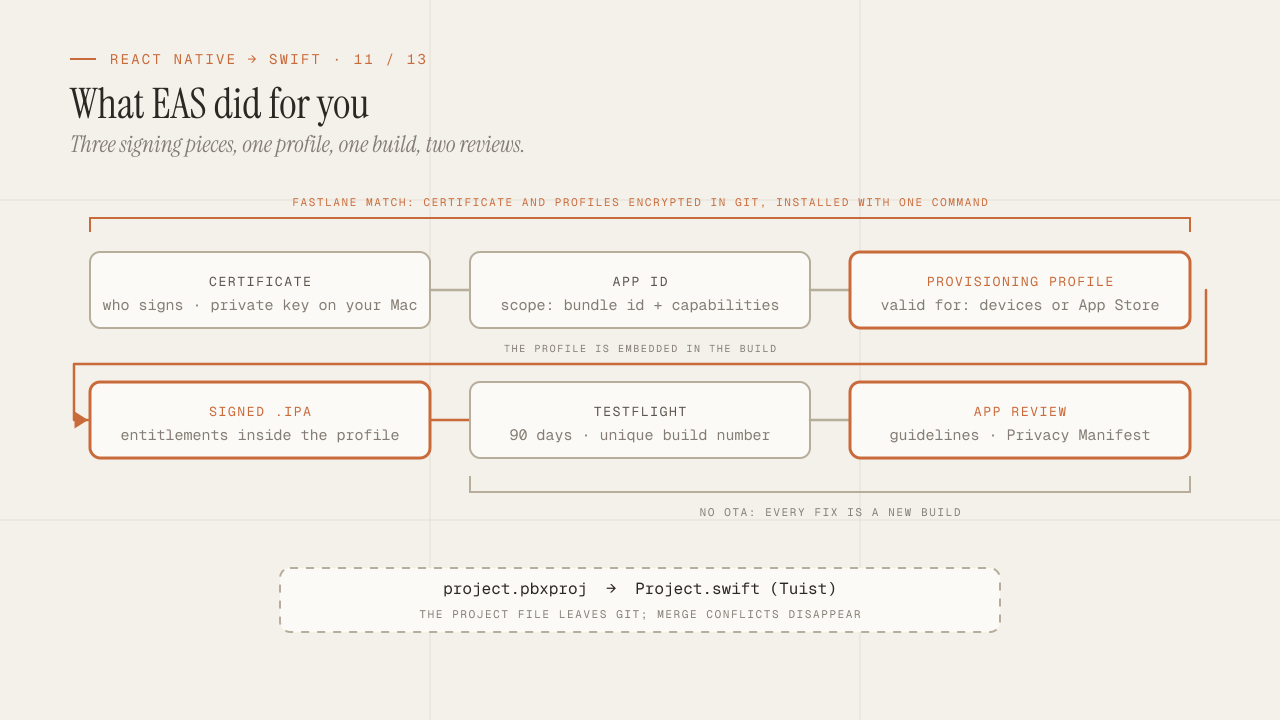
Build, signing and the App Store: what EAS hid from you
What EAS Build did for you is now yours: certificates, profiles and entitlements, Fastlane match, TestFlight, App Review rejections and the Privacy Manifest.
Read more