Build, signing and the App Store: what EAS hid from you
What EAS Build did for you is now yours: certificates, profiles and entitlements, Fastlane match, TestFlight, App Review rejections and the Privacy Manifest.
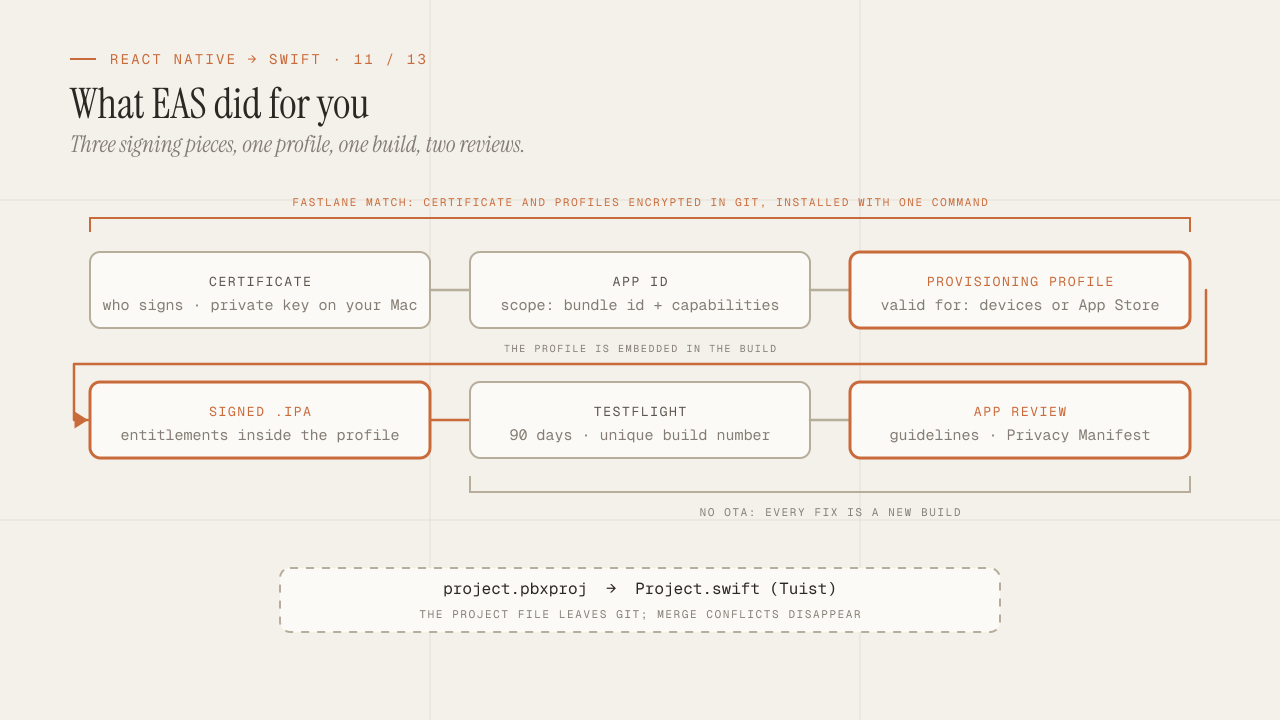
eas build --platform ios was one line, and behind that line Expo created the distribution certificate, registered the devices, generated the provisioning profile, stored it on its servers, compiled on a remote machine and handed you an .ipa ready for TestFlight. When something failed, eas credentials fixed it with a menu. In native, each of those steps exists, has a name, expires on a different date and fails with messages that assume you know what an entitlement is. This post explains the signing system once and for all, the way to share it across a team without passing files through Slack, the path to TestFlight and App Review with the guidelines that produce the most rejections, the Privacy Manifest that has been mandatory since 2024, and Tuist as the answer to the project file that breaks the merge.
TL;DR
- Signing is three things: a certificate (who you are, with the private key on your Mac), an App ID with capabilities (what the app can do) and a provisioning profile (the union of the two with the device list, for development, or without it, for the store). Entitlements are the copy of those capabilities inside the binary, and they must match the profile.
- Fastlane match stores certificates and profiles encrypted in a git repository and installs them on any machine or CI with one command. It is what EAS did on its servers, and it is the right way to sign as a team.
- Tuist generates the Xcode project from a Swift file: the
.pbxprojleaves git and merge conflicts disappear. Together with packages, it is the difference between a team that is afraid to add files and one that is not.
In this article:
- Signing — Certificates, App IDs and profiles · Entitlements · Fastlane match
- Delivery — Build and TestFlight · App Review · Privacy Manifest
- The project — Tuist and the .pbxproj
Certificates, App IDs and provisioning profiles: the system explained once
Apple’s signing system has three pieces, and all the confusion comes from not being clear about what each one does.
The certificate identifies who signs. It is a key pair: the private key lives in the Keychain of the machine that generated it, and the public key is signed by Apple and stays in the developer portal. Two types matter: Development (to install on test devices from Xcode) and Distribution (for TestFlight and the App Store). They expire after a year, and an account has a limit on active distribution certificates, which is the cause of the classic “you already have the maximum number of certificates” error when someone new tries to create one.
The App ID identifies the app: the bundle identifier (com.empresa.app) plus the list of capabilities it can use (push, Sign in with Apple, Associated Domains, App Groups, In-App Purchase, iCloud). It is registered in the portal, and every capability you enable there is one the profile will allow.
The provisioning profile joins the other two and says in which context the signature is valid: which certificate signs, which App ID, which capabilities, and for development or ad hoc distribution, which devices (by UDID, up to one hundred per type per year). An App Store profile carries no devices, because the store installs on any of them. The profile is embedded in the app at build time, and the system checks it at install time.
-
Certificate — who signs
The private key lives in your Keychain.
-
App ID + capabilities — which app it is and what it can do
Bundle id, push, sign in, domains…
-
Provisioning profile — the certificate and the App ID, together
-
Signed build — an
.ipawith the profile embedded
And there are three profiles, differing in one thing only:
| Profile | What it adds |
|---|---|
development | Device list (UDID) |
ad hoc | Device list, without Xcode |
app store | No devices |
With that, the usual errors read themselves:
- “No profiles for ‘com.empresa.app’ were found”: there is no profile for that App ID with that type (development or distribution) on this machine.
- “Provisioning profile doesn’t include the currently selected device”: a development profile without that UDID; you have to register it and regenerate the profile.
- “Provisioning profile doesn’t support the Push Notifications capability”: the App ID has the capability, but the profile was generated before it was enabled. Regenerate.
- “Missing private key”: the certificate is in the portal but the private key was created on another machine. It cannot be recovered; you have to revoke it and create another, or export the
.p12from the original machine.
Xcode offers automatic signing (“Automatically manage signing”), which creates certificates and profiles for you and regenerates them when the capabilities change. For one person, it works. For a team, it produces exactly the “missing private key” problem every time someone new opens the project, because each Mac creates its own certificate until the limit runs out. That is where match comes in.
Entitlements: what the binary says it can do
Entitlements are a file (App.entitlements, a plist) that is compiled into the binary and declares which capabilities the app claims: aps-environment for push, com.apple.developer.associated-domains with the list of domains, com.apple.security.application-groups to share data with extensions, and so on. Xcode edits it when you enable a capability in the Signing & Capabilities tab.
The rule that causes half of the rejections at upload time: the binary’s entitlements must be a subset of what the profile allows. If the file declares aps-environment and the profile was generated without the push capability, the upload fails with a mismatched-entitlements error. The reverse is harmless: a profile with more capabilities than the binary is valid.
Two details that EAS took care of and in native are yours:
aps-environmentswitches betweendevelopmentandproductiondepending on the profile; Xcode adjusts it when archiving. If you see push working in development and not in TestFlight, this is the first place to look, along with the server, which must use the APNs production endpoint.- Every extension (widget, notification service) has its own bundle id, its own profile and its own entitlements. Sharing data between the app and the widget requires an App Group in the entitlements of both.
Fastlane match: shared signing without passing files around
match is the Fastlane tool that solves team signing with a simple idea: a single distribution certificate and a single profile per app and type, generated once, stored encrypted in a git repository (or in an S3 or Google Cloud bucket), and installed on any machine or CI with one command and one password.
# Once, by whoever administers the account:
fastlane match init             # points at the certificates repo
fastlane match appstore         # creates certificate + App Store profile, uploads them encrypted
fastlane match development      # the same for development

# Every new person, and the CI:
fastlane match appstore --readonly   # downloads and installs; creates nothing
With --readonly, nobody else creates certificates by accident, and the private key exists exactly once, in the encrypted repository. It is literally what EAS did with eas credentials on its servers, with the difference that the store is yours.
What goes in the Matchfile: the repository, the app_identifier (or several, including those of the extensions), the team_id and the type. The encryption password (MATCH_PASSWORD) goes in the CI’s secrets manager, never in the repository. And so that match can create and renew without a person signing in with two-factor authentication, you use an App Store Connect API key (a .p8 with key id and issuer id), which also serves to upload builds.
The minimal Fastfile for a TestFlight build looks like this:
lane :beta do
  app_store_connect_api_key(
    key_id: ENV["ASC_KEY_ID"],
    issuer_id: ENV["ASC_ISSUER_ID"],
    key_content: ENV["ASC_KEY_CONTENT"],
  )
  match(type: "appstore", readonly: true)
  increment_build_number(build_number: latest_testflight_build_number + 1)
  build_app(scheme: "App", export_method: "app-store")
  upload_to_testflight(skip_waiting_for_build_processing: true)
end
On GitHub Actions that runs on a macOS runner with Xcode preinstalled; on Xcode Cloud, Apple’s service, signing is managed by Apple with the team’s account and match is not needed. For small teams with a single product, Xcode Cloud is the option with the fewest pieces; for several products, your own CI with match is more controllable.
Build, archive and TestFlight: the path to the tester
In native, the .ipa comes out of an archive: Product > Archive in Xcode, or xcodebuild archive followed by xcodebuild -exportArchive with an ExportOptions.plist that states the method (app-store, ad-hoc, development). Fastlane’s build_app wraps both. The resulting archive includes the debug symbols (dSYM), which you have to upload to the crash reporter so that stack traces have names.
TestFlight is the replacement for EAS internal builds and for ad hoc distribution:
- Internal testers (up to one hundred members of the App Store Connect team): they receive the build as soon as it is processed, with no review.
- External testers (up to ten thousand, by public link or email): the first build of each version goes through a TestFlight review, faster than the App Store one but a review all the same. Subsequent builds of the same version usually go straight through.
- Every build expires after ninety days.
What changes compared to EAS: there are no update channels, there is no eas update. Every change is a new build, with an incremented build number (CFBundleVersion, which must be unique per version and increasing). Hence the increment_build_number in the lane.
One detail that surprises people: the processing after uploading takes between minutes and an hour, and during that time the build does not appear in TestFlight and cannot be submitted for review. The “Missing Compliance” emails (export encryption) are avoided with ITSAppUsesNonExemptEncryption set to false in Info.plist if the app only uses HTTPS.
App Review: the guidelines that reject the most
You already went through App Review with React Native, so the rules are not new. What changes is that now there are more surfaces (extensions, entitlements, capabilities) and no tool that warns you before uploading. The guidelines that produce the most rejections in apps coming from a React Native team, in my experience and from what the developer forums report:
| Guideline | What it asks for | Typical rejection |
|---|---|---|
| 2.1 Completeness | The app works in full, with no placeholders or crashes | A flow that requires an account and you gave no test credentials in the review notes |
| 2.3 Accurate metadata | Screenshots, description and permissions match the app | Screenshots from another platform or from an earlier version |
| 3.1.1 In-app purchases | Digital goods and services consumed in the app go through IAP | A button that leads to paying for a subscription on the web to unlock content in the app |
| 4.2 Minimum functionality | The app is not a wrapped website | A WKWebView with the site and nothing native |
| 4.8 Sign in with Apple | If there is third-party login, Apple too | Google login without the Apple button |
| 5.1.1 Privacy, data | Every permission with a clear purpose; do not ask for data you do not use | Asking for location at launch with no feature that uses it; generic permission text |
| 5.1.2 Use and sharing | The privacy label and the manifest match what the app does | An undeclared analytics SDK |
| 5.2.1 Intellectual property | Rights over the content and the brand | A client’s app uploaded from your personal account instead of the client’s |
Three practices that reduce rejections measurably:
- Complete review notes: test credentials, how to reach every feature that needs permissions, and a video if there is hardware or a flow that is hard to reproduce.
- The client’s account, not yours: client apps are published from the client’s developer account, with your user as a team member. Switching accounts later is a migration that loses the reviews.
- Submit early on a weekday: the typical review takes one to two days; if there is a rejection, replying in the Resolution Center is usually faster than uploading a new build, unless the rejection is for a bug.
Privacy Manifest and the privacy label
Since spring 2024, Apple requires that apps and SDKs that use certain APIs include a Privacy Manifest: a PrivacyInfo.xcprivacy file that declares which data the app collects, for what purpose, whether it is linked to the user and whether it is used for tracking, plus the approved reasons for which the app uses APIs considered sensitive (UserDefaults, file timestamps, disk space, system boot time, active keyboards).
<key>NSPrivacyAccessedAPITypes</key>
<array>
  <dict>
    <key>NSPrivacyAccessedAPIType</key>
    <string>NSPrivacyAccessedAPICategoryUserDefaults</string>
    <key>NSPrivacyAccessedAPITypeReasons</key>
    <array>
      <string>CA92.1</string>   <!-- read and write the app's own preferences -->
    </array>
  </dict>
</array>
If your app uses UserDefaults (they all do) and does not declare the reason, App Store Connect sends a warning email at upload time and, once the grace period is over, rejects. The same goes for every third-party SDK on the list Apple publishes: the SDK must ship its own manifest, and if it does not, the responsibility falls on the app. It is one of the reasons to prefer SDKs maintained through SPM.
The privacy label on the App Store listing (the “cards” of collected data) is filled in on App Store Connect, and since 2024 Apple generates a report from the manifests of the app and its SDKs to compare against it. If the label says “we collect no data” and an SDK’s manifest says otherwise, there is a rejection under guideline 5.1.2.
In EAS, each module’s config plugin added its fragment to the manifest. In native, you write the file yourself and review it every time you add an SDK.
Tuist and the .pbxproj that broke the merge
The architecture post already mentioned the problem: project.pbxproj is a text file with hexadecimal identifiers for every file, group, target and build phase, and two people adding files on different branches produce merge conflicts that have to be resolved by hand in a format that was not made for it. On a team of three it happens every week.
Tuist solves the problem by removing the file from git. The project is described in Swift, in Project.swift, and tuist generate produces the .xcodeproj on each person’s machine, where it stays in .gitignore:
import ProjectDescription

let project = Project(
    name: "App",
    targets: [
        .target(
            name: "App",
            destinations: .iOS,
            product: .app,
            bundleId: "com.empresa.app",
            deploymentTargets: .iOS("17.0"),
            infoPlist: .extendingDefault(with: [
                "NSCameraUsageDescription": "To scan your receipts.",
                "ITSAppUsesNonExemptEncryption": false,
            ]),
            sources: ["App/Sources/**"],
            resources: ["App/Resources/**"],
            entitlements: "App/App.entitlements",
            dependencies: [
                .target(name: "Widgets"),
                .package(product: "Features"),
            ]
        ),
        .target(
            name: "Widgets",
            destinations: .iOS,
            product: .appExtension,
            bundleId: "com.empresa.app.widgets",
            infoPlist: .extendingDefault(with: [
                "NSExtension": ["NSExtensionPointIdentifier": "com.apple.widgetkit-extension"],
            ]),
            sources: ["Widgets/Sources/**"],
            entitlements: "Widgets/Widgets.entitlements"
        ),
    ]
)
Adding a file is creating the file: the Sources/** pattern picks it up on regeneration. Adding a target is adding a block of Swift that gets reviewed in a PR like any other code. The signing configuration, the entitlements and the Info.plist files live in the same file, versioned and readable.
What Tuist adds beyond the project:
- A cache of compiled modules (
tuist cache): packages that did not change are downloaded as binaries instead of being compiled, which in a modularized project cuts clean build times substantially. - A dependency graph (
tuist graph) that shows what depends on what and detects cycles. - Selective generation:
tuist generate Features/Ordersopens a project with only that module and its dependencies, which compiles in a fraction of the time.
The alternative without a tool is XcodeGen (a project.yml that generates the project), simpler and without a cache. And the alternative without generating anything is what the architecture post already said: move all the code into SPM packages, so that the app target’s .pbxproj is so small it almost never changes. All three work; Tuist is the one I use when there is more than one target or more than two people.
The day the team stopped seeing
project.pbxprojin the diffs, something changed that I did not expect: people started creating small files. Before, every new file was a potential conflict, and the unconscious response was to add the code to a file that already existed.
Frequently asked questions
Can I keep using EAS Build for a native app?
No. EAS Build compiles Expo and React Native projects. For native, the options are Xcode Cloud, a CI with macOS runners (GitHub Actions, Bitrise, Codemagic, CircleCI) with Fastlane, or building and uploading from one of the team’s Macs. Codemagic and Bitrise have signing flows similar to EAS if you want something managed.
What do I do when the distribution certificate expires?
Builds already published keep working: the store’s signature is Apple’s, not yours. What stops working is creating new builds. With match, fastlane match nuke distribution followed by fastlane match appstore creates the new one and distributes it to the team. Without match, you create it in the portal and share the .p12. It is worth putting it on the calendar a month ahead.
How do I distribute an internal app without the App Store?
With an ad hoc profile (up to one hundred registered devices per year) and an install link, or with TestFlight and internal testers. For companies with Apple Business Manager, private distribution (Custom Apps) lets you publish only for the organization without a public listing. The Apple Developer Enterprise Program exists but is hard to obtain and is not the answer for most.
Should release builds carry symbols?
The App Store .ipa goes out without readable symbols, and Apple keeps the dSYM files if you enable “Upload symbols”. For Crashlytics or Sentry, you have to upload the dSYM files to them too, with a step in the lane (upload_symbols_to_crashlytics or sentry_upload_dif). Without that, crashes arrive as memory addresses.
Is Xcode Cloud worth it over GitHub Actions?
Xcode Cloud manages signing with the team’s account, is configured from Xcode and has a free quota of hours per month. Its limit is flexibility: the workflows are the ones Apple offers, and integrations with external tools are done with scripts in fixed phases. For an app with a standard flow, it is the shortest path. For several products, monorepos or custom steps, GitHub Actions with Fastlane.
Conclusion
What EAS hid was a system with three pieces (certificate, App ID with capabilities, provisioning profile) that can be understood in an afternoon and that, once understood, makes every signing error readable. Fastlane match is the answer to the team problem: shared signing, encrypted in git, installed with one command. TestFlight replaces internal builds, with no OTA channels and with a build number that goes up on every submission. App Review did not change, but now there are more surfaces to review and no tool that warns you beforehand. The Privacy Manifest is mandatory and it is yours. And Tuist removes the .pbxproj from git, which is the difference between a team that is afraid to add files and one that is not.
To get started: set up match before a second person opens the project, write the TestFlight lane in the first week, create the PrivacyInfo.xcprivacy with the UserDefaults reason the same day, and generate the project with Tuist if there is more than one target. The next post covers what makes all of the above sustainable: Swift Testing, snapshots, mocks without jest.mock, XCUITest versus Maestro, Instruments and how to bring build times down.
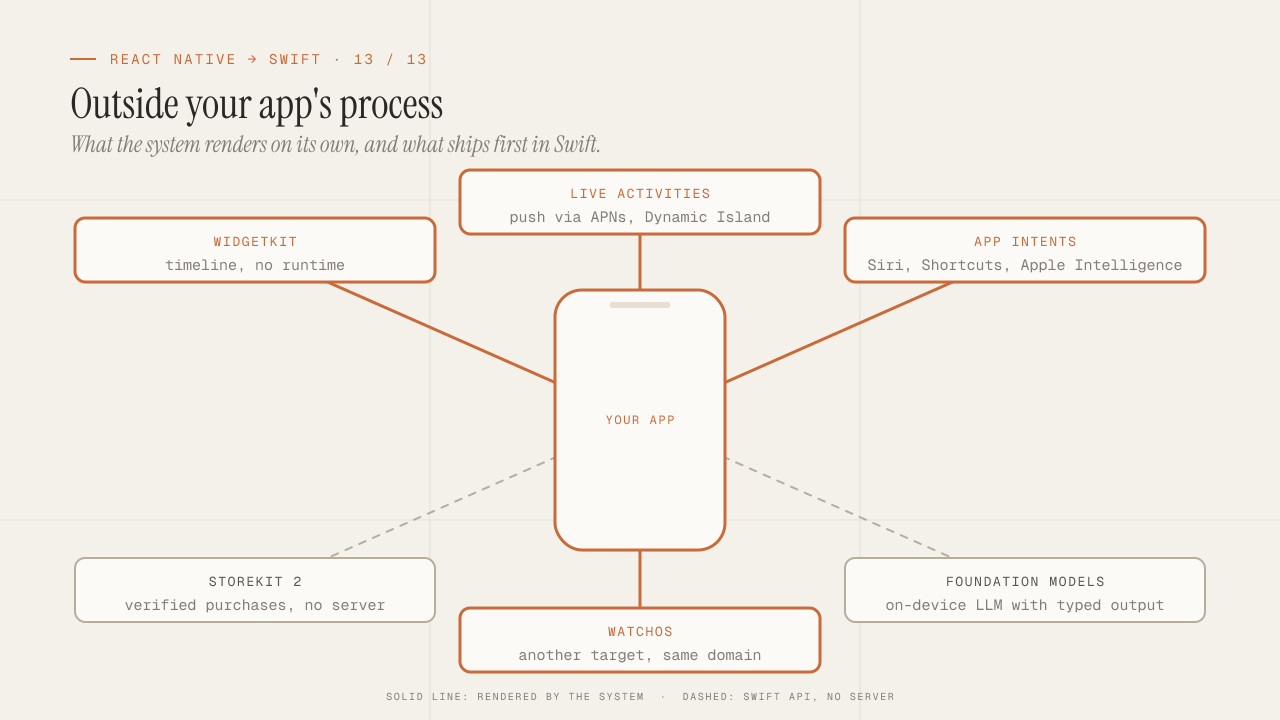
What you can only do in native: WidgetKit, Live Activities, App Intents, StoreKit 2, Foundation Models and watchOS
What only native iOS can do and React Native can't: WidgetKit, Live Activities, App Intents and Siri, StoreKit 2, Foundation Models on device, and watchOS.
Read more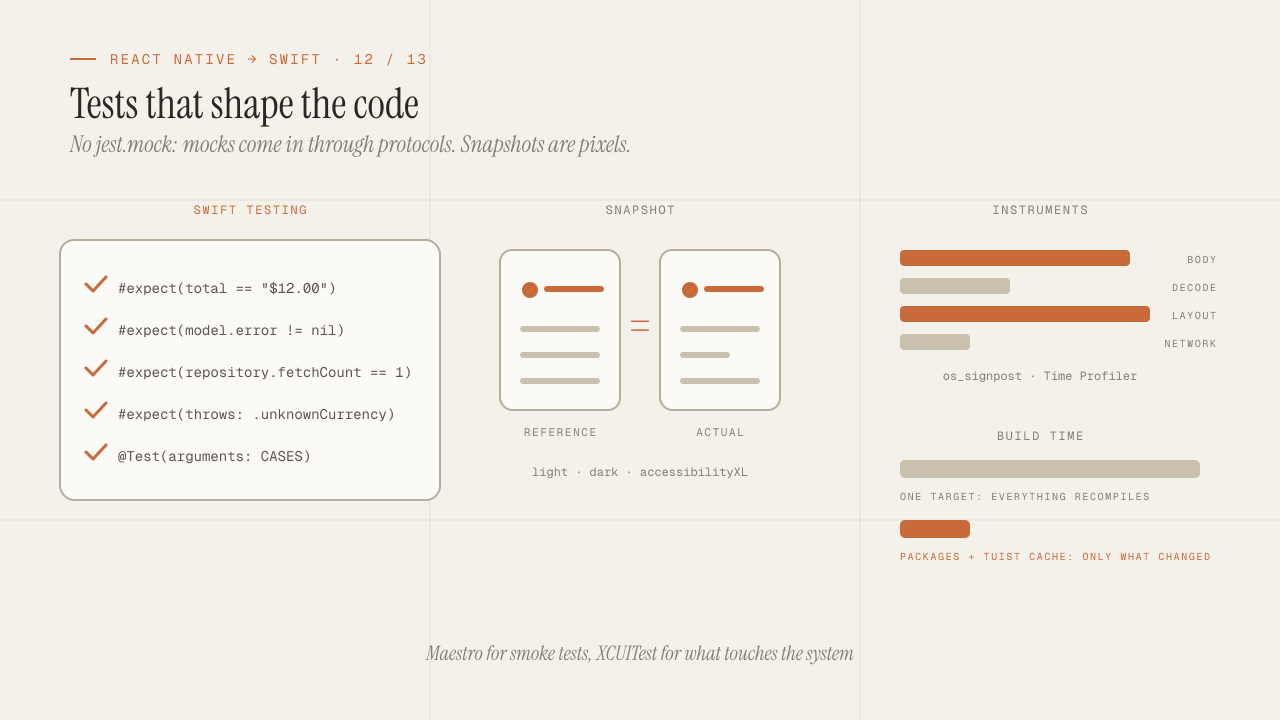
iOS testing and tooling for seniors: Swift Testing, snapshots, mocks, Instruments and build times
iOS testing coming from Jest: Swift Testing vs XCTest, snapshots, mocks via protocols and URLProtocol, XCUITest vs Maestro, Instruments and faster build times.
Read more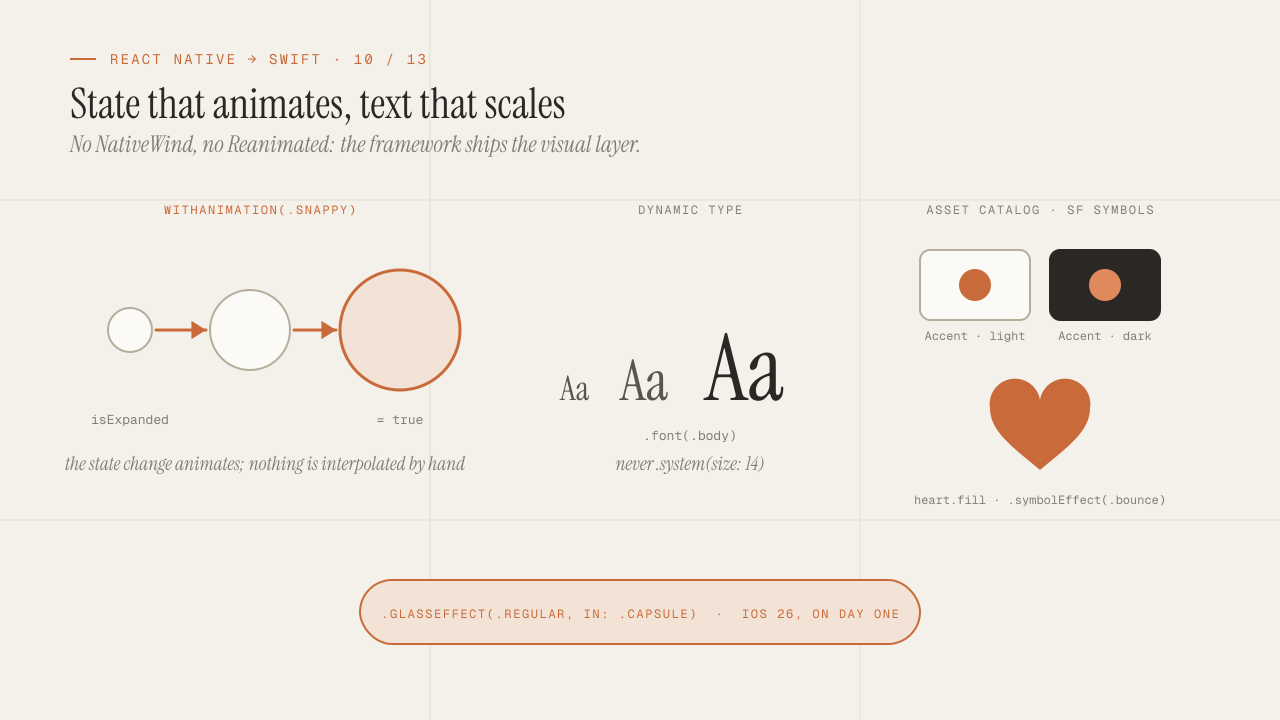
UI, theming and animations in SwiftUI without NativeWind or Reanimated
Theming, animations and accessibility in SwiftUI without NativeWind or Reanimated: design tokens, Dynamic Type, SF Symbols, withAnimation and Liquid Glass.
Read more