Data in Swift: what TanStack Query did for you and how to build your cache layer
Swift has no TanStack Query. How to build an iOS data layer: URLSession and Codable, an AsyncStream repository, SwiftData or GRDB as cache, invalidation.
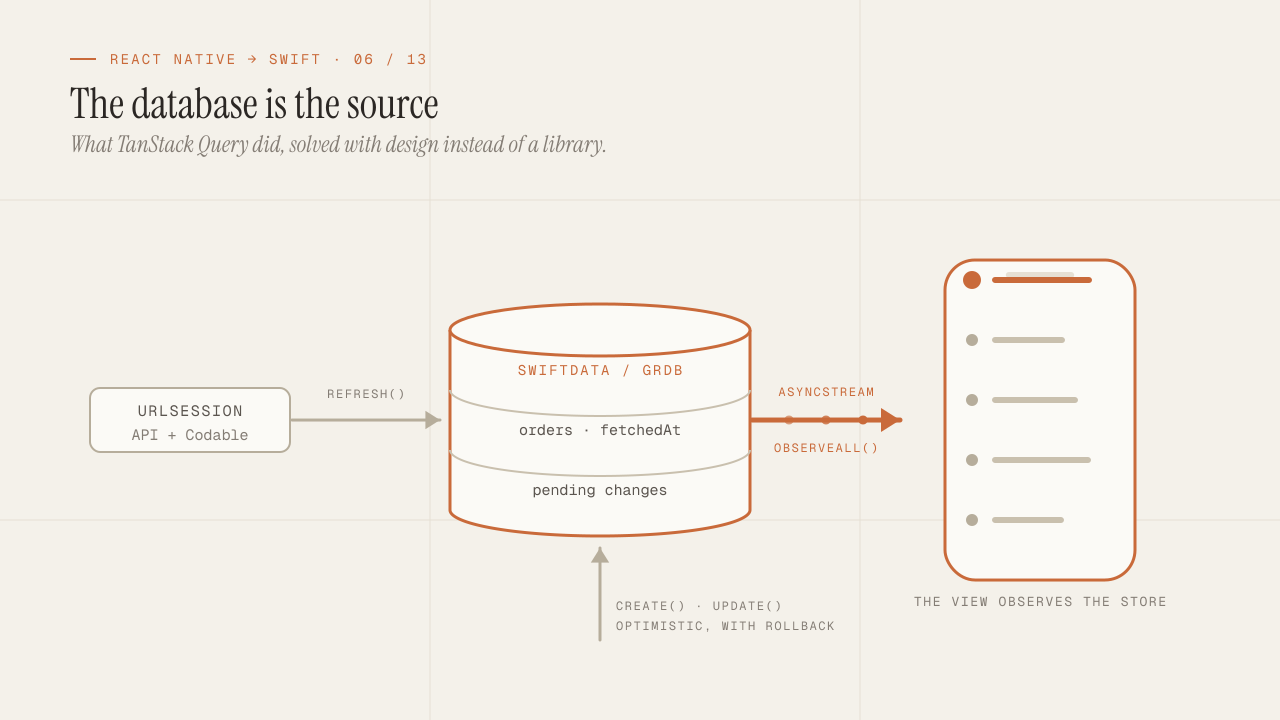
TanStack Query did so much for a React Native app that many teams didn’t know how much until they lost it: it deduplicated requests, cached by key, marked data as stale, refreshed when the app came back to the foreground, retried with backoff, allowed optimistic updates and exposed all of that as a hook. Swift has no equivalent with that level of adoption. It has to be said plainly: you are going to build your cache layer. The good news is that the pieces to do it well are in the system and in two or three mature libraries, and the resulting design usually ends up clearer than a useQuery with twenty options. This post is that design: URLSession with Codable, a repository that emits a stream with AsyncStream, a local database as the cache, and the invalidation rules that replace staleTime.
TL;DR
URLSessionwithasync/awaitandCodablecovers transport; you don't need Alamofire for a normal REST API. What's missing is everything TanStack Query put on top: cache, staleness, deduplication and refresh.- The pattern that works is "the local database is the cache": the repository writes what it fetches from the network into SwiftData or GRDB, and the view observes the database, not the network. That way offline, refresh and consistency between screens come out of the same design; request deduplication is a ten-line actor.
- Invalidation is modeled explicitly: a timestamp per collection and a policy per use case. It is less automatic than
staleTimeand easier to reason about when something shows up stale.
In this article:
- The base layer — What TanStack Query did · URLSession and Codable
- The design — The repository with AsyncStream · The database as cache
- Operation — Invalidation and refresh · supabase-swift
What TanStack Query did, and what is now your job
It’s worth listing what a useQuery({ queryKey: ["orders"], queryFn }) solved without you asking for it, because each item is a decision you now have to make:
| What TanStack Query did | What Swift has |
|---|---|
| In-memory cache by key | Nothing by default; URLCache only caches HTTP responses with valid headers |
| Deduplication of concurrent requests | Nothing; two views asking for the same thing make two requests |
staleTime and background refresh | Nothing; you have to store when each piece of data was fetched |
| Refresh on returning to the foreground | scenePhase tells you; you trigger the refresh |
| Retries with exponential backoff | Nothing; a retry function of your own |
| Optimistic updates and rollback | Nothing; the repository implements them |
isLoading / isFetching / error state | A Loadable enum of your own, as in the Swift post |
| Cache persistence across launches | SwiftData, GRDB or Core Data |
| Infinite pagination | A loadMore() method on the repository with a cursor |
There are libraries that try to cover the whole list, but none has the adoption or the maintenance to justify putting it at the center of the app. What the Swift community does in practice is different: instead of an in-memory cache by key, it uses the local database as the single source of truth for the UI, and treats the network as a process that updates that database. With that change of approach, half the table disappears.
URLSession and Codable: transport without libraries
For a REST API with JSON, URLSession with async/await is enough and adding Alamofire isn’t worth it. A minimal client I use in almost every project:
struct APIClient: Sendable {
    let baseURL: URL
    let session: URLSession
    let decoder: JSONDecoder
    let tokenProvider: @Sendable () async -> String?

    func get<T: Decodable>(_ path: String, query: [URLQueryItem] = []) async throws -> T {
        try await send(request(path, method: "GET", query: query))
    }

    func post<T: Decodable, Body: Encodable>(_ path: String, body: Body) async throws -> T {
        var req = request(path, method: "POST")
        req.httpBody = try JSONEncoder().encode(body)
        req.setValue("application/json", forHTTPHeaderField: "Content-Type")
        return try await send(req)
    }

    private func request(_ path: String, method: String, query: [URLQueryItem] = []) -> URLRequest {
        var url = baseURL.appending(path: path)
        if !query.isEmpty { url.append(queryItems: query) }
        var req = URLRequest(url: url)
        req.httpMethod = method
        return req
    }

    private func send<T: Decodable>(_ request: URLRequest) async throws -> T {
        var request = request
        if let token = await tokenProvider() {
            request.setValue("Bearer \(token)", forHTTPHeaderField: "Authorization")
        }
        let (data, response) = try await session.data(for: request)
        guard let http = response as? HTTPURLResponse else { throw APIError.invalidResponse }
        guard (200..<300).contains(http.statusCode) else {
            throw APIError.http(status: http.statusCode, body: data)
        }
        return try decoder.decode(T.self, from: data)
    }
}

enum APIError: Error {
    case invalidResponse
    case http(status: Int, body: Data)
}
What it gives you over a fetch with Axios: types on the output (let orders: [OrderDTO] = try await client.get("/orders")), errors as values that a catch can distinguish by case, and a single send function where authentication and HTTP status handling live. Retries are added as a generic function that wraps send:
func withRetry<T>(
    attempts: Int = 3,
    delay: Duration = .milliseconds(400),
    _ operation: () async throws -> T
) async throws -> T {
    var lastError: Error?
    for attempt in 0..<attempts {
        do {
            return try await operation()
        } catch let error as APIError {
            // 4xx responses are not retried: the server already said no.
            if case .http(let status, _) = error, (400..<500).contains(status) { throw error }
            lastError = error
        } catch {
            lastError = error
        }
        // After the last attempt there is nothing to wait for.
        guard attempt < attempts - 1 else { break }
        // Exponential backoff (400, 800, 1600 ms...) with some jitter so that
        // many clients don't retry at the same instant.
        let backoff = delay * (1 << attempt) + .milliseconds(Int.random(in: 0...100))
        try await Task.sleep(for: backoff)
    }
    throw lastError ?? APIError.invalidResponse
}
About URLCache: it exists, it respects Cache-Control and ETag, and for static resources (images, catalogs that rarely change) it solves HTTP caching without writing anything. For business data it doesn’t work as an application cache: it operates at the level of HTTP request and response (you can read a stored response, even without network, with the right cache policy), but it doesn’t give you the data model, invalidation with domain semantics or the observation the UI needs. It is a transport cache, not a data cache.
The repository that emits a stream (AsyncStream)
In TanStack Query, a component subscribes to a query and receives updates when the cache changes, no matter who changed it. The equivalent in Swift is a repository that exposes an asynchronous stream instead of a function that returns once:
protocol OrderRepository: Sendable {
    /// Emits the current list and every later change, until cancelled.
    /// It can fail: the store is a database, and a database fails.
    func observeAll() -> any AsyncSequence<[Order], any Error>
    /// Fetches from the network and updates the local store. Observers receive the change.
    func refresh() async throws
    func create(_ draft: OrderDraft) async throws -> Order
}
The view (or its ViewModel) consumes the stream with for await inside .task, which also cancels the subscription when leaving the screen:
@Observable
@MainActor
final class OrdersViewModel {
    private(set) var orders: [Order] = []
    private(set) var isRefreshing = false
    private(set) var error: Error?

    private let repository: OrderRepository

    init(repository: OrderRepository) { self.repository = repository }

    func observe() async {
        do {
            for try await orders in repository.observeAll() {
                self.orders = orders
            }
        } catch {
            // A store failure is a state the UI shows, not a silent end.
            self.error = error
        }
    }

    func refresh() async {
        isRefreshing = true
        defer { isRefreshing = false }
        do { try await repository.refresh() } catch { self.error = error }
    }
}
struct OrdersScreen: View {
@State private var model: OrdersViewModel
var body: some View {
List(model.orders) { OrderRow(order: $0) }
.refreshable { await model.refresh() }
.task { await model.observe() } // cancelled when leaving the screen
.task { await model.refresh() } // first load
}
}With this design, observeAll never touches the network. It emits what is in the local store, immediately, and emits again every time that store changes. refresh is the only one that talks to the API, and it doesn’t return data: it writes to the store, and the observers find out. The protocol asks only for an AsyncSequence that can fail; the concrete type is up to the implementation: an AsyncStream if the store is in memory, or the sequence the database already offers, as shown below with GRDB. That decoupling is what gives you, with no additional code:
- One source for many views: three screens observing
ordersread the same store and see the same data at the same instant. - Offline: without network,
observeAllkeeps emitting the last thing that was saved. - Consistency: creating an order writes to the store, and the list updates without anyone refreshing it.
What this design does not give you on its own is request deduplication: three screens calling refresh() when they appear are still three requests. That part has to be written, and it’s ten lines that I show next to the repository.
| Who | What it does with the local store (SwiftData / GRDB) |
|---|---|
| Views A, B and C | They observe it: they redraw when it changes |
refresh() | Writes into it what the APIClient brings from the network |
create(), update() | Write into it directly |
The local database as cache: SwiftData or GRDB
The store in the diagram is a database. The two options I use, and the criteria, are detailed in the persistence post; here is what matters for the data layer.
SwiftData ships with the system, is declared with macros on classes (@Model) and is observed from SwiftUI with @Query. For the repository pattern, a background ModelContext writes what arrives from the network, and the view uses @Query directly or the repository exposes the stream. Its strength is the integration with SwiftUI; its weakness is that complex queries and fine-grained transaction control fall short.
GRDB is SQLite with a very carefully designed Swift API, explicit migrations, Codable types as rows and, what matters for this post, ValueObservation: a query that emits every time its result changes, and that the library itself lets you consume as an AsyncSequence with values(in:), with cancellation and errors included. No wrapping needed:
final class GRDBOrderRepository: OrderRepository {
    private let db: DatabaseQueue
    private let client: APIClient

    private let inFlight = InFlight()

    func observeAll() -> any AsyncSequence<[Order], any Error> {
        // GRDB already delivers the observation as an AsyncSequence, with cancellation
        // and with database errors propagated to the consumer.
        ValueObservation
            .tracking { db in try Order.order(Column("createdAt").desc).fetchAll(db) }
            .values(in: db)
    }

    func refresh() async throws {
        try await inFlight.run("orders") { [client, db] in
            let dtos: [OrderDTO] = try await withRetry { try await client.get("/orders") }
            let orders = dtos.map { $0.toDomain() }
            try await db.write { db in
                try Order.deleteAll(db)
                for order in orders { try order.insert(db) }
                try SyncMark(collection: "orders", fetchedAt: .now).save(db)
            }
        }
    }
}

/// Deduplicates in-flight work by key: if a refresh of a collection is already
/// running, the second call waits for that result instead of firing another request.
actor InFlight {
    private var tasks: [String: Task<Void, any Error>] = [:]

    func run(_ key: String, _ operation: @escaping @Sendable () async throws -> Void) async throws {
        if let running = tasks[key] { return try await running.value }
        let task = Task { try await operation() }
        tasks[key] = task
        defer { tasks[key] = nil }
        try await task.value
    }
}
The write replaces the whole collection inside a transaction; observers receive a single emission with the final result. The InFlight actor is the request deduplication the design doesn’t give you for free: the first screen fires the request and the following ones wait on the same Task. For large collections, an upsert by id plus a delete of the rows that no longer come back is more efficient, but the structure is the same.
My short rule: SwiftData if the app is small, iOS 17 or later only, and the views can use @Query directly; GRDB if there are queries with joins, migrations that will change, synchronization with conflicts, or if you want the data layer not to depend on SwiftUI. In apps with a serious backend, almost always GRDB.
Invalidation, refresh and optimistic updates
staleTime in TanStack Query said “this data is good for five minutes; after that, refresh in the background when it’s used”. Without the library, that policy is written by hand, but the design above keeps it short: each collection stores when it was fetched (SyncMark), and a policy decides whether a refresh is needed.
enum FreshnessPolicy {
    case always                   // every time the screen appears
    case maxAge(Duration)         // only if the last refresh is older than this
    case manual                   // only with pull-to-refresh or an explicit action
}

extension GRDBOrderRepository {
    func refreshIfNeeded(policy: FreshnessPolicy) async throws {
        switch policy {
        case .always:
            try await refresh()
        case .maxAge(let maxAge):
            let last = try await db.read { try SyncMark.fetchOne($0, key: "orders")?.fetchedAt }
            if last.map({ Date.now.timeIntervalSince($0) > maxAge.seconds }) ?? true {
                try await refresh()
            }
        case .manual:
            break
        }
    }
}
The view calls refreshIfNeeded(policy: .maxAge(.minutes(5))) in its .task, and on returning to the foreground with .onChange(of: scenePhase). It is more explicit than staleTime, and when someone asks “why does this screen show stale data?” the answer is on one line of the screen, not in a global configuration.
Optimistic updates follow the same principle: write to the local store before the network, and revert if the network fails.
func create(_ draft: OrderDraft) async throws -> Order {
    // 1. Write a provisional version: the UI shows it immediately.
    let provisional = Order(draft: draft, id: .temporary(), status: .pending)
    try await db.write { try provisional.insert($0) }

    do {
        // 2. Network. If it works, replace the provisional one with the real one.
        let created: OrderDTO = try await client.post("/orders", body: draft)
        let order = created.toDomain()
        try await db.write { db in
            try Order.deleteOne(db, key: provisional.id)
            try order.insert(db)
        }
        return order
    } catch {
        // 3. Rollback: the provisional one disappears and the list updates on its own.
        try await db.write { try Order.deleteOne($0, key: provisional.id) }
        throw error
    }
}
Invalidation across collections (creating an order invalidates the profile summary) is solved with the same mechanism: the orders repository also updates the row the summary observes, or deletes its SyncMark so the next refreshIfNeeded fetches it. There is no queryClient.invalidateQueries; there is a write to the database that observers see.
What surprised me most when building this for the first time was how much TanStack Query code didn’t need replicating. Refresh on mount, offline and synchronization between screens are not features you have to implement: they are consequences of the view observing the database instead of the network. Request deduplication does have to be written, but it’s ten lines in an actor.
supabase-swift: when the backend is already Supabase
If the backend is Supabase, the official supabase-swift library covers auth, database (PostgREST), storage, realtime and functions, with async/await and Codable. It fits into the previous design without changing it: it replaces APIClient inside the repository, and the local store is still the source for the UI.
let supabase = SupabaseClient(supabaseURL: url, supabaseKey: anonKey)

func refresh() async throws {
    let rows: [OrderRow] = try await supabase
        .from("orders")
        .select()
        .order("created_at", ascending: false)
        .execute()
        .value
    try await db.write { /* upsert of rows */ }
}
Two decisions worth making early:
- Realtime as a write source for the store, not as view state. The realtime channel delivers inserts and changes; the repository writes them to GRDB or SwiftData, and the views find out through the same stream as always. If the view subscribes to the channel directly, you lose offline and duplicate logic.
- The auth session lives in Keychain.
supabase-swiftdoes this by default with its session store; if you replace it, don’t move it toUserDefaults. The persistence post explains why.
What is still yours with Supabase: the freshness policy, the local upsert, optimistic updates and retries. The library solves transport and authentication, not the cache.
Frequently asked questions
Isn’t there any TanStack Query-style library for Swift?
There are several with that intent, and some are reasonable for small projects. The problem is adoption: none has a comparable community, and putting the center of the app on a dependency that may end up unmaintained is a risk I prefer not to take. The “local database as cache” pattern depends on no one and covers the full use case.
Is a database mandatory? My app only lists things from an API.
No. For an app without offline and with few screens, an in-memory store inside an actor (a dictionary per collection with its timestamp) and an AsyncStream as the sequence works, and it can be swapped for GRDB later without touching the views. The abstraction that matters is the repository that emits a stream, not the database.
How do I handle infinite pagination?
The repository stores the cursor of the last page and exposes loadMore(), which fetches the next one and adds it to the store. The view observes the full list and calls loadMore() when the last row appears (.onAppear on the row, or .task(id:)). A refresh() resets the cursor and replaces the collection.
How do I stop two screens from firing two refresh() calls at once?
With an actor that keeps the in-flight Task per collection, like the InFlight in the GRDB repository: if a refresh is already running, the second call waits for the result of the first instead of firing another request. The database as the source unifies what the views read; that actor deduplicates the requests.
What about images? Is there anything like expo-image with a cache?
AsyncImage ships with SwiftUI, caches with the standard HTTP rules and, since iOS 27, lets you customize the URLRequest and the URLSession it uses (asyncImageURLSession(_:)), so you can give it your own cache configuration. What it still lacks is what an app with many images ends up needing: memory and disk cache with your own limits, prefetch, processing and progressive placeholders. For that, Nuke or Kingfisher remain the mature libraries, and they are among the few third-party dependencies I consider mandatory in that kind of app.
Conclusion
There is no TanStack Query in Swift, and the right way to replace it is not to rewrite it, it’s to change the design: URLSession with Codable for transport, a repository that emits an AsyncStream from a local store, and the network as a process that writes to that store. With that, offline, consistency between screens and refresh on returning to the foreground stop being features and become consequences. What you do have to write is request deduplication, the freshness policy, optimistic updates with rollback and retries, and all four are short when the rest of the design is right.
To get started: write the twenty-line APIClient, define a repository protocol with observeAll() and refresh(), back it with GRDB or SwiftData, and add the freshness policy only to the screens that need it. The next post explains the model this one took for granted with every async, Sendable and @MainActor: Swift 6 concurrency, where a data race is a compile error.
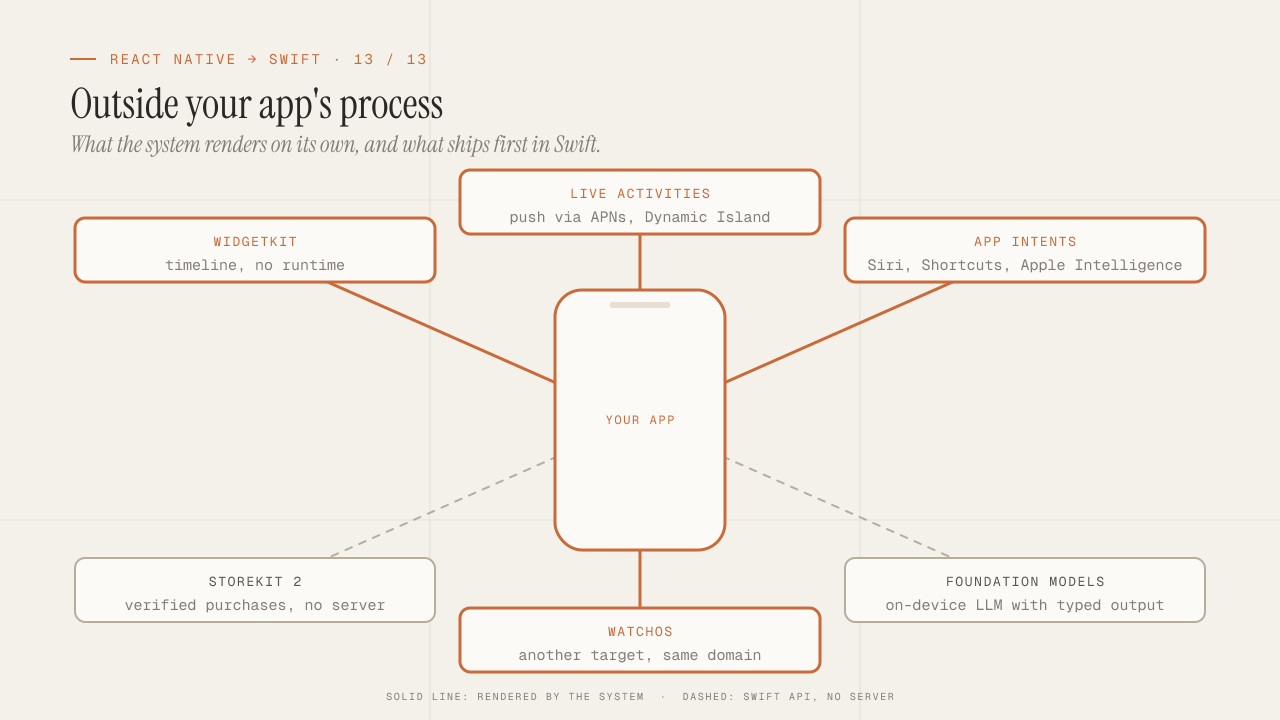
What you can only do in native: WidgetKit, Live Activities, App Intents, StoreKit 2, Foundation Models and watchOS
What only native iOS can do and React Native can't: WidgetKit, Live Activities, App Intents and Siri, StoreKit 2, Foundation Models on device, and watchOS.
Read more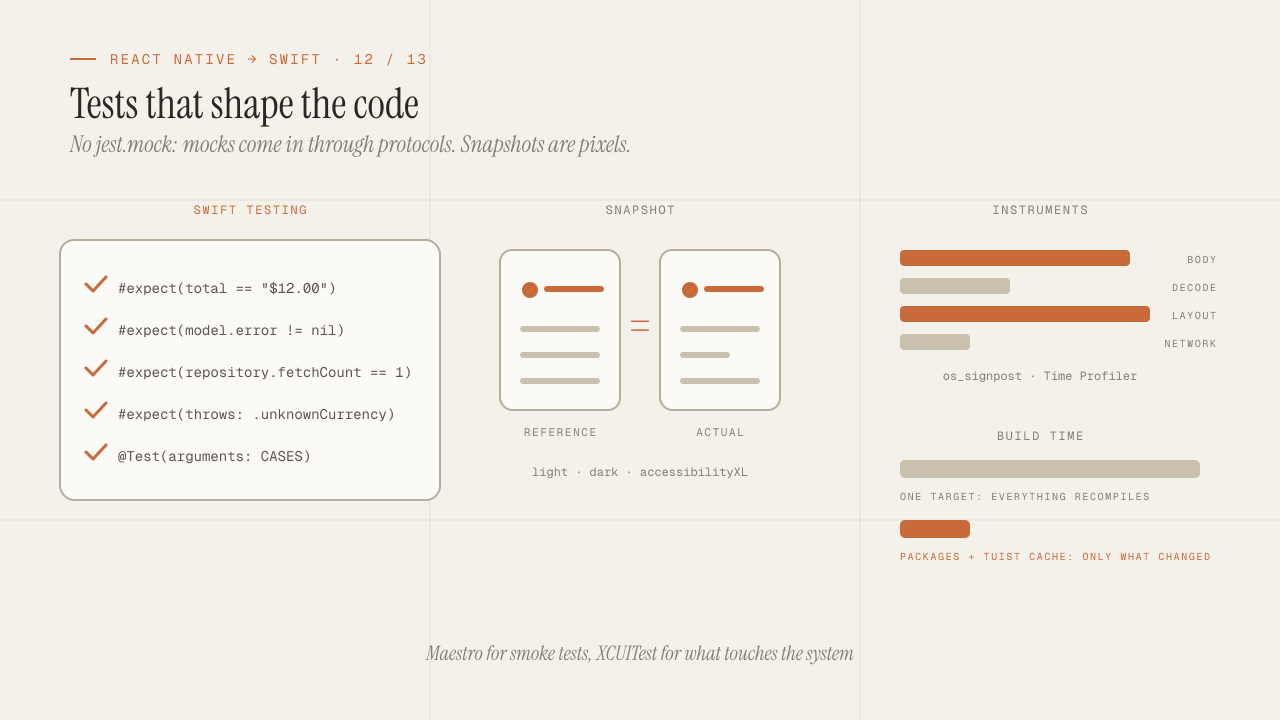
iOS testing and tooling for seniors: Swift Testing, snapshots, mocks, Instruments and build times
iOS testing coming from Jest: Swift Testing vs XCTest, snapshots, mocks via protocols and URLProtocol, XCUITest vs Maestro, Instruments and faster build times.
Read more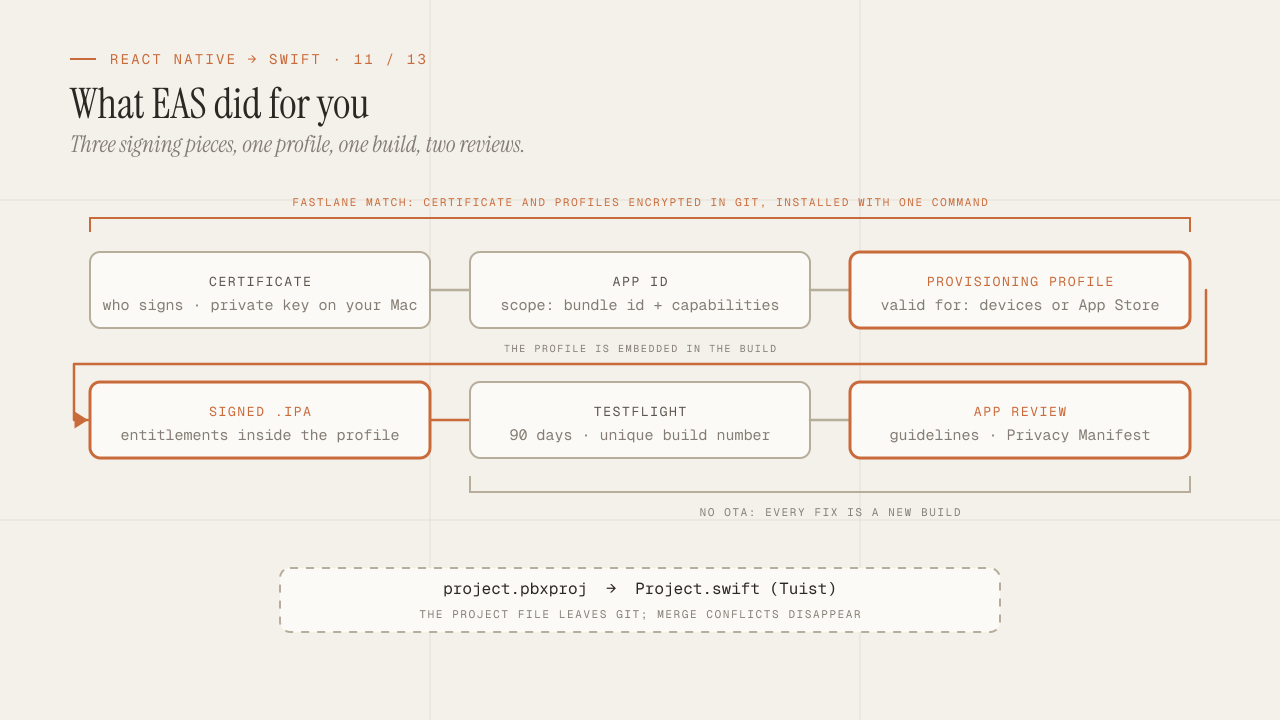
Build, signing and the App Store: what EAS hid from you
What EAS Build did for you is now yours: certificates, profiles and entitlements, Fastlane match, TestFlight, App Review rejections and the Privacy Manifest.
Read more