Swift concurrency: goodbye event loop. async let, TaskGroup, actors and Swift 6
Swift Concurrency for JavaScript developers: no event loop, async let and TaskGroup instead of Promise.all, actors, @MainActor, Sendable and Swift 6 data races.
JavaScript has a single thread and an event loop, and that restriction is also its guarantee: two functions never run at the same time, so a shared object never gets corrupted halfway through a write. async/await in JavaScript is sugar over promises that resolve when the loop gives them a turn. Swift uses the same words, async and await, on top of a completely different model: there are several real threads, the code after an await can continue on a different one, and two tasks can touch the same data at the same time. Swift 6 turns that risk into a compile error. This is the most technical post in the series because the concurrency model is the part of Swift that looks like nothing you have used in React Native, and also the one that, once understood, gives you the most confidence in your code.
TL;DR
- There is no event loop:
awaitsuspends the function and frees the thread, and the continuation may run on another thread.async letandTaskGroupare yourPromise.all, but with real parallelism and cancellation that flows down to the children. - An actor is a class whose state is only touched from inside, one call at a time.
@MainActoris the actor of the main thread, where the UI lives.Sendableis the mark that a value can cross between actors safely. - With Swift 6 strict mode, sharing mutable data between tasks without protection does not compile. The errors are noisy at first and worth every minute: they remove the hardest class of bug to reproduce.
In this article:
- The model — No event loop · Tasks and structured concurrency
- Isolation — Actors and @MainActor · Sendable
- In practice — Strict Swift 6 · Cancellation · Common mistakes
No event loop: what await means in Swift
In JavaScript, await means “hand control back to the event loop and continue when the promise resolves”. Since there is a single thread, when you continue you know nobody else touched anything while you were waiting: any state you read after the await may have been changed by another task that ran during that turn, but not simultaneously.
In Swift, await marks a suspension point: the function pauses, the thread is freed for other tasks, and when the result is ready the function continues on some thread of the cooperative pool, not necessarily the same one. There are as many threads as cores, and two async functions can be executing at the same time, on different cores.
func loadDashboard() async throws -> Dashboard {
    let user = try await api.user()          // suspension: the thread is freed
    // You may be on a different thread here.
    let orders = try await api.orders()      // another suspension
    return Dashboard(user: user, orders: orders)
}
The two consequences that change everything:
- Sequential calls are still sequential. The code above waits for the user and then asks for the orders, just like in JavaScript. To run them at the same time you have to ask for it explicitly, and that is the next section.
- Shared state is genuinely dangerous. If two tasks modify the same array from different threads, the result is not “one wins”: it is corrupted memory and a crash with no useful stack trace. JavaScript did not have this problem because it could not have it. Swift solves it with actors and with the compiler, not with discipline.
One part is the same: an async function can only be called from an async context, and the entry point from synchronous code is Task { ... }, the equivalent of calling an async function without await in JavaScript. In SwiftUI, .task { } is that entry point with automatic cancellation when the screen goes away.
Tasks and structured concurrency: async let and TaskGroup
Promise.all([a(), b()]) has two translations, depending on whether you know how many operations there are at compile time.
async let when the number is fixed. Each async let starts a child task immediately; the later await collects the results:
func loadDashboard() async throws -> Dashboard {
    async let user = api.user()              // starts now
    async let orders = api.orders()          // starts now, in parallel
    async let promos = api.promotions()
    return try await Dashboard(user: user, orders: orders, promos: promos)
}
TaskGroup when the number is dynamic, like a Promise.all(ids.map(fetch)):
func loadThumbnails(for ids: [Photo.ID]) async throws -> [Photo.ID: UIImage] {
    try await withThrowingTaskGroup(of: (Photo.ID, UIImage).self) { group in
        for id in ids {
            group.addTask { (id, try await api.thumbnail(id)) }
        }
        var result: [Photo.ID: UIImage] = [:]
        for try await (id, image) in group {     // they arrive in completion order
            result[id] = image
        }
        return result
    }
}
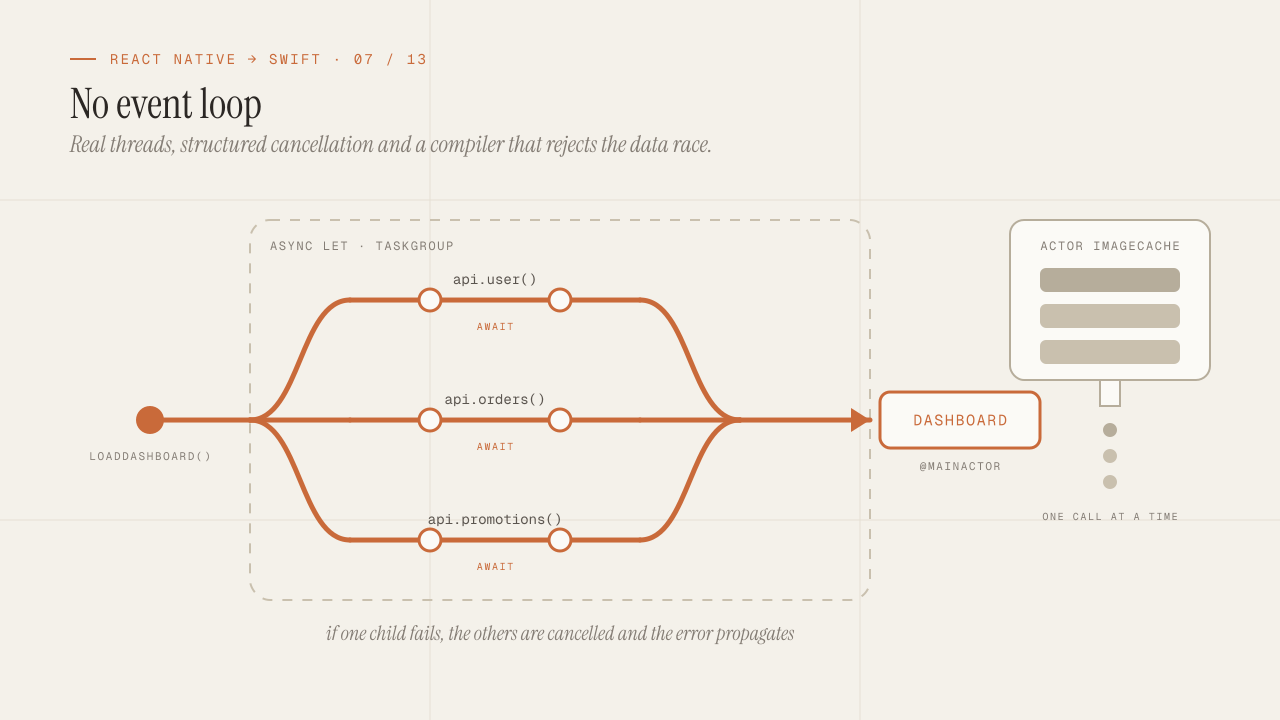
The difference from Promise.all is not in the syntax but in the word “structured”. The child tasks of an async let or a TaskGroup cannot outlive the function that created them. If the function returns, throws or is cancelled, the children are cancelled and awaited before it exits. There is no promise left running after the component unmounted, and no useEffect updating the state of a screen that is no longer there. The task tree mirrors the call tree.
-
loadDashboard()— opens three children withasync letapi.user(),api.orders()andapi.promotions()leave at the same time. -
Waits for all three
If one throws, it cancels the other two and propagates the error.
-
return Dashboard
Task { } and Task.detached { } are the unstructured tasks: they live on their own and you have to store and cancel them by hand. They are used at the edges (the @main, a button, a notification handler), not inside the logic.
Actors and @MainActor: state that is only touched from inside
An actor is a reference type whose mutable state can only be read or modified from inside the actor itself, and the actor executes one operation at a time. From outside, every access is an await, because the actor may be busy:
actor ImageCache {
    private var storage: [URL: UIImage] = [:]

    func image(for url: URL) -> UIImage? {
        storage[url]
    }

    func store(_ image: UIImage, for url: URL) {
        storage[url] = image
    }
}

let cache = ImageCache()
await cache.store(image, for: url)      // await: enters the actor when it is free
let cached = await cache.image(for: url)
It is the solution to the problem from the previous section: the dictionary cannot get corrupted because two threads never touch it at once. In JavaScript, every object was an implicit actor because there was a single thread. In Swift, you declare it.
One detail that takes getting used to: inside an actor method, an await on something external suspends the method and lets other calls in. The state may have changed by the time the method continues. It is the same behavior JavaScript has after an await, and the rule is the same: do not assume that what you read before the await is still true after it.
actor ImageCache {
    func load(_ url: URL) async throws -> UIImage {
        if let cached = storage[url] { return cached }
        let image = try await downloader.fetch(url)   // other calls get in here
        storage[url] = image                            // may overwrite one that already got in
        return image
    }
}
To deduplicate properly, you store the in-flight Task per key and await that task if it already exists. It is the pattern the data post mentioned to avoid two simultaneous refresh() calls.
@MainActor is a global actor that represents the main thread. Everything that touches the UI lives there: SwiftUI views, the ViewModels they observe, anything from UIKit. Marking a class with @MainActor guarantees that its methods and properties are only accessed from the main thread, and the compiler forces an await to enter from outside:
@Observable
@MainActor
final class OrdersViewModel {
    private(set) var orders: [Order] = []

    func load() async {
        // This await runs on the pool; the actor is free meanwhile.
        let fetched = try? await repository.fetchAll()
        // The continuation comes back to the MainActor: assigning here is safe.
        orders = fetched ?? []
    }
}
This replaces the DispatchQueue.main.async you would see in older code, and the question “am I on the main thread?” that did not exist in React Native because the bridge already handled it. With @MainActor the answer comes from the type, not from the call site.
Sendable: what can cross the boundary
If an actor protects its state, what about the values that go in and out of it? A struct made only of values is copied, and the copy is safe. A class with mutable properties is not: the actor would receive a reference that another thread could be modifying.
Sendable is the protocol that marks “this type can cross between isolation domains safely”. struct and enum types whose properties are Sendable are Sendable automatically. Classes are only if they are final and immutable (let), or protect their own state (for example, an internal lock, declared with @unchecked Sendable on your own responsibility). Actors are Sendable by definition. Closures that cross are marked @Sendable and can only capture Sendable values.
struct Order: Sendable {              // value struct: automatically Sendable
    let id: String
    let items: [OrderItem]            // requires OrderItem: Sendable
}

final class Session: Sendable {       // class: only if everything is immutable
    let token: String
    let expiresAt: Date
}

@Observable
final class CartStore { ... }         // not Sendable: mutable and with no actor
This is why the Swift post insisted on modeling with struct: not only for value semantics, but because struct values cross actors for free. A model made of mutable classes is a model the Swift 6 compiler will reject at every boundary.
Swift 6: the data race as a compile error
With the language in Swift 6 mode (the -strict-concurrency=complete compiler option, which is the default in a new project with Swift 6), the compiler verifies all of the above and rejects code that could produce a data race:
- Passing a non-
Sendableclass to aTaskor to an actor. - Capturing a mutable variable in a
@Sendableclosure. - Touching a
@MainActorproperty from a context that is not on it withoutawait. - A mutable global variable with no isolation (a module-level
var).
Each of these used to be an intermittent crash in production that would not reproduce in development. Now they are red lines in Xcode before anything runs.
// Swift 6: error. `logger` is a mutable class captured by a Sendable closure.
final class Logger { var lines: [String] = [] }
let logger = Logger()
Task { logger.lines.append("hello") }

// Fix: make it an actor.
actor Logger {
    private var lines: [String] = []
    func log(_ line: String) { lines.append(line) }
}
let logger = Logger()
Task { await logger.log("hello") }
Migrating an existing project to Swift 6 is a noisy experience: dozens or hundreds of errors on the first build, most of them from the same family. The path that works is module by module: turn strict mode on package by package (one more reason for modularization), starting with the domain (all struct, zero errors) and finishing with the app. In a new project, you start on Swift 6 and the errors arrive one at a time, the moment you write the code that causes them.
Swift 6.2 added an important option to cut that noise: MainActor isolation by default for a module (-default-isolation MainActor). With it, everything that is not marked is assumed to be on the main thread, which is where most of an app’s code lives, and you only declare explicitly what leaves it (nonisolated or an actor of your own). For an app target, it is the configuration I recommend from day one; for a networking or persistence package, it is not.
After migrating a medium-sized project to strict Swift 6, the feeling was not of having fixed bugs but of having discovered how many there were: every compiler error pointed at a place where a mutable class crossed a thread without anyone knowing. None of them had been reported as a crash yet.
Structured cancellation versus AbortController
In JavaScript, cancelling a fetch requires creating an AbortController, passing its signal, calling abort() and cleaning up in the useEffect cleanup. And cancellation only reaches the operations you passed the signal to.
In Swift, cancellation is cooperative and structured. Cancelling a task marks the task and all its children as cancelled. System operations that suspend (URLSession, Task.sleep) throw CancellationError on resumption if their task is cancelled. Your own code checks with Task.checkCancellation() or Task.isCancelled at the points where it makes sense:
func processAll(_ items: [Item]) async throws -> [Result] {
    var results: [Result] = []
    for item in items {
        try Task.checkCancellation()          // exits with CancellationError if cancelled
        results.append(try await process(item))
    }
    return results
}
And in SwiftUI, .task { } cancels on its own when the view disappears, and .task(id:) cancels and restarts when the id changes. It is the useEffect with cleanup and AbortController, without writing either:
struct SearchScreen: View {
    @State private var query = ""
    @State private var results: [Product] = []

    var body: some View {
        List(results) { ProductRow(product: $0) }
            .searchable(text: $query)
            .task(id: query) {
                // Every query change cancels the previous search and starts this one.
                try? await Task.sleep(for: .milliseconds(300))   // debounce
                guard !Task.isCancelled else { return }
                results = (try? await api.search(query)) ?? []
            }
    }
}
That block is the debounce with cancellation that in React Native took a custom hook with useRef, setTimeout, clearTimeout and an AbortController. Here cancellation is part of the model: the sleep throws if cancelled, and the network request is never fired.
The common mistakes when coming from JavaScript
- Putting
awaitin series when you wanted parallel. Two consecutiveawaitcalls are sequential. If they do not depend on each other, useasync let. - Using
Task { }for everything. An unstructuredTaskinside anasyncmethod breaks cancellation and error handling. Insideasynccode, useasync letorTaskGroup;Task { }only at the synchronous edges. - Capturing mutable
selfin aTaskfrom a ViewModel without@MainActor. Swift 6 rejects it. Mark the ViewModel with@MainActorand the problem goes away. - Making an
@Observablean actor. It does not work well: SwiftUI needs to read the properties synchronously inbody. Objects the UI observes go on@MainActor, and heavy work is delegated to your own actors or tononisolatedfunctions. - Forgetting that an actor “re-enters” at every
await. A check before theawaitdoes not hold after it. Store the in-flight task or check again. - Blocking the thread with heavy synchronous work inside an
asyncfunction. The pool has as many threads as cores; a one-second loop on one of them slows down the rest. CPU work is split up, or markednonisolatedand run in aTask.detachedwith low priority. - Synchronizing with
DispatchQueueor semaphores fromasynccode. Mixing the two models produces deadlocks the runtime cannot detect. Insideasync, only actors andawait.
Frequently asked questions
So DispatchQueue and GCD are no longer used?
In new code, almost never. They exist, they are compatible, and you will see them in libraries and examples from before 2021. The rule I follow: inside a module written with async/await, DispatchQueue does not appear; at the boundary with an API that only offers callbacks, withCheckedContinuation converts it to async once, and the rest of the module never knows.
How do I convert a callback-based API or a delegate to async/await?
With withCheckedThrowingContinuation for a single call (a callback that is invoked exactly once) and with AsyncStream for repeated events (a delegate that emits several times). The hard rule: the continuation is resumed exactly once; resuming it zero or two times is a crash in development, which is what “checked” means.
Are actors slow? Should I avoid await in hot paths?
An actor hop costs more than a direct call, but it is on the order of microseconds. Where it does show is in loops with thousands of await calls to an actor: there it is better to expose a method that does the work in a batch inside the actor, instead of a thousand entries and exits. For the rest of an app, it is not a concern.
Doesn’t @MainActor on the whole ViewModel block the UI?
No. @MainActor says where the ViewModel’s synchronous code runs, not where it waits. When the ViewModel does await repository.fetchAll(), the main thread is free during the wait; only the assignment of the result comes back to the main thread, which is exactly what you want. What blocks is synchronous CPU work inside the ViewModel, and that moves to an actor or to a nonisolated function.
How do I test concurrent code?
async functions are tested with async tests (Swift Testing and XCTest both support them). To control time, you inject a clock (any Clock) instead of calling Task.sleep directly, and the test uses a test clock that advances by hand. For actors, you test the behavior observable from outside; the exclusion guarantee comes from the language, there is no need to test it. The testing post goes into detail.
Conclusion
Swift uses async and await like JavaScript, but without an event loop: there are real threads, the continuation can change threads, and shared state can get corrupted. The language’s answer is a system, not a convention: structured tasks whose lifecycle follows the function that created them, actors that execute one operation at a time, @MainActor for everything that touches the UI, Sendable for what can cross boundaries, and a compiler that in Swift 6 rejects code that could produce a data race. Cancellation stops being an AbortController you pass around by hand and becomes a property of the task tree.
To get started: turn on strict Swift 6 from the first commit, mark ViewModels with @MainActor, model the domain with struct so it is Sendable with no effort, use async let when two calls do not depend on each other, and rely on .task to cancel. The next post goes down to disk: SwiftData, GRDB, Core Data and Keychain, with the decision of which one to use and why Realm stopped being an option.
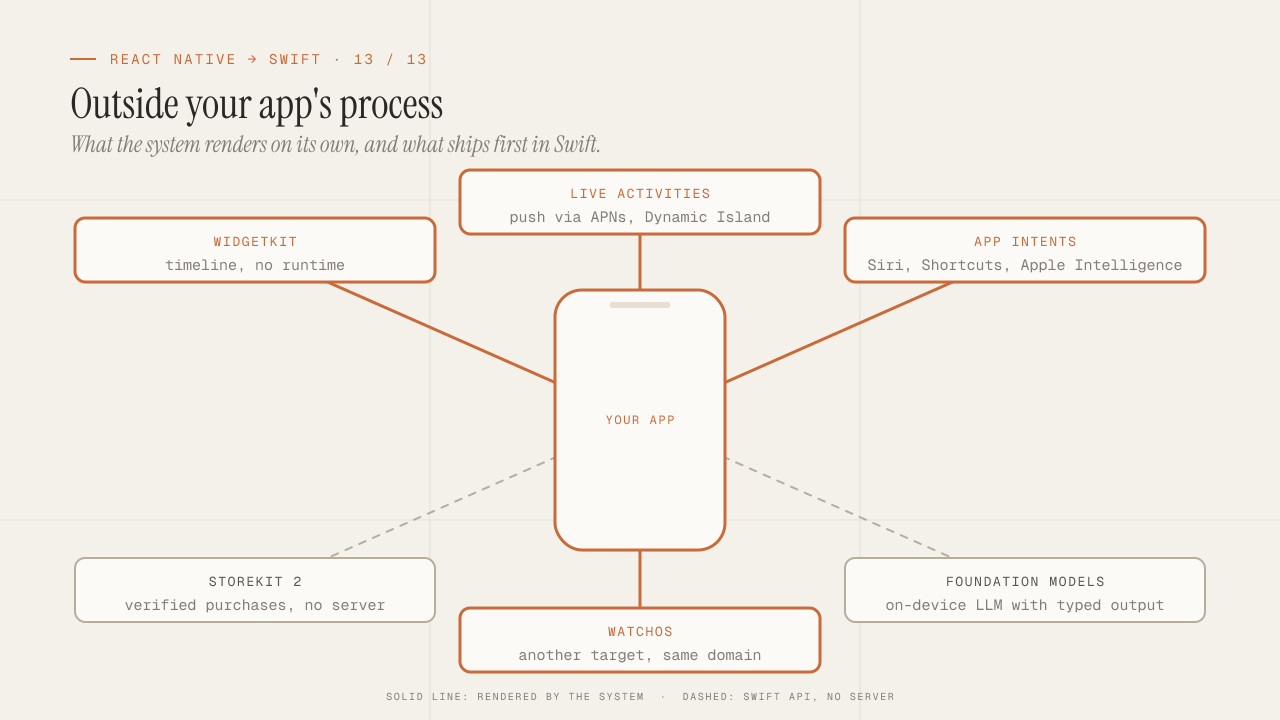
What you can only do in native: WidgetKit, Live Activities, App Intents, StoreKit 2, Foundation Models and watchOS
What only native iOS can do and React Native can't: WidgetKit, Live Activities, App Intents and Siri, StoreKit 2, Foundation Models on device, and watchOS.
Read more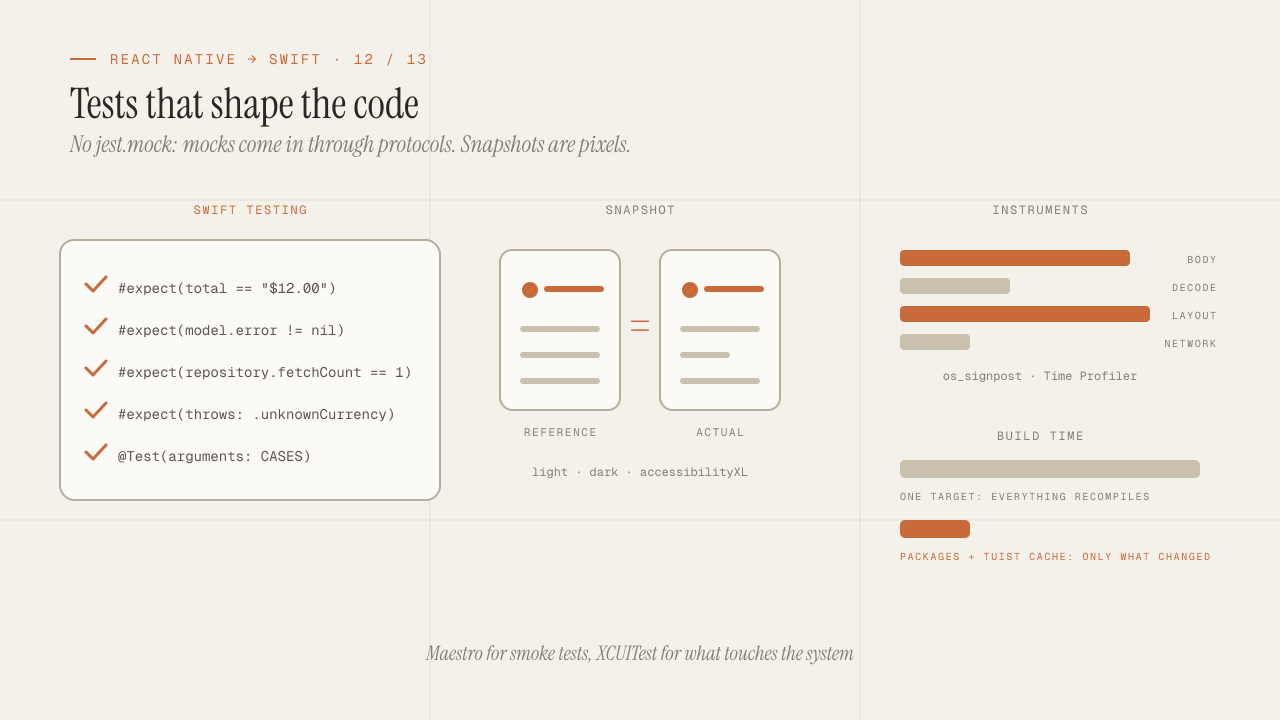
iOS testing and tooling for seniors: Swift Testing, snapshots, mocks, Instruments and build times
iOS testing coming from Jest: Swift Testing vs XCTest, snapshots, mocks via protocols and URLProtocol, XCUITest vs Maestro, Instruments and faster build times.
Read more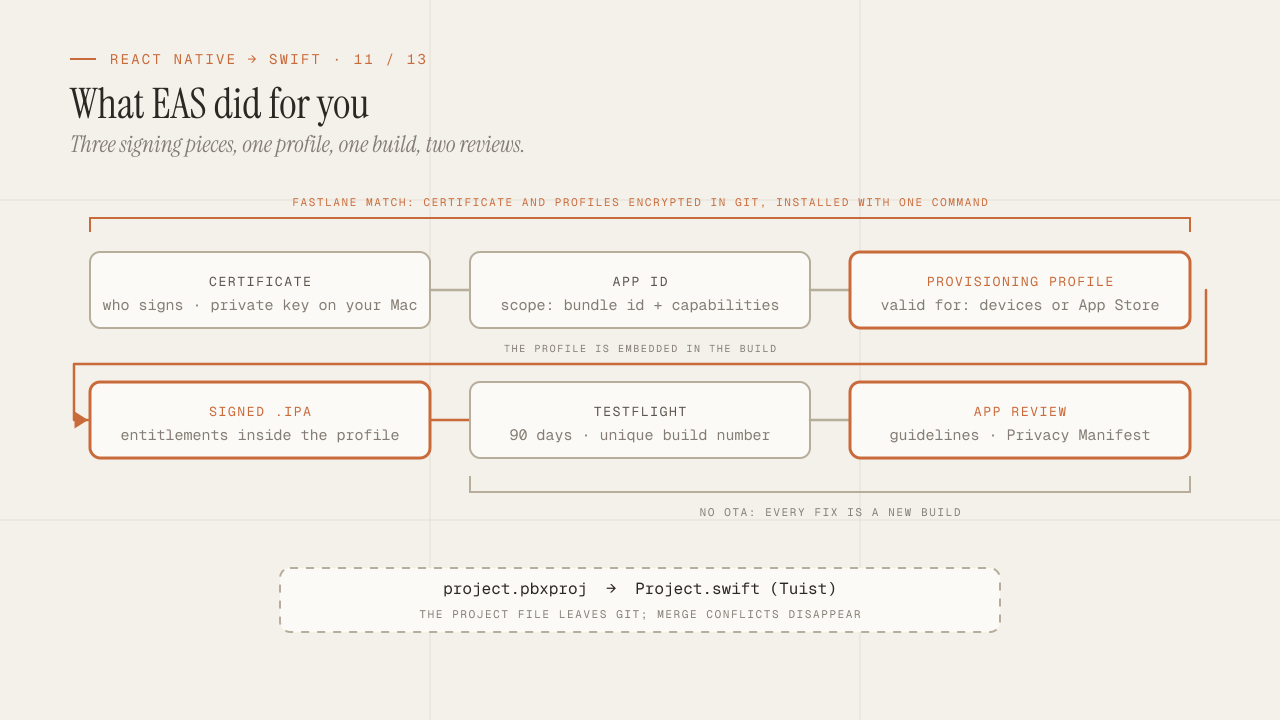
Build, signing and the App Store: what EAS hid from you
What EAS Build did for you is now yours: certificates, profiles and entitlements, Fastlane match, TestFlight, App Review rejections and the Privacy Manifest.
Read more