Chatbot vs AI agent: differences, benefits and which one your business needs
Chatbot vs AI agent: what each one does, their benefits, the work and risk an agent adds, and how to decide which one your business needs before a quote.
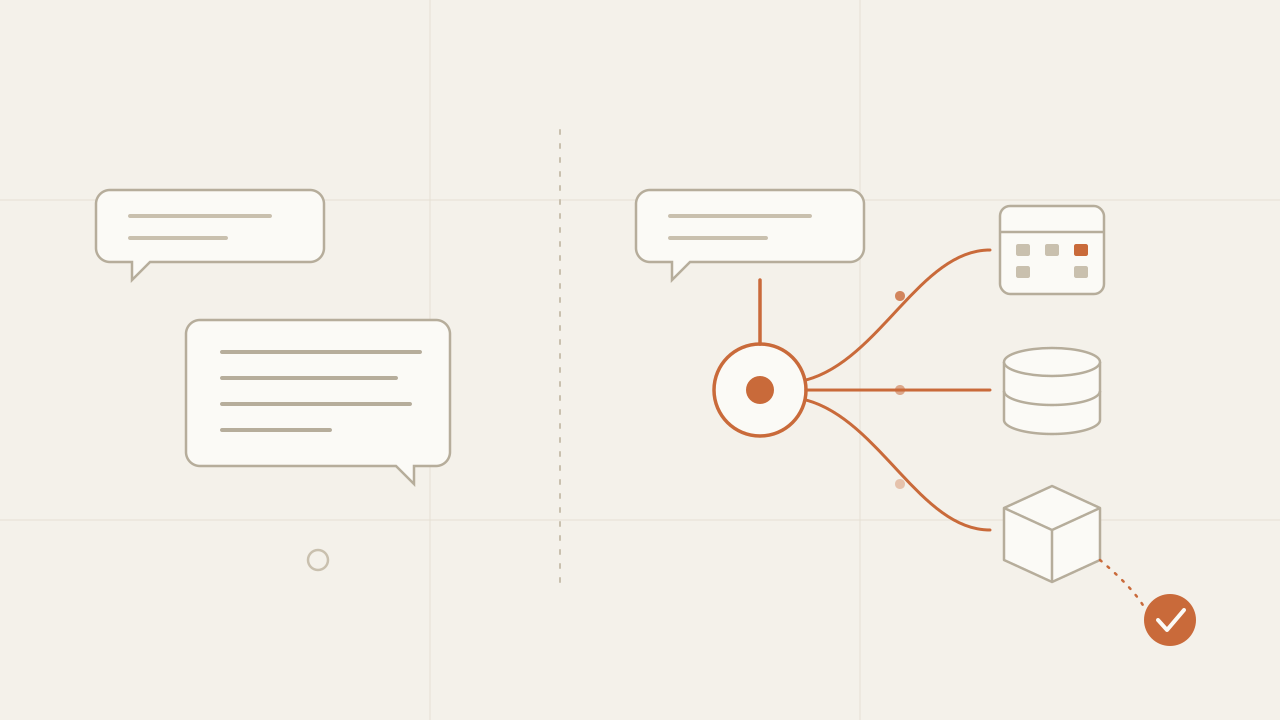
A chatbot answers; an AI agent acts. That’s the difference between a chatbot and an AI agent in a single line: the chatbot takes a question and returns text, while the agent takes a goal, reads and changes your systems (the calendar, the inventory, the CRM) and ends with a finished task, not with an explanation of how to finish it. I have built both: chatbots for clients that answer from a company’s documents or draft letters ready to send, an autonomous agent that publishes news every three hours, and a voice agent, built as a proof of concept for a client, that ends the call with an appointment created in the calendar. The quickest way to know which one you need is to look at what happens when the conversation ends: if someone on your team copies data into another system, that work is what an agent would do.
TL;DR
- A chatbot delivers information: it answers questions from your documents. An agent delivers outcomes: it uses tools connected to your systems to book, record or update something.
- A chatbot is cheaper, faster to build, and its worst mistake is a wrong answer. An agent saves real work, but its worst mistake is a wrong action, which calls for confirmations, narrow permissions and a log of everything it does.
- If the conversation ends with someone on your team copying data into another system, you need an agent. If it ends when the customer has their answer, a chatbot is enough.
In this article:
- Basics — What each one is · The difference in a table · Four levels
- How they compare — How an agent works · Benefits of a chatbot · Benefits of an agent · What an agent requires
- Deciding — Which one your business needs · What to prepare before a quote
What is a chatbot and what is an AI agent
An AI chatbot is a program that converses: it receives a message, a language model generates a reply, and it sends it back. Good ones don’t answer from memory. They first search your company’s documents (manuals, policies, catalog, FAQs) and answer from what they found; that technique is called RAG, retrieval-augmented generation. What comes out of a chatbot is always text: an answer, a summary, a draft. It is what many companies call a virtual assistant or AI assistant, and it can live on your website or on WhatsApp.
An AI agent also converses, but it has tools as well. A tool is a function the model can ask to run: check open time slots, create a booking, look up an order by number, add a contact to the CRM. The agent decides which tool to use, reads the result and decides the next step, in a cycle that repeats until the task is done or until it needs someone to confirm something. On the technical side, that cycle is called an agent loop.
The practical difference is what remains when the conversation ends. With a chatbot, the customer knows something they didn’t know before. With an agent, something changed in your systems: there is an appointment in the calendar, an open ticket, an updated order.
Chatbot vs AI agent: the difference in a table
| AI chatbot | AI agent | |
|---|---|---|
| What it delivers | An answer or a piece of text | A completed task |
| What it works with | Your documents and the conversation history | Your documents plus tools connected to your systems |
| Who takes the final step | A person, with the information the chatbot gave them | The agent itself, within the limits you set |
| Worst possible mistake | A wrong answer | A wrong action: a duplicate booking, a wrongly recorded field |
| Integrations | Few or none | One for every system it touches |
| Model calls per conversation | Usually one per message | Several per message, one for each step of the cycle |
| How you measure it | Share of correct answers and of questions it couldn’t answer | Share of tasks completed without human help, and errors in actions |
The worst-mistake row is the one that weighs most when deciding. A chatbot that gets it wrong gives a bad answer, which the next answer can correct. An agent that gets it wrong leaves an effect in your systems that someone has to spot and undo.
From chatbot to agent: four levels
Between a basic chatbot and an autonomous agent there are intermediate levels, and almost every real project falls into one of them. Knowing your level is the fastest way to make sense of a quote:
| Level | What it does | Example |
|---|---|---|
| 1. Rule-based chatbot | Follows a fixed menu of options, no language model | ”Press 1 for opening hours, 2 for prices” |
| 2. AI chatbot with RAG | Understands open questions and answers from your documents | An assistant that answers about return policies from the internal handbook |
| 3. Agent with tools | Talks to the customer, checks your systems and, with their confirmation, carries out specific actions | An agent that checks the calendar, offers time slots and creates the appointment |
| 4. Autonomous agent | Works with nobody in the conversation, on a schedule or a trigger | A system that checks sources every few hours, drafts and publishes |
I’ve built projects at levels 2 to 4. Credit Helper and Clona are client projects, both at level 2. Credit Helper explains credit concepts and drafts dispute letters ready to send: it produces text, and the person decides what to do with it. Clona is a B2B platform of conversational agents that answer from each client’s knowledge base over chat, voice and WhatsApp. The voice agent that books appointments is level 3: a proof of concept I built for a client, where the person talks and hangs up with the appointment created in Cal.com. TechBlog AI Agent is level 4: two agents that read more than 20 RSS feeds, rewrite the news in Spanish and publish it every three hours without anyone starting them. The full projects are on AI and chatbot development.
A warning for when you read quotes: vendors use the word “agent” for products at any of these levels. To find out which level you’re being sold, ask one question: what does it change in your systems?
The jump that changes a project the most is from level 2 to level 3. Up to level 2, the system only reads. From level 3 on, it writes to your systems.
How an agent works when it serves a customer
This is what a conversation with an appointment-booking agent looks like, in the order it happens:
-
The customer asks for something — “I’d like an appointment Thursday afternoon”
The model understands the intent and which details are missing.
-
It calls a tool — open time slots
The agent asks the backend for Thursday’s available slots.
-
It offers real options
It only offers times the calendar returned, never one the model made up.
-
It asks for confirmation
It repeats the chosen option and waits for an explicit yes before doing something that can’t be undone.
-
It carries out the action — create the appointment
The backend creates the booking, not the model, and the agent confirms with the data the calendar returned.
How the conversation ends
- Task completed — the appointment exists and the customer gets the confirmation.
- No availability — the agent offers another day or takes the details so someone on the team can call back.
- Something failed — the agent says so plainly and hands the case to a person instead of improvising.
Every step of that flow is a design decision, not something the model gets right on its own. In the voice agent, dates, the wording of the time slots, protection against duplicate bookings and the error messages live in a backend with automated tests. The model only handles the conversation.
Benefits of a chatbot
For many businesses a chatbot is the right tool, and it has benefits an agent can’t match:
- It’s faster to build. There is no integration with other systems, so the work goes into preparing the documents, the quality of the answers and the interface. In the projects I quote, a focused AI feature such as a RAG chatbot usually takes 2 to 5 weeks.
- It’s cheaper to run. It makes one model call per message, not one for every step of a cycle.
- Its worst mistake is a wrong answer, not a wrong change in your systems. It writes nothing to your systems, so it can go to production with fewer controls around it.
- It’s easy to evaluate. Before launch, you put together a set of real questions with their correct answers and measure how many it gets right. With an agent, besides the answer you also have to check that every action was the right one.
- It frees up time spent on repeat questions. If your team answers the same twenty questions every day, a chatbot that answers from your documents already solves the problem.
Benefits of an AI agent
An agent does the work someone on your team does today once the chat ends:
- It removes the manual step. If today someone reads the chat and then copies the details into the calendar, the CRM or a spreadsheet, the agent does that step in the same conversation, with nobody copying data by hand.
- It gets things done outside business hours. A chatbot can answer at eleven at night, but the booking waits until the next day. An agent creates it right then.
- It answers with current data. Because it checks your systems in every conversation, it tells the customer what is available now, not what a document said when it was uploaded.
- It chains tasks. It can look up an order, see that it’s late, open a ticket and tell the customer the ticket number, all in one conversation.
- It can work with nobody in the conversation. At level 4, the agent runs on a schedule: it checks, processes and publishes. There it replaces a recurring task someone on the team does.
What an agent requires that a chatbot doesn’t
Every tool you give an agent is access to one of your systems, and you decide what it may do there. These are the pieces an agent needs and a chatbot doesn’t, and they are why an agent costs more to build:
- Integrations with your systems. Every system the agent touches needs API access, credentials and a backend that translates between what the model asks for and what the system accepts. If a system has no API, that part of the project grows.
- Narrow permissions. The agent should only be able to do what its task requires. One that books appointments can create bookings, but not wipe the calendar or see other customers’ data.
- Confirmation before anything irreversible. Every action that can’t be undone (booking, charging, sending) waits for an explicit yes from the customer, and it’s designed so that confirming twice doesn’t run it twice.
- Hard limits. A maximum number of steps, time and spend per conversation, so a mistake doesn’t repeat in a loop. I cover this in detail in the hard limits of an autonomous agent.
- A log of every action. Which tool it used, with what data, and what the system replied. Without that log, when something goes wrong nobody can reconstruct why.
- A way out to a person. When the agent can’t resolve something, it hands the case to someone on your team along with the conversation, instead of insisting.
Which one your business needs
The question that best separates AI agents from chatbots is what happens after the conversation ends. If the answer is “nothing, the customer already has what they were looking for”, a chatbot is enough. If the answer is “someone on my team records it in another system”, what that person does is what an agent would do.
| Your situation | What fits |
|---|---|
| Your team answers the same questions every day | A RAG chatbot over your documents |
| Customers ask for information that changes daily (stock, time slots, order status) | An agent with read-only tools |
| After every conversation someone copies data into another system | An agent with tools that write, with confirmation |
| There is a recurring task with no customer involved (checking, sorting, publishing) | An autonomous agent with a schedule and hard limits |
| Your systems have no API or the data lives in scattered spreadsheets | A chatbot first; get the data in order before thinking about an agent |
| A wrong action has legal or financial consequences | An agent that prepares the action and a person who approves it |
Before building something custom, check whether an off-the-shelf tool already covers the case. If what you need is answering FAQs on WhatsApp or in your website chat, with no other systems involved, the support platforms you already use often include an assistant that is enough. Custom development pays off when the assistant has to answer accurately from your own data, or when it has to act in systems those platforms don’t connect to.
What to prepare before asking for a quote
To quote a chatbot or an agent accurately, I need to know these five things. If you bring them written down to the first call, the conversation goes straight to scope:
- The specific tasks. Not “handle customers”, but “answer shipping questions, book visits and check an order’s status”. Each task is a tool or a set of documents.
- The systems involved. Which calendar, which CRM, which store or database, and whether they have an API. This is what moves the price of an agent the most.
- The irreversible actions. Which of those tasks change something that can’t be undone. Those are the ones that get confirmation and extra testing.
- Who takes the cases the agent can’t resolve. A person, an email address, a team channel. Without that way out, the agent has no way to end a difficult conversation well.
- How you’ll measure that it works. Fewer messages your team answers, more appointments booked after hours, fewer data-entry errors. That metric is what later tells you whether the project was worth what it cost.
With that written down, the quote is built on a concrete scope. How I get from that call to a fixed price is in how much it costs to build an app and why I quote a fixed price.
Frequently asked questions
What is the difference between a chatbot and an AI agent?
An AI chatbot answers questions: it receives a message and returns text, usually based on the company’s documents. An AI agent, besides conversing, uses tools connected to the business’s systems to carry out actions, such as creating an appointment, recording a contact or updating an order. The chatbot is done when the customer has their answer; the agent is done when the task is complete.
Is an AI agent better than a chatbot?
An AI agent is not always better than a chatbot. An agent is the right choice when, after the conversation, someone has to carry out an action in another system. If the goal is answering frequent questions from your documents, a RAG chatbot is faster to build, cheaper to run and easier to evaluate, and its worst mistake is a wrong answer rather than a wrong action.
How much does an AI agent cost compared to a chatbot?
An agent costs more to build and to run. To build, because every system it touches needs an integration, permissions, confirmations and tests. To run, because it makes several model calls per conversation instead of one. A focused AI feature, such as a RAG chatbot on top of an existing app, usually takes 2 to 5 weeks; an agent is quoted based on how many systems it integrates and how many of its actions are irreversible.
Is it safe to let an AI agent make changes in my systems?
An AI agent can make changes in your systems safely if it is designed with limits: permissions that only cover its task, explicit confirmation before any irreversible action, protection so that confirming twice doesn’t run the action twice, a maximum number of steps and spend per conversation, and a log of every action. The model decides what it wants to do, but the actions are carried out by a backend that validates every field before touching your system.
Can I start with a chatbot and turn it into an agent later?
Yes. Starting with a chatbot and adding tools later is usually the lowest-risk path to an AI agent. The chatbot shows what customers actually ask, and that data tells you which actions are worth automating. Tools are added one at a time, starting with read-only ones, such as checking availability or an order’s status, before adding the ones that write to your systems.
Conclusion
Chatbot or AI agent, the difference isn’t how much each one understands but what each one gets done: a chatbot leaves the customer with information, an agent leaves a completed action in your systems.
If you’re deciding, do this in order: write down what happens today after each conversation with a customer; mark which of those steps are manual and which system they end up in; start with a chatbot if most conversations end in an answer, or with a single-tool agent if they end in a record. With that list, the first call is about scope rather than definitions. How I work describes what happens from your first message to the proposal.
What is Jev: TypeSafe AI's model that decides instead of writing
What is Jev, TypeSafe AI's System One model: it returns typed decisions with probabilities instead of text. How to call its API, what it costs and when to use it.
Read more
Sensitive data out of the prompt: a TypeScript library written in 39 minutes from its specification
sanitype redacts, masks or drops sensitive data inside the process before a payload leaves for an LLM, a log sink or a third party. How it is implemented in TypeScript.
Read more
Spec-Driven Development in React Native: an MVP that lists the world's earthquakes, specified before writing code
I applied Spec-Driven Development to a React Native MVP that lists the world's earthquakes: the specification decides what goes in the list, and its acceptance criteria become the tests.
Read more